Customer data is often the first thing teams need to move when Jira becomes the central system for service and delivery work. Support teams need to recognize customers, group them by organization, and control access. Delivery and product teams need to reference the same customers in Jira issues once work leaves the service desk.
Jira Service Management provides customer and organization concepts to support service workflows. With the introduction of Atlassian’s Service Collection and the Customer Service Management app, customer-facing features now live in a dedicated layer for external support. At the same time, the way customer data is stored and scoped has not changed.
This guide explains how customer import works in Jira Service Management and Customer Service Management today, what is technically supported in each product, and what limitations remain after import. It also describes how teams handle customer data when it must be reused across Jira projects.

Table of Contents
Customer and Organization Concepts in Jira Service Tools
Before you import anything, align on terminology. These concepts define the scope of imported data and the operations it can and cannot support.
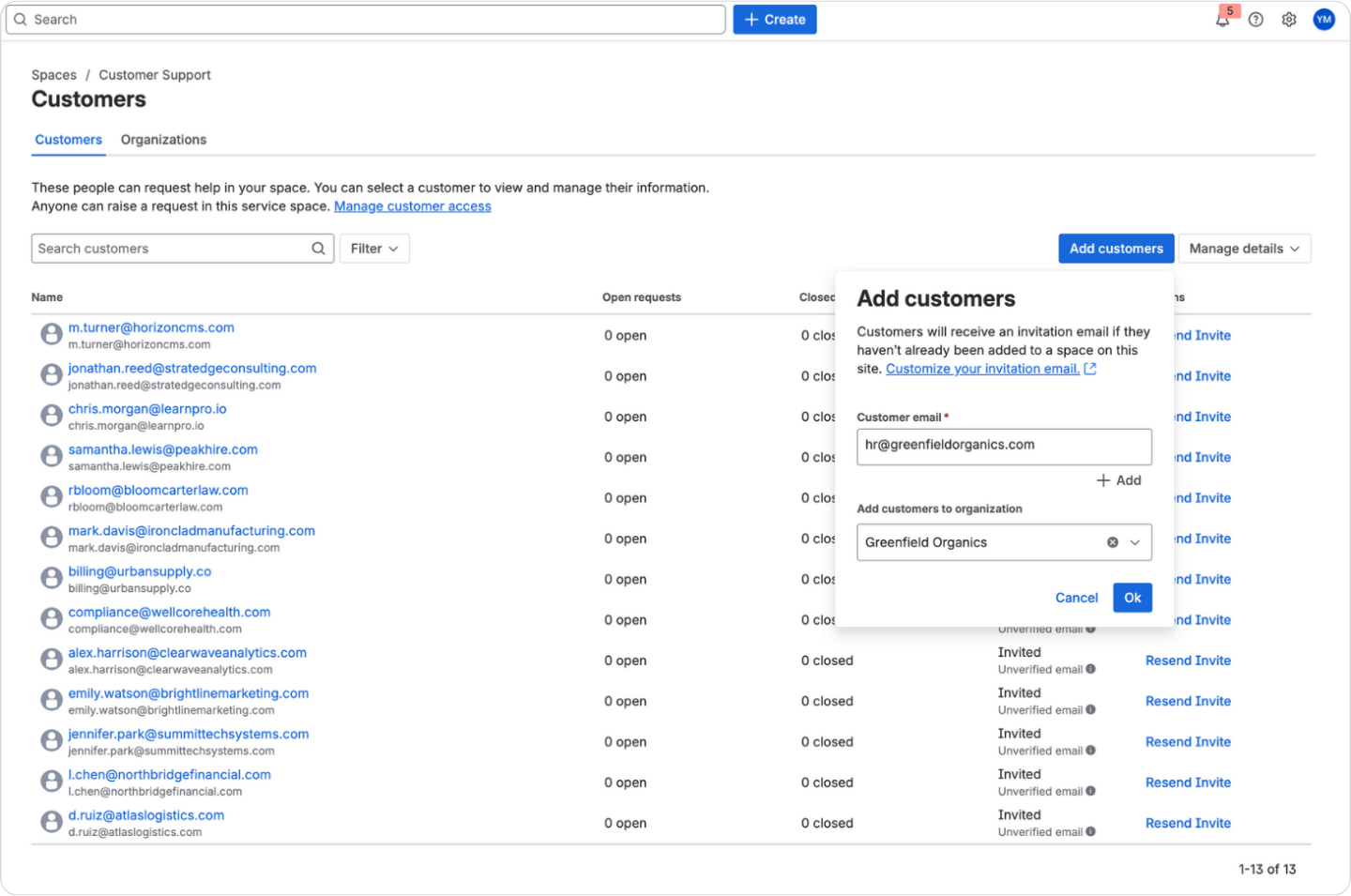
Customers
In the Atlassian service stack, a customer is first and foremost a person who participates in service workflows: submitting requests, receiving notifications, and being included in request visibility rules. Customers are typically anchored to an email identity and optimized for service interaction, not for account management.
What this means in practice:
- Customer records are designed to support service participation (portal/email, notifications, request visibility).
- Customer profile fields are useful for agent context, routing, and segmentation inside service.
- Customer identity is not automatically designed to function as a shared business object across all Jira projects.
Organizations
An organization is a grouping mechanism for customers. Organizations typically exist to control:
- portal access and request visibility at scale
- sharing behavior among customers who belong to the same organization
- simple segmentation of customers for service operations
Organizations are very useful for service access control, but they are not equivalent to CRM “accounts” with lifecycle stages, ownership, hierarchies, and account planning.
Keep this distinction: service identity vs business identity. It will drive your import choices.
Customer Profiles in the Service Collection Era
Until 2025, Jira Service Management handled both internal service and external customer support. Customers, organizations, portals, and customer profiles all lived inside JSM.
In October 2025, Atlassian changed this model. With the introduction of Service Collection, customer service features are no longer available in Jira Service Management on new sites. These capabilities have been moved to a new application: Customer Service Management (CSM), which is included in Service Collection.
This change does not invalidate existing JSM-based customer support setups. If you already run external customer support through JSM, you can continue to do so. Your portals, customers, organizations, and workflows remain functional.
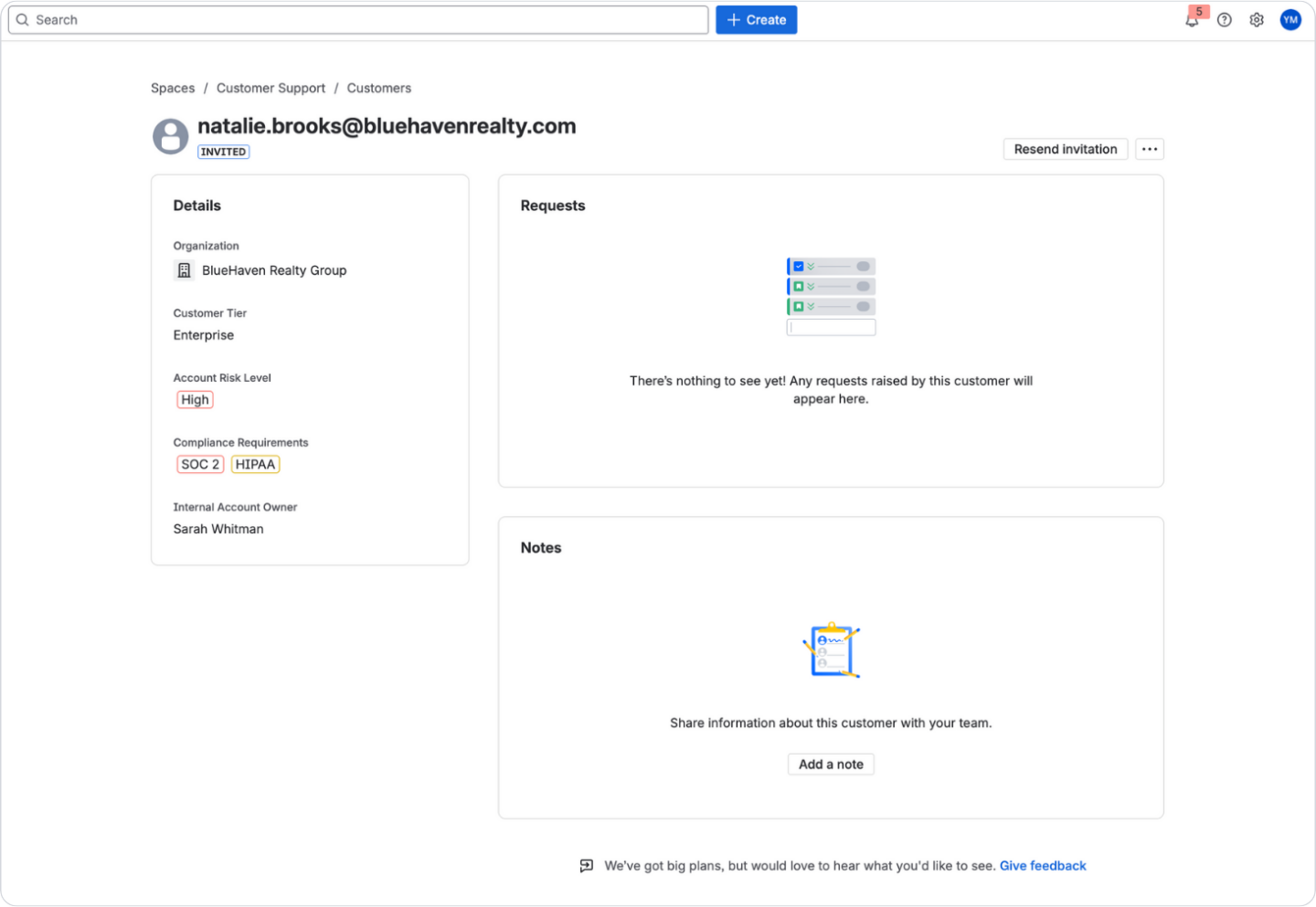
What has changed is that Atlassian has now designed CSM specifically for external customer support. It provides a more advanced, customer-oriented experience and a richer profile layer.
As part of the Service Collection transition, existing Jira Service Management customers will also receive access to CSM on the same site. This gives teams a choice:
- continue running customer support through JSM, or
- move customer-facing workflows into CSM, which is now the dedicated external support layer.
Because of this shift, there are now two valid places where customer profiles can live:
- the service layer in JSM, and
- the external customer layer in CSM.
The underlying customer and organization model is still the same, but import behavior now depends on which layer you target.
The next section explains what each layer supports in terms of customer and organization import.
Customer Import Capabilities in JSM and CSM
Although Jira Service Management and Customer Service Management share the same underlying customer and organization concepts, they support different import operations.
The difference is not in the data model, but in how customer records are created and maintained within each layer. This section describes what each product supports and what those operations are designed to achieve.
Customer Service Management: Profile Creation and Bulk Import
Customer Service Management supports creating customer and organization profiles through both CSV and REST API imports.
CSM treats customer and organization profiles as first-class records in the external customer layer, which makes bulk creation and synchronization possible.
What this import path is designed for
- Migrating customers and organizations from another helpdesk or CRM
- Preloading customer data before enabling customer-facing portals
- Maintaining customer and organization profiles from an external system via API
Atlassian documentation
- Import customer and organization profiles (CSM)
- Create customer profiles
- Create organization profiles
Jira Service Management: Customer and Organization Detail Enrichment
Jira Service Management supports importing customer and organization details using CSV or API.
This operation is performed from within a service project using:
Customers → Manage details → Import from CSV
This import process does not create new customers or organizations.
It only updates details for records that already exist in the service environment.
If you previously used customer and organization profiles in Jira Service Management, you must:
- Create the customers and organizations first (by inviting customers or having them submit requests).
- Define the customer and organization detail fields you intend to maintain.
- Import the details using CSV or API.
Availability note
With the introduction of Service Collection in October 2025, customer service features are no longer available in Jira Service Management on new sites. These capabilities are provisioned through Customer Service Management (CSM) instead.
On existing Jira Service Management sites, customer and organization features in JSM continue to work. This means the JSM customer details import path described above is available only in environments where JSM customer features are present. In environments provisioned with Service Collection from the start, customer import is performed through CSM.
What this import path is designed for
- Enriching and updating customer and organization fields for agent context
- Normalizing customer metadata for users already participating in service workflows
- Maintaining structured customer attributes within the service environment
Atlassian documentation
Customer Data in JSM and CSM: Service Context vs. Operational Reality
After importing customers and organizations into Jira Service Management or Customer Service Management, the system provides service-layer customer context.
This context is designed to help support teams resolve requests, not to function as a shared customer data model across Jira.
This distinction becomes visible only after teams try to reuse customer identity outside the service environment.
Service-Layer Customer Context (JSM & CSM)
After import, native customer records provide:
- Customer profiles with contact information and custom fields
- Organization records that group customers
- Customer context on service work items, driven by the customer (reporter) and organization fields
- Organization membership reflected in access and visibility rules
- Configurable customer and organization detail fields that appear for agents
In CSM, this same model is exposed through a richer profile layer and customer context panel, but the scope is still service.
What Remains Out of Scope
Native customer records still do not provide:
- A reusable customer entity across Jira projects
- A persistent link between customers and non-service issues
- A single customer timeline across support, delivery, onboarding, and product work
- Organizations that behave as business accounts owning work across Jira
- Reliable cross-project reporting by customer or company without manual reconciliation
Customer and organization records remain service-scoped identities. They improve service visibility. They do not become operational customer data for Jira as a whole.
Operational Implications
Most teams import customers into JSM because they expect:
- continuity when work moves between teams
- one customer identity across Jira
- reporting and automation based on customers and companies
Those outcomes are outside the design scope of JSM and CSM.
That gap is why teams introduce a shared customer layer inside Jira, where Mria Contacts: Contact Management in Jira & JSM fits.
Introducing Mria Contacts: Contact Management in Jira & JSM
Native customer records in JSM and CSM are optimized for service participation and service context. Mria Contacts: Contact Management in Jira & JSM app solves a different problem: making customer identity usable as part of Jira work, across projects and teams, with the same consistency as issues, epics, and other Jira objects.
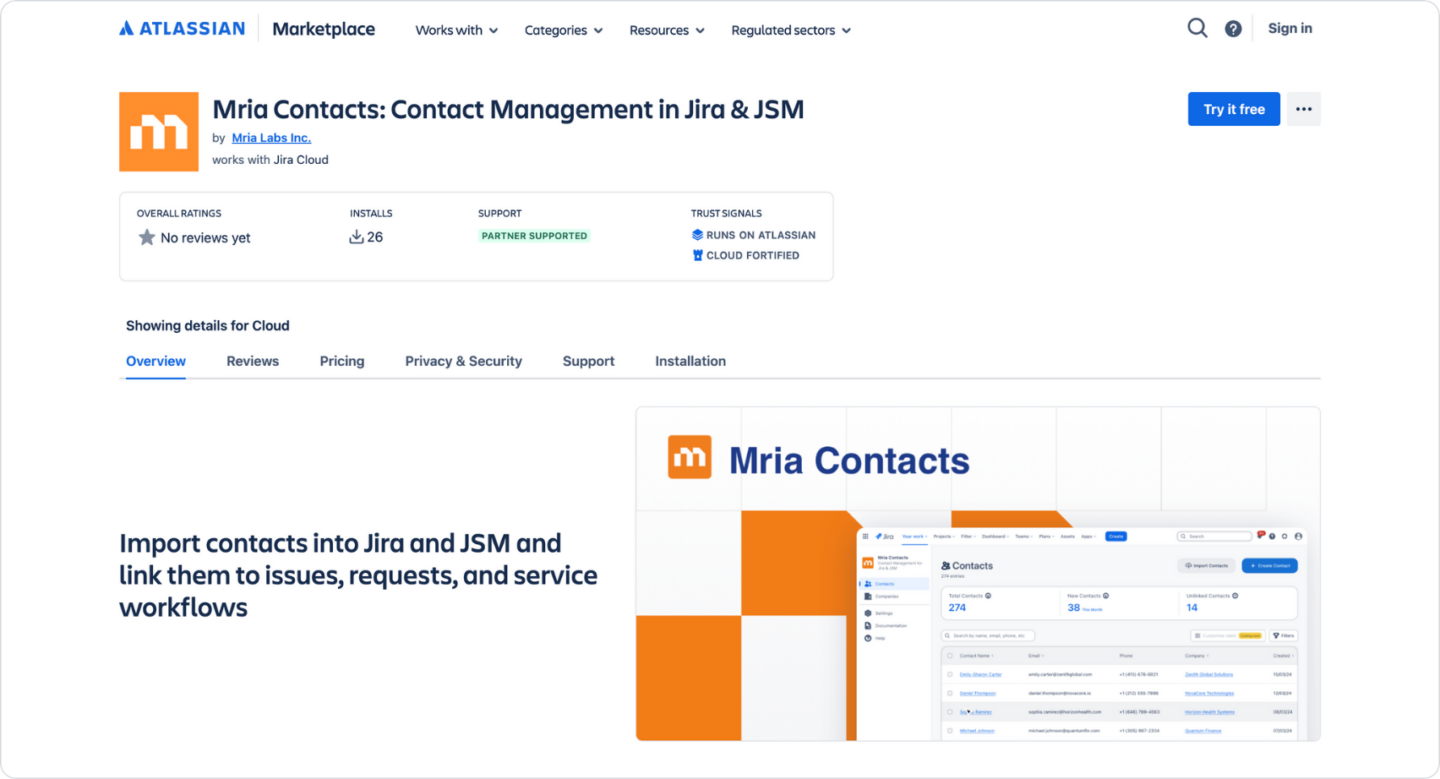
Mria Contacts is a Jira-native app that introduces two managed record types inside Jira:
- Contacts (people)
- Companies (business entities)
These records are created and maintained inside the app’s own interface, then surfaced directly inside Jira issues and JSM requests wherever customer context is needed.
A Dedicated Interface for Customer Data in Jira
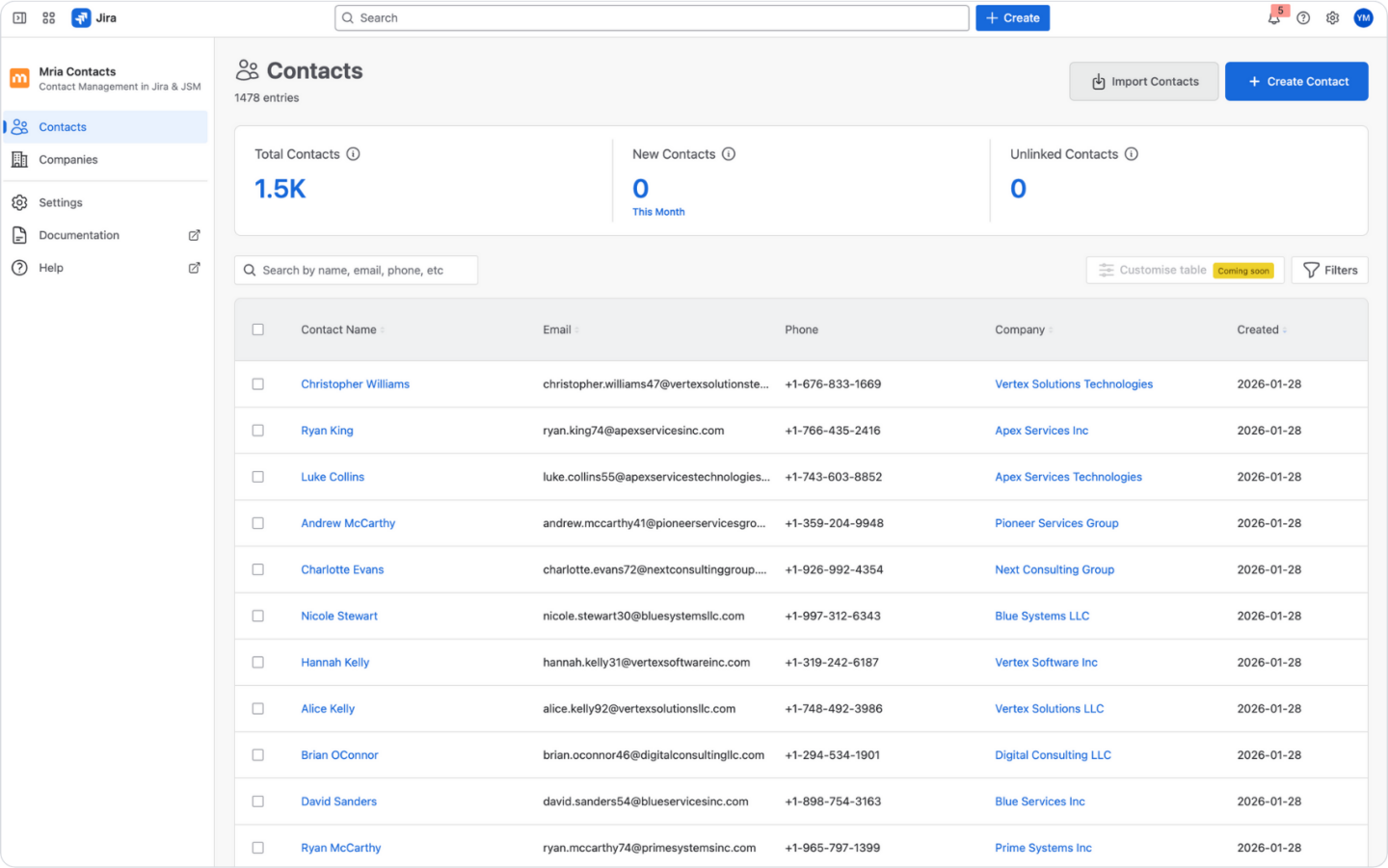
Mria Contacts is not “fields on issues.” It is a working area inside Jira with a stable structure: Contacts, Companies, and Settings.
This matters operationally because customer data becomes something teams can manage deliberately:
- Table views support search, filtering, and sorting, so customer records are usable at scale.
- Full record views provide a single place to review and edit customer data without hunting across projects.
- Settings control access and governance so customer data is managed as a shared asset, not ad-hoc metadata.
Contacts and Companies as a B2B Relationship Model
The app treats people and organizations as separate records because most B2B work depends on that distinction.
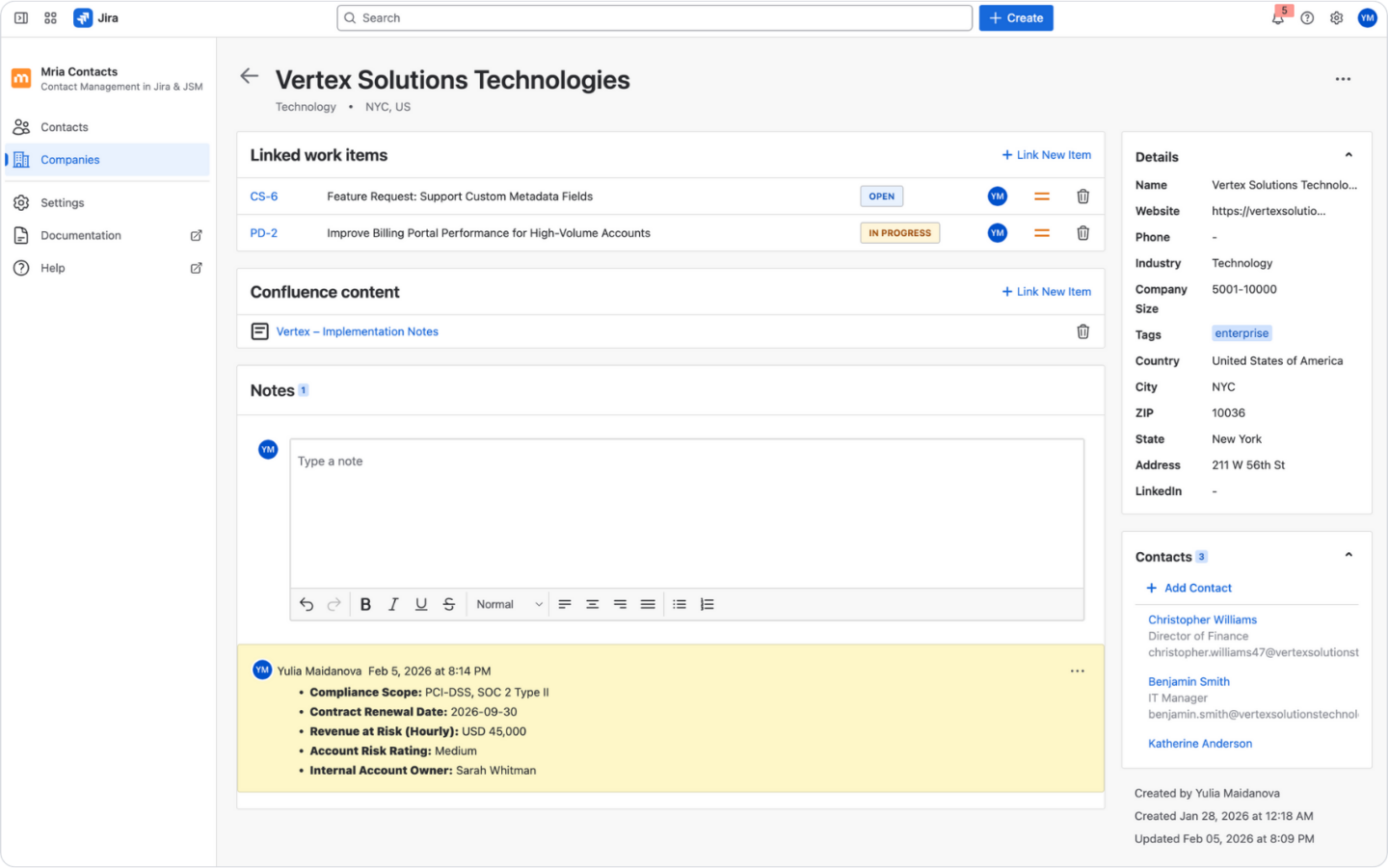
A company can be connected to multiple contacts.
A contact can display its connected company.
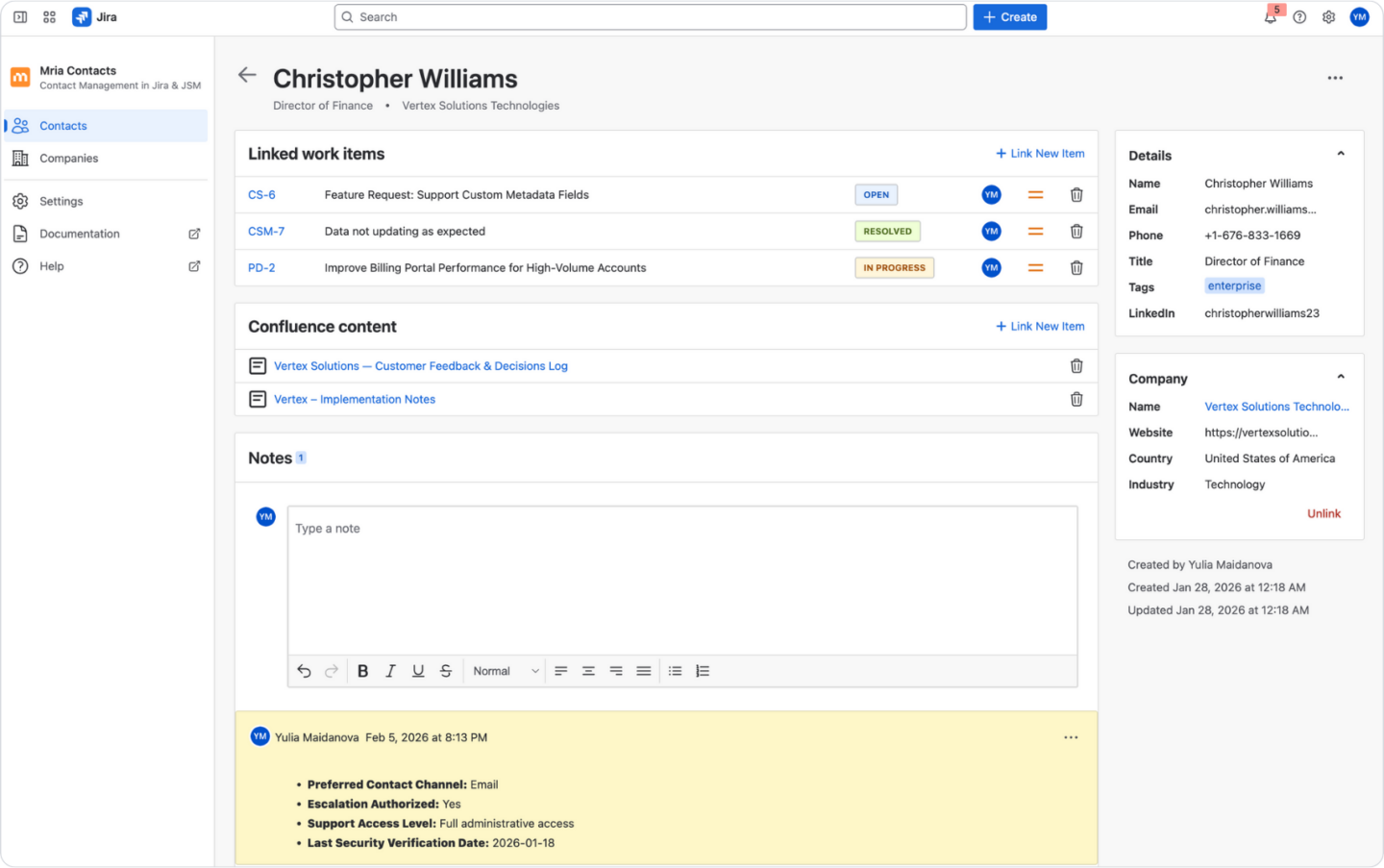
This is not cosmetic. It enables a reliable workflow:
- Open a company record and immediately see the people attached to it.
- Open a contact record and immediately see which company they represent.
- Manage these relationships explicitly, rather than inferring them from email domains or text fields.
Full Record Views That Consolidate Customer Context
Each contact and company has a full record view that combines structured data with the work and knowledge connected to that customer.
A typical record view includes:
- the record’s fields (contact/company data)
- the connected contact/company relationship
- linked Jira work items (issues)
- linked JSM requests (support tickets)
- linked Confluence content (spaces, pages, live docs)
- notes for context that should not live in structured fields
The practical result is that customer understanding is no longer scattered across tickets, issues, and documents. It is consolidated under a customer record that teams can revisit and update over time.
Bi-Directional Linking Across Jira Issues and JSM Requests
Mria Contacts works in both directions: from the customer record to the work item, and from the work item back to the customer record.
Inside Jira issues and JSM requests, Mria Contacts adds a right-side panel where users can:
- search existing contacts and companies
- link one or multiple contacts/companies to the same issue or request
- open the full record view for deeper context
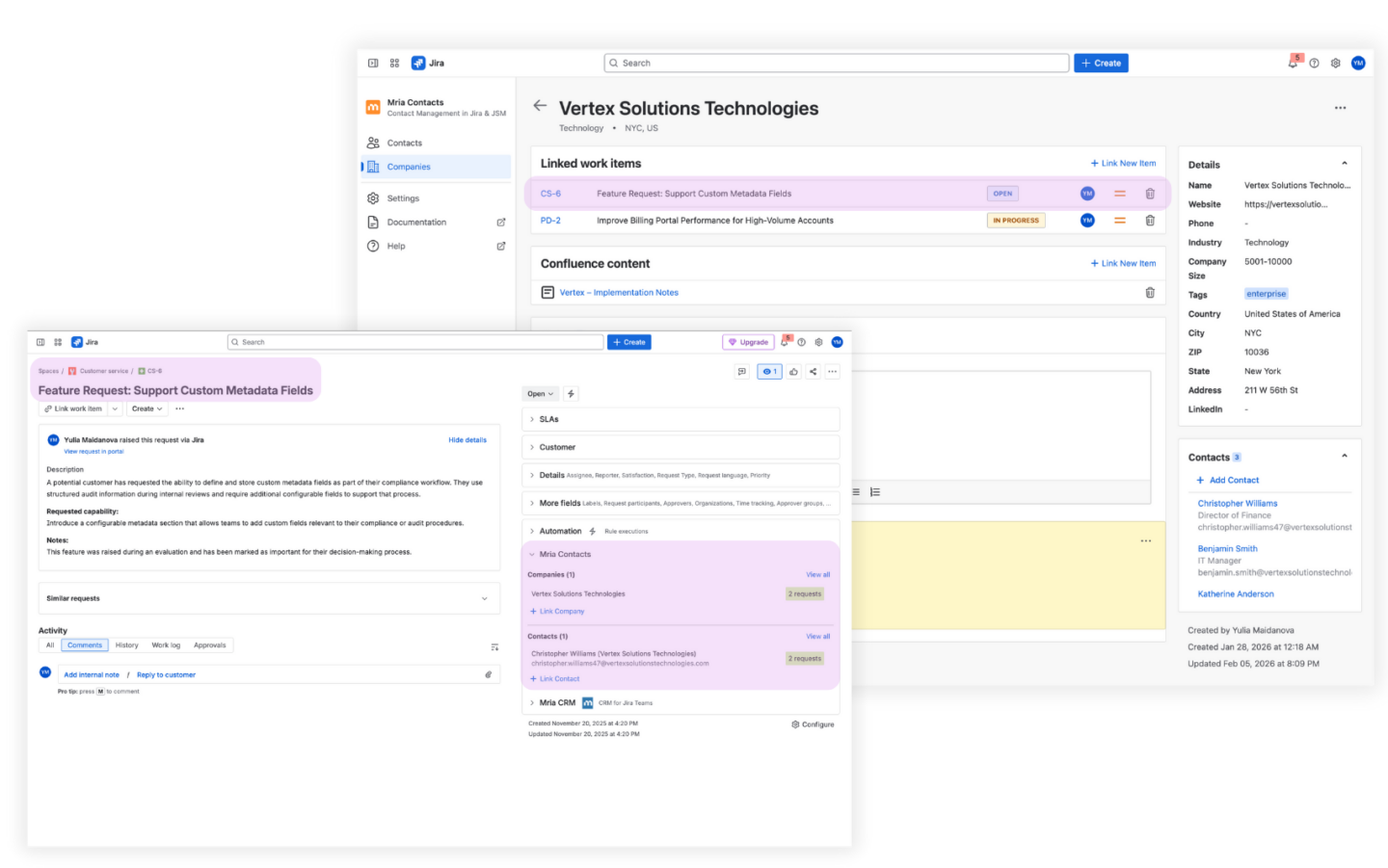
Once linked, the relationship is reflected everywhere:
- the work item shows the linked contact/company
- the contact/company record shows the linked work item
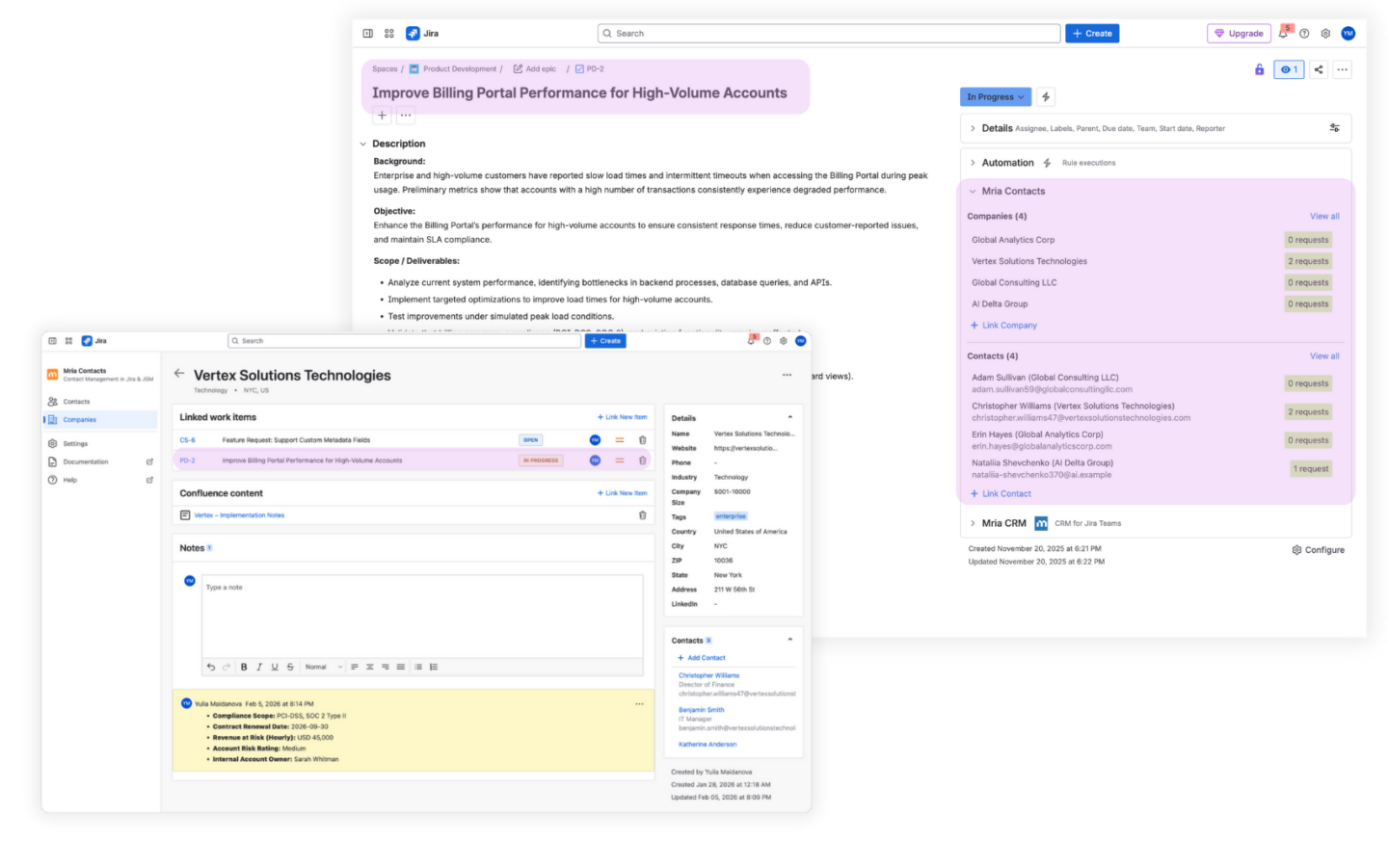
This is what turns customer identity into something that can be reused across Jira projects. Context doesn’t stay trapped in the original ticket or project.
Matching and Suggestions on Incoming JSM Support Requests
Customer data only stays clean if it can be reused without constant manual search.
When a new JSM request arrives, Mria Contacts evaluates the requester and suggests the most likely customer records:
- It checks for an existing contact match.
- It can detect an existing company while the contact is new.
- It can propose creating a new contact and linking it to the existing company.
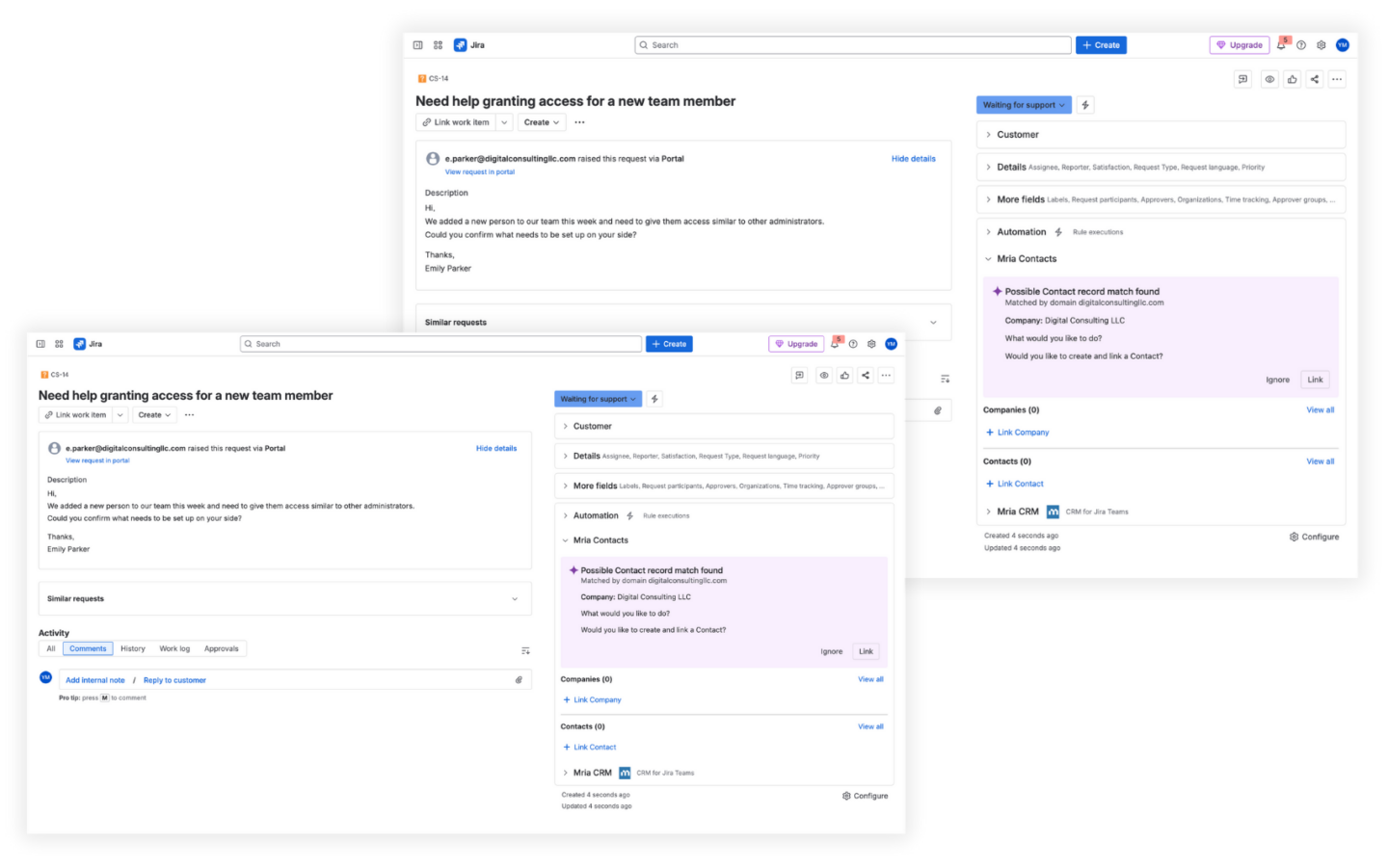
This makes customer capture part of the support flow. Instead of generating duplicates, each new request becomes an opportunity to strengthen the shared customer directory.
Import Designed for Ongoing Maintenance
Mria Contacts includes import inside its own interface and treats it as a maintenance mechanism, not a one-off migration step.
Key behaviors that matter in practice:
- Contacts and companies can be imported together from a single file.
- Relationships can be established during import (contacts linked to companies).
- Re-importing can update existing records and add new ones.
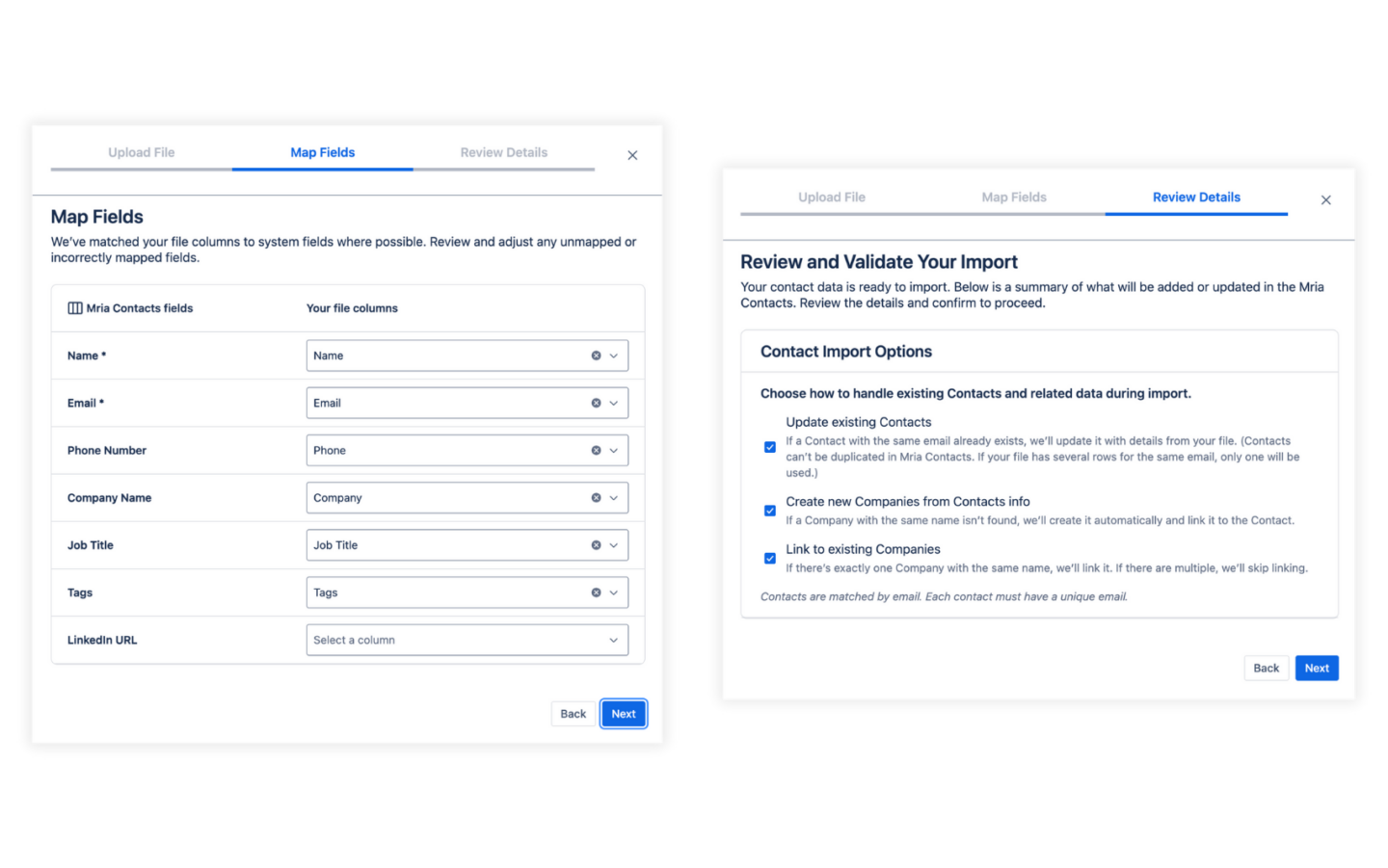
This is important because customer data changes constantly. The app is designed for keeping the directory current, not just getting an initial list into Jira.
What Mria Contacts Enables That Native Customer Context in JSM Does Not
After you introduce Mria Contacts, customer identity becomes usable in places where native service profiles do not carry through.
You gain the ability to:
- treat contacts/companies as reusable references across Jira projects
- attach multiple customer stakeholders to a single issue or ticket (and keep those links discoverable later)
- open a customer record and see the customer’s connected work and knowledge across Jira and JSM
- maintain customer data in one governed directory rather than duplicating it per project
This is the purpose of the app in the architecture: it turns customer identity into a shared operational object inside Jira, while JSM/CSM remain focused on service execution.
Step-by-Step: Set Up Mria Contacts and Use It in Jira and JSM
So now let’s walk through the steps to set up Mria Contacts and start using it in Jira and Jira Service Management.
Step 1: Install Mria Contacts from Atlassian Marketplace
- In Jira, go to Apps → Explore more apps (Atlassian Marketplace).
- Search for Mria Contacts: Contact Management for Jira & JSM.
- Select Try it free and complete installation on your site.
- Open Mria Contacts from Jira’s navigation (Apps) to confirm it loads.
Mria Contacts: Installation Guide
Step 2: Configure Permissions Before Importing Data
Customer data becomes shared across teams, so governance must come first.
- Open Mria Contacts → Settings.
- Go to Roles & Permissions.
- Assign Jira users or groups to roles: Administrator, User, Viewer
Practical recommendation:
- Keep Admins limited (support ops / system admins).
- Grant Users to the teams who will maintain customer data.
- Use Viewers for teams that need visibility but should not edit records.
Expected result: the right people can manage customer records, and edits are controlled from day one.
Mria Contacts: Roles & Permissions Guide
Step 3: Import Your Customer Directory
Import should create a usable B2B structure immediately: companies with multiple contacts.
- In Mria Contacts → Settings, open Data administration → Import.
- Download the sample CSV and use it as your template.
- Prepare your file:
File preparation rules (practical):
- Include contacts and companies in one file so relationships are created automatically.
- Populate the Company column for each contact where applicable.
- Keep company naming consistent (avoid “Acme Ltd” vs “Acme LLC” duplicates).
- Start the import and wait for completion.
- Validate with a quick spot-check:
- Open a company record and confirm its contacts are attached.
- Open a contact record and confirm it shows the linked company.
Expected result: you have a working customer directory inside Jira, with contact–company relationships in place.
Step 4: Establish How You Will Link Customers to Work
Mria Contacts allows users to link Contacts and/or Companies to their Jira work, so before teams start linking ad hoc, define one simple rule so data stays consistent.
Recommended linking rule for B2B operations:
- Link the Company to work items that affect the account (most delivery, escalations, renewals, account-wide issues).
- Link the Contact when a specific stakeholder matters (requester, decision maker, primary communicator).
- Link both when you need account context + the exact person involved (common for escalations and feature requests).
This keeps records usable for reporting and avoids “random linking” patterns.
Step 5: Link Customers to Jira Issues (Delivery, Product, Onboarding)
Use this when work is tracked outside service: feature requests, onboarding tasks, escalations, bugs.
- Open the Jira issue.
- In the Mria Contacts right panel, search for the relevant company and/or contact.
- Link the selected records.
Expected result:
- The Jira issue shows the linked customer context.
- The contact/company record shows the issue under linked work items.
This is the core mechanism that makes customer identity reusable across projects.
Mria Contacts: Jira Integration Guide
Step 6: Link Customer Knowledge from Confluence (Optional but High-Value)
This step prevents “customer knowledge” from being spread across random pages no one can find.
- Open the relevant contact or company record in Mria Contacts (full view).
- In the top-right corner, open the three-dots menu and select Add Confluence link.
- Search for the Confluence content you want to associate.
You can link:
- a space (customer knowledge base)
- specific pages (onboarding notes, technical specifications, agreements)
- live docs (ongoing working documents)
Expected result: the customer record becomes the entry point to both work and documentation.
Mria Contacts: Confluence Integration Guide
Step 7: Daily Support Workflow in Jira Service Management
This is the workflow support teams actually follow, ticket by ticket.
- A new JSM request arrives.
- Support opens the request and checks the Mria Contacts panel on the right.
- Mria Contacts suggests matches based on requester identity:
- If the contact/company exists, support links it in one click.
- If the company exists but the contact is new, support creates the contact and links it to the company.
- If neither exists, support creates new records directly from the request.
- If deeper context is needed, support opens Full view from the panel to see:
- customer fields and notes
- linked Jira issues and linked JSM requests
- linked Confluence documentation
Expected result: every new request is connected to a customer record, and customer history remains complete over time.
Mria Contacts: JSM integration Guide
Step 8: Escalations That Preserve Customer Context for Engineering
When a support ticket becomes delivery or product work, the goal is simple: the dev team should see the same customer context without asking support.
- Create or identify the escalation issue (bug/task/feature).
- Link the same company/contact to the Jira issue (from the right panel).
- Ensure the JSM request remains linked to the customer record.
Expected result:
The customer record shows both the support ticket and the related Jira issue, making the chain traceable.
Engineering sees who the work is for directly on the issue and can see the linked JSM request for deeper context.
Operating Mria Contacts in Production
Once contacts and companies are actively used across Jira and Jira Service Management, the value of the system depends on whether it remains consistent under daily pressure: new tickets, escalations, handoffs, and exceptions. The goal is simple: every new interaction must strengthen the customer model, not fragment it.
Below are practices teams use to keep customer data clean, current, and trusted.
1) Make Customer Linking Part of the Workflow
Customer records should not be optional context.
- Every support request should be linked to a contact, a company, or both.
- Escalated Jira issues should inherit the same customer links.
- Any unlinked work item is a signal that customer context is missing.
This embeds customer identity into the definition of work itself.
2) Use the Right Panel as the Entry Control Point
The Mria Contacts panel in Jira and JSM is the control surface for data quality.
When a ticket or issue is created:
- review the suggested matches
- link the existing contact or company
- create a new record only when no match exists
This ensures the database grows through real interactions, not manual backfills.
3) Keep Companies as the Anchor in B2B Environments
For B2B teams, companies represent the stable entity.
- link companies to strategic or recurring work
- link contacts when a specific person is involved
- maintain correct contact–company relationships
This preserves account-level visibility even when people change roles.
4) Re-Import to Keep Records in Sync
Customer data evolves: names change, people leave, companies merge.
Use Mria Contacts’ import capability to:
- update existing records
- add new contacts and companies
- keep relationships aligned
Re-importing from a source system (CRM, billing, ERP) turns your directory into a living dataset, not a static snapshot.
5) Use Customer Links to Drive Decisions
Once links are consistent, they become operational signals.
Teams use them to:
- prioritize work by affected customers
- track escalations by company
- understand delivery impact across accounts
This is where shared customer identity becomes part of how work is managed.
Conclusion: Import Is the First Step. Reuse Is the Real Goal.
Importing customers into Jira Service Management or Customer Service Management solves only the first layer of the problem. It enables service participation, access control, and basic context for agents. But it does not create a customer model that survives handoffs between teams, escalations into delivery, or long-running account work.
That gap appears immediately once work leaves the service boundary. Tickets become issues, issues move across projects, and customer identity fragments into comments, custom fields, and naming conventions. Reporting becomes unreliable, and teams lose the continuity they expected when they imported customer data in the first place.
Mria Contacts changes the role of customer data inside Jira. Instead of being scoped to a service project or experience, contacts and companies become shared records that can be referenced anywhere work happens. This allows support, delivery, onboarding, and product teams to work from the same customer context, with history preserved across projects and tools.
In 2026, the right question is no longer “how do I import customers into JSM,” but “where does customer identity live in Jira.” Native tools provide service context. A shared customer layer provides continuity. That is the difference between storing customer data and actually using it to run the business.
Learn More About Mria Contacts
- Atlassian Marketplace: Mria Contacts: Contact Management for Jira & JSM
- Demo: Mria Contacts walkthrough video
- Mria Contacts Documentation: Setup and usage guides
- Mria Contacts Support: Customer support portal