Pipeline value in isolation rarely reflects the expected business outcome. As deal volume grows and pipelines become more structured, teams need a consistent way to represent probability directly inside the pipeline itself, rather than interpreting totals manually or relying on external forecasting models.
Mria CRM: CRM for Jira Teams now supports probability at both the stage level and the individual deal level, and surfaces probability-adjusted value directly in the pipeline view. This allows expected value to be evaluated in the same place where deals are reviewed and moved, without adding separate reporting or forecasting layers.
Alongside probability and weighted value visibility, this update also introduces smaller workflow improvements for teams working with multiple pipelines.

Stage Probability: Defining Default Probability per Pipeline Stage
Stage probability is the default closing likelihood you assign to each stage of a specific deal pipeline. In practical terms, it answers one operational question: when a deal reaches this stage, what percentage of deals typically close from here, based on how your team actually works and sells. Mria CRM uses this probability as the baseline for weighted value whenever a deal does not have its own individual probability set.
Stage probability is configured per pipeline. To define probability values for each stage, open the pipeline you want to configure and set probability on each stage:
Mria CRM → Settings → Deals → Select Pipeline → Probability (%)
This configuration is meant to represent stable assumptions about how deals progress through your pipeline. Stage probability should not change frequently, because its value comes from being consistent across deals and across reporting periods.
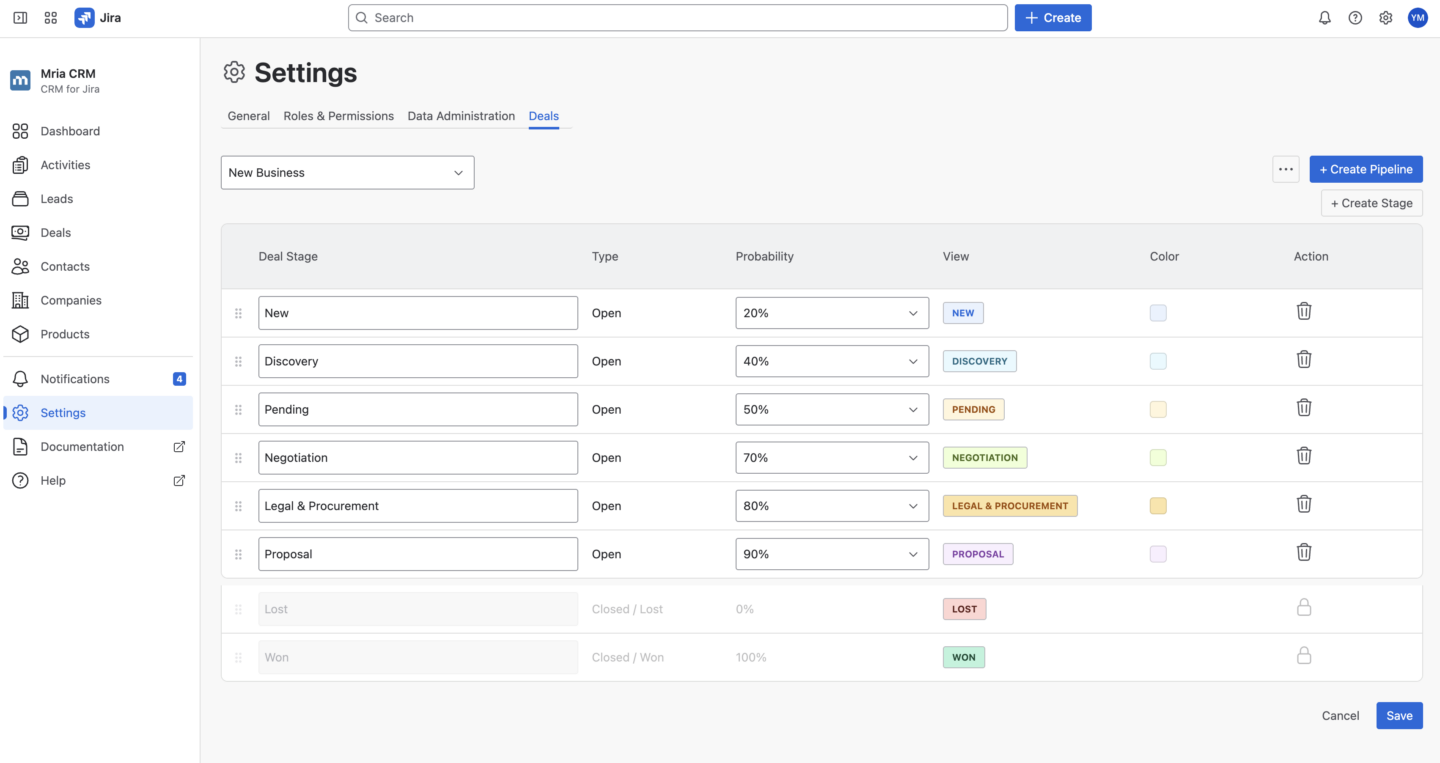
Example: A Typical Deal Pipeline with Stage Probabilities
Below is an example of a realistic deal pipeline.
Pipeline: New Business
- Qualification — 20%
The deal is confirmed as real, but scope, timeline, and commercial fit may still change. - Discovery / Solution Fit — 35%
Requirements and success criteria are understood, and the solution direction is validated. - Proposal Sent — 50%
Commercial conversation is active, but competitive and budget risks still exist. - Negotiation — 70%
Terms, pricing, and contract details are being finalized, with remaining execution and procurement risk. - Verbal Agreement — 90%
The customer has effectively confirmed the decision, with only formal approval or paperwork remaining.
The exact percentages are not universal. The correct values are the ones that reflect how deals actually convert inside your organization.
Individual Deal Probability: Controlling Probability at the Deal Level
Individual deal probability allows teams to define closing likelihood directly on a specific deal when that deal’s situation is materially different from the typical probability associated with its stage. In practical terms, it answers a simple operational question: does this deal have a higher or lower chance of closing than most deals that reach this stage.
When the individual deal probability is set in Mria CRM it becomes the probability used for weighted amount calculation for that deal, regardless of the stage probability. This ensures that weighted pipeline totals reflect real deal context instead of forcing every deal to follow stage averages.
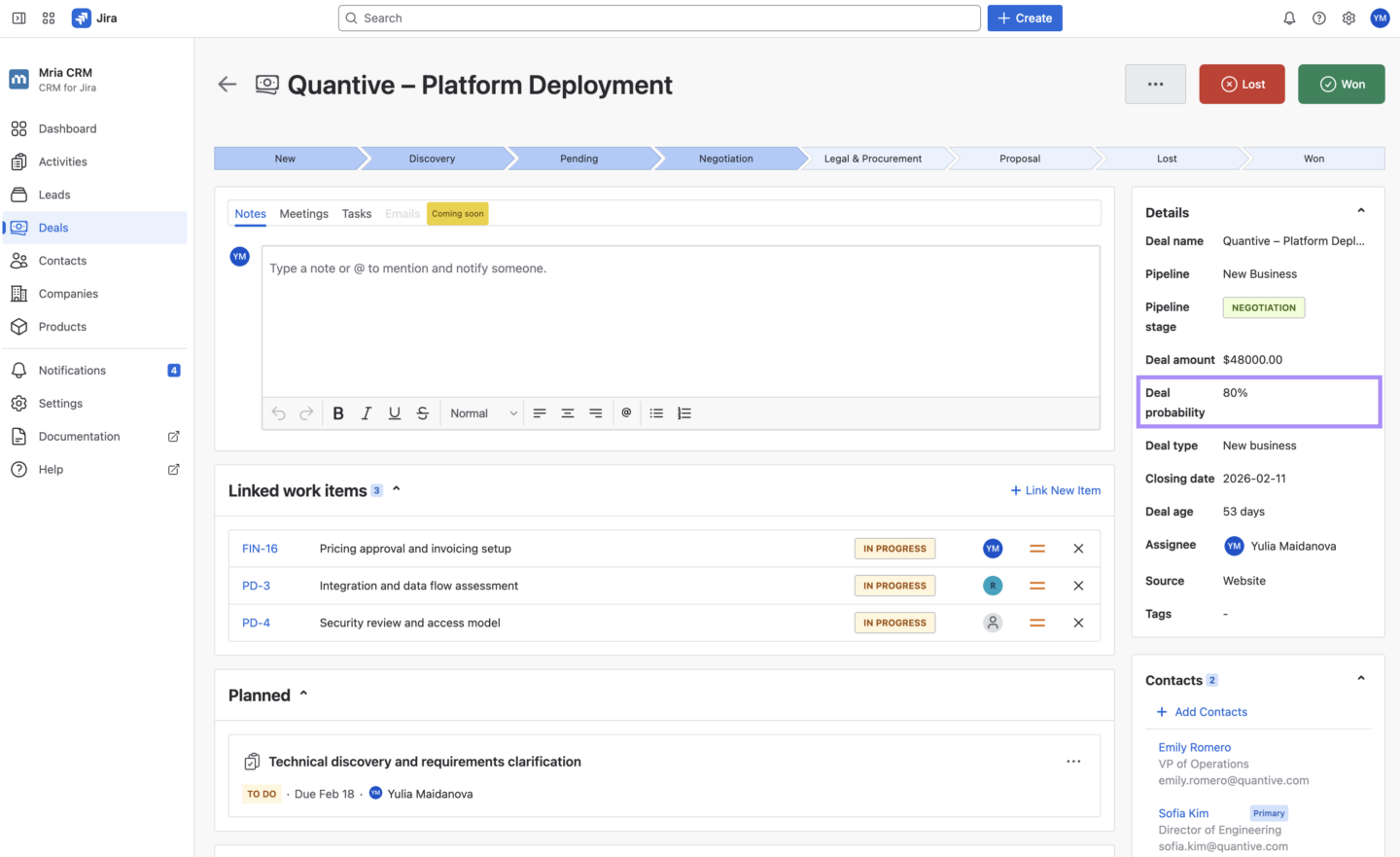
Individual deal probability is configured directly inside the deal record, in the Deal Details section. Once set, this value automatically overrides stage probability for the weighted amount calculation for that deal.
Example: How Individual Deal Probability Works in Practice
Consider the following scenario:
Pipeline Stage: Negotiation
Stage Probability: 70%
Most deals that reach Negotiation close successfully, so the stage default is 70%. However, not every deal behaves like the average.
Deal A — Strong Strategic Deal
Deal Amount: €50,000
- Customer already selected your solution
- Legal review completed
- Final approval pending
Individual Deal Probability set to: 90%
Weighted Amount: €45,000
Deal B — Risky Negotiation
Deal Value: €50,000
- Procurement delays
- Competing vendor still active
- Budget approval uncertain
Individual Deal Probability set to: 40%
Weighted Amount: €20,000
Both deals are in the same stage, but their real closing likelihood is different. Individual deal probability allows the pipeline to reflect that reality without forcing stage probability to become unstable.
How Stage and Individual Deal Probability Work Together
Mria CRM for Jira uses a single, predictable rule when calculating weighted deal amounts and pipeline totals.
The system always uses the most specific probability available for each deal.
If Individual Deal Probability Is Set
Mria CRM uses the probability defined directly on the deal to calculate weighted amount for that deal.
If Individual Deal Probability Is Not Set
Mria CRM automatically uses the probability defined for the deal’s current stage.
This ensures that every deal always has probability context, either inherited from the stage or defined directly on the deal.
Stage probability provides a stable baseline that reflects how deals typically convert across the pipeline. Individual deal probability allows teams to reflect real deal-specific context when a deal is stronger or weaker than the stage average.
Weighted Amount: Expected Value Directly in the Pipeline View
With this release, the weighted deal amount is now visible directly inside the pipeline Kanban view. Teams can see expected value next to total deal value without switching to reports, dashboards, or external forecasting tools.
At the bottom of each stage column, Mria CRM shows:
• Total amount — full value of all deals currently in that stage
• Weighted amount — expected value after probability is applied to each deal in that stage
Weighted totals update automatically as deals move between stages or when probability or deal values change. This means stage totals always reflect the current operational state of the pipeline.
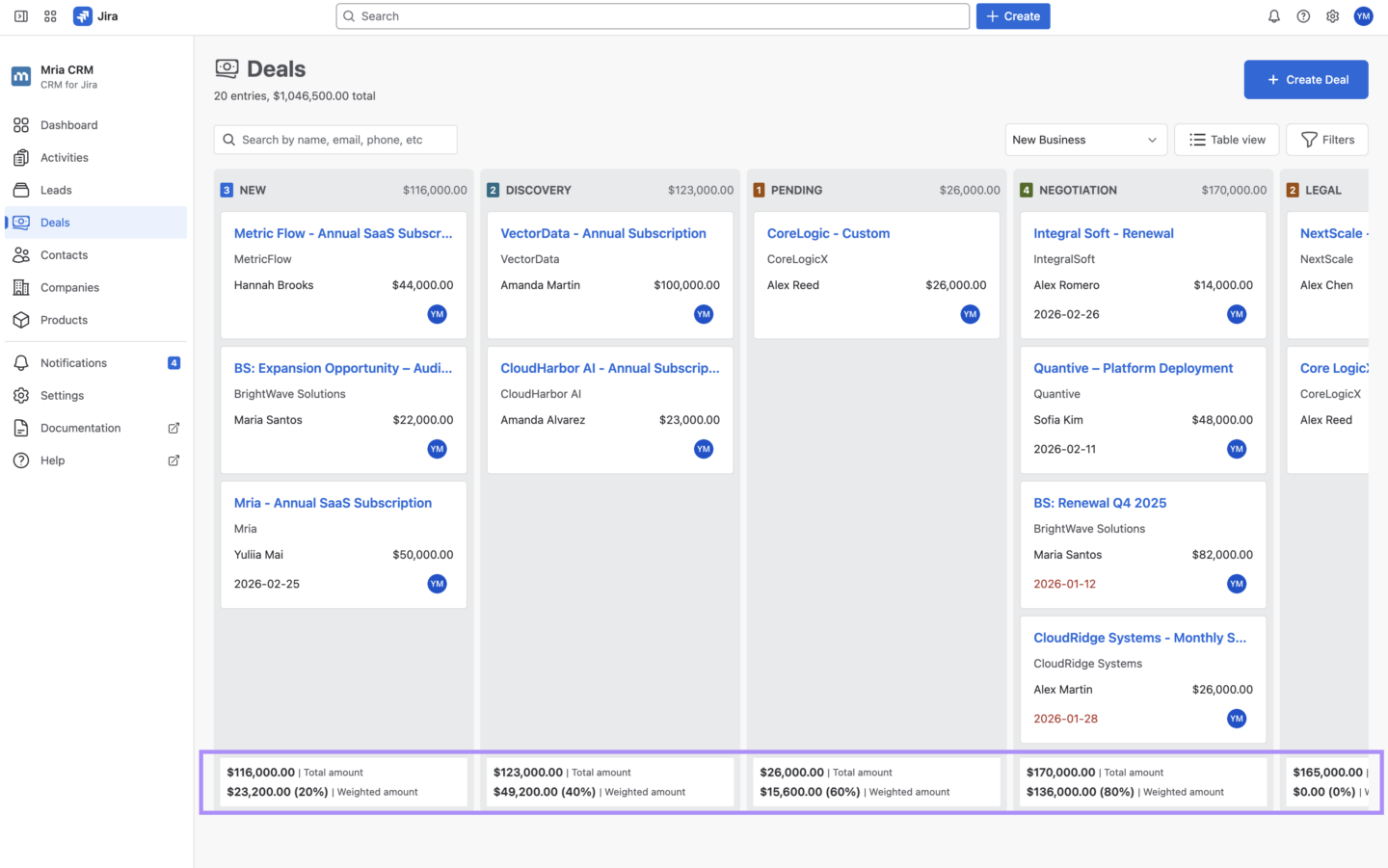
Example: Weighted Totals Inside a Stage Column
Imagine the Negotiation stage has a stage probability of 60%.
This stage contains three deals:
• Two deals use the stage probability (60%)
• One deal has its own individual deal probability (80%), which overrides the stage probability
Deal A — Uses Stage Probability
Value: €50,000
Stage Probability: 60%
Calculation: €50,000 × 0.60 = €30,000 Weighted
Deal B — Uses Individual Deal Probability
Value: €40,000
Individual Deal Probability: 80%
Calculation: €40,000 × 0.80 = €32,000 Weighted
Deal C — Uses Stage Probability
Value: €30,000
Stage Probability: 60%
Calculation: €30,000 × 0.60 = €18,000 Weighted
Stage Totals (Negotiation)
Total Amount
€50,000 + €40,000 + €30,000 = €120,000
Weighted Amount
€30,000 + €32,000 + €18,000 = €80,000
Stage columns now show not only how much deal value sits in each step of the pipeline, but also how much of that value is realistically expected to convert. This allows teams to understand stage health and expected outcomes directly inside the working pipeline view.
Because weighted value is calculated per deal and aggregated per stage, even small deal movements or probability updates immediately affect stage totals, making pipeline reviews more precise and easier to explain.
Additional Improvement: Pipeline Reordering for Multi-Pipeline Sales Environments
This release also adds the ability to reorder pipelines directly in Mria CRM settings, making it easier to organize multiple pipelines in the order teams actually use and review them.
Pipeline order can be changed in:
Mria CRM → Settings → Deals → Three-dot menu → Reorder Pipelines
Reordering pipelines does not affect deals, stages, or historical data. It only changes how pipelines are displayed across the product.
This is especially useful for teams working with multiple pipelines that follow a specific review or navigation order. Because pipeline order is controlled centrally, all users see pipelines in the same sequence.
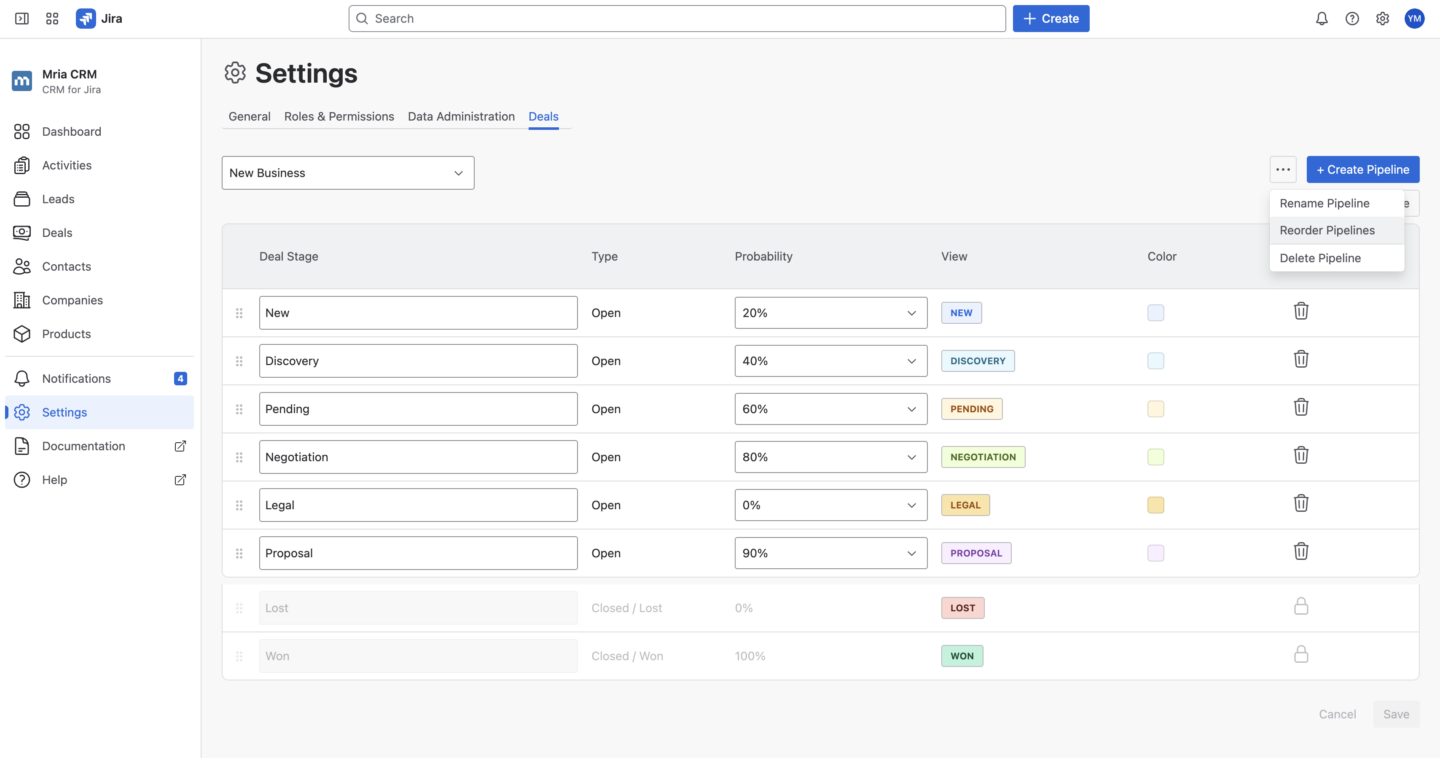
Example: Multi-Pipeline Review Flow
Imagine a team works with three pipelines:
- New Business
- Expansion
- Renewals
Sales leadership reviews pipelines in that exact order during weekly pipeline calls. With pipeline reordering, the product now matches the real review workflow instead of forcing teams to adapt to creation order or alphabetical sorting.
Get Started with Probability-Driven Pipelines in Mria CRM
These changes are available now in Mria CRM: CRM for Jira Teams and are designed to fit directly into the way teams already manage deals and pipelines inside Jira. As pipelines grow and sales decisions depend more heavily on expected outcomes rather than raw totals, having probability and weighted value built into the working pipeline view makes pipeline discussions more grounded and easier to align across sales, operations, and leadership.
You can learn more about configuration and usage in the Mria CRM documentation.
New to Mria CRM?
Start a free trial and explore the latest version directly in your Jira environment: