The Atlassian Marketplace is moving through a structural transition. For years, most conversations about Jira apps focused on features, integrations, or pricing. In 2026, enterprise buyers are asking a different set of questions. Where does the app run? Where is data processed? How does the app align with long-term cloud architecture?
The Runs on Atlassian designation is becoming one of the clearest signals answering those questions. It identifies apps that run fully inside Atlassian infrastructure, using Atlassian-hosted compute and storage, and aligning with Atlassian data residency and security boundaries. For many organizations, it is becoming part of procurement, security review, and platform strategy.
This article examines ten Jira apps aligned with this shift and selected because they represent meaningful, production-ready capabilities organizations should consider implementing. Together, they show how Jira is evolving into a broader operational platform supporting delivery, customer operations, governance, and strategic planning.

Table of Contents
What Is the Runs on Atlassian Badge?
Before presenting the top 10 Jira apps, it is important to clarify what the Runs on Atlassian badge represents and why it matters when selecting Jira apps.
Runs on Atlassian is an official Atlassian Marketplace designation for apps that operate entirely within Atlassian’s cloud infrastructure. These apps are built on Atlassian Forge and meet specific architectural requirements related to hosting, data residency, and external data transmission.
To qualify, an app must:
- Use Atlassian-hosted compute and storage
- Support the same data residency regions as the host Atlassian product
- Avoid transmitting in-scope end-user data outside the Atlassian platform
- Allow administrators to control external data egress
Eligibility is automatically verified by Atlassian based on the app’s declared permissions and infrastructure configuration. If the requirements are met, the badge appears on the Marketplace listing. Apps continue to be monitored, and eligibility can change if architectural permissions are modified.
Not all Forge apps qualify. Some categories of apps, especially integrations that exchange data with external systems, cannot meet the containment requirements because their functionality depends on communication outside the Atlassian platform.
The badge should also not be confused with Cloud Fortified. Cloud Fortified reflects operational maturity, reliability standards, and vendor support practices. Runs on Atlassian specifically reflects architectural containment and data handling boundaries inside Atlassian Cloud.
Why This Matters When Choosing Jira Apps
In many organizations, installing the Atlassian Marketplace app is not just a feature decision. It often triggers security review, compliance evaluation, and architecture approval. Questions typically include where the app runs, how data is stored, and whether information leaves the primary platform environment.
Runs on Atlassian simplifies that evaluation at the infrastructure level. Because qualifying apps run fully within Atlassian Cloud and restrict external data transmission, they reduce uncertainty around hosting and residency.
For organizations operating under stricter security policies or regional data requirements, this can significantly shorten the path from evaluation to implementation.
That is why this article focuses specifically on Runs on Atlassian apps. The ten Jira apps below are not only strong in functionality. They also align with an architectural standard that is becoming increasingly relevant for Jira Cloud environments in 2026. Each one addresses a meaningful operational dimension – from planning and execution to governance, data modeling, and customer visibility.
Top 10 Jira Apps That Meet the “Runs on Atlassian” Standard
The apps below were selected because they combine architectural alignment with practical operational impact. Each meets the Runs on Atlassian criteria and represents a meaningful capability layer within modern Jira environments. These are not peripheral extensions. They are apps that can materially influence how Jira is structured and used at scale.
They are presented in no particular order and are not ranked; each serves a different purpose within a mature Jira environment.
1. Mria CRM: CRM for Jira Teams by Mria Labs
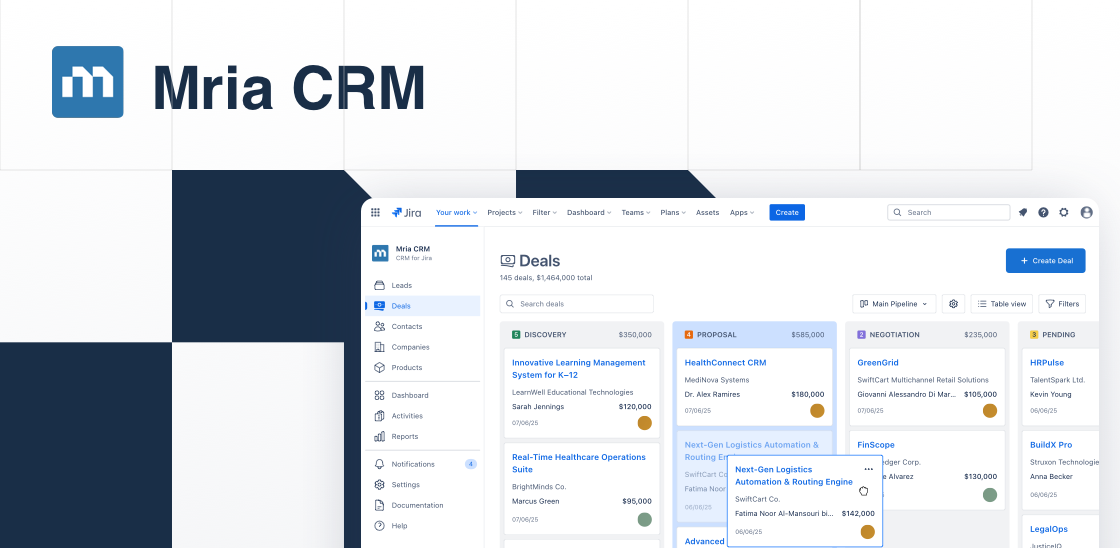
Mria CRM extends Jira Cloud with structured customer and revenue management capabilities. Instead of relying on external CRM integrations or custom issue configurations, it introduces dedicated CRM modules directly inside Jira.
Teams can manage Leads and Deals in pipeline views, link Contacts and Companies to work items, track sales Activities, and associate Products with opportunities. All records connect to Jira issues, Jira Service Management tickets and Confluence spaces/pages/live docs, allowing commercial context to sit alongside operational execution.
This is particularly relevant for Jira-centric organizations that want tighter alignment between sales, delivery, and support without maintaining a separate CRM system.
Key Capabilities
- Lead capture, qualification, and conversion into Deals
- Kanban and table-based sales pipeline management
- Structured Contact and Company records linked to Jira work
- Product catalog with quantities and values attached to Deals
- Activity tracking for meetings, notes, and tasks
- Direct linking between CRM records and Jira issues or JSM tickets
- Unified visibility of customer lifecycle inside Jira
2. Portfolio by HeroCoders (Structure PPM for Jira & Capacity) by HeroCoders
Portfolio by HeroCoders extends Jira from team-level execution to program and portfolio-level visibility. It provides structured views across multiple projects, allowing organizations to monitor progress, dependencies, resource allocation, and delivery risk in a consolidated environment.
Instead of switching between individual boards, teams can define a portfolio scope manually or via JQL and visualize initiatives in table views, Gantt charts, and graphical reports. Inline editing, rollups, time-in-status tracking, and predicted end dates support higher-level oversight beyond single-issue tracking.
The app also includes capacity planning capabilities. Teams can assess workload distribution, manage holiday calendars, evaluate availability, and plan future demand against real-time data. For organizations using worklog-based cost tracking, integrations allow actual cost and revenue visibility alongside portfolio structure.
Key Capabilities
- Integration with worklog-based cost and revenue data
- Portfolio-level view across multiple Jira projects
- Customizable table views with rollups and time-in-status tracking
- Gantt chart with dependency visualization
- End-date forecasting and risk indicators
- Capacity planning with team workload visibility
- Role- and skills-based resource allocation
- Holiday and leave calendar management
- Graphical reporting (treemap, pie charts, workload views)
- Portfolio scoping via manual selection or JQL
3. Smart Checklists for Jira (Free & Pro) by TitanApps
Smart Checklists extends Jira issues with structured, lightweight task breakdowns that replace or reduce the need for subtasks. Instead of creating multiple child issues, teams can embed actionable checklist items directly within a single issue.
Checklist items can include assignees, due dates, custom statuses, links, and additional details. Templates allow recurring processes such as Definition of Done, code review, onboarding, or release procedures to be standardized and automatically applied based on issue type, field values, or workflow transitions.
The Free version is suited for smaller teams that need structured checklists and basic templates. The Pro version expands into workflow validation, advanced automation, permissions management, and deeper integration across Jira Automation, JQL, and other ecosystem tools.
Key Capabilities
- Create detailed checklist items inside Jira issues
- Assign users, set due dates, and define custom statuses
- Save and reuse checklist templates for recurring processes
- Automatically apply templates on issue creation or transition
- Block issue transitions if required checklist items are incomplete
- Track checklist history and changes
- Search checklist values via JQL
- Integrate with Jira Automation, JSM, Confluence, and REST API
- Manage editing permissions (Pro)
- Share templates across projects (Pro)
4. Worklogs – Time Tracking, Time Reports, Timesheets by SolDevelo
Worklogs extends Jira’s native time logging with structured reporting, filtering, and export capabilities. While Jira allows basic time entries on issues, Worklogs centralizes time data into dedicated reporting views that make analysis and oversight significantly easier.
Teams can log time through a timeline-style interface and generate dynamic reports grouped by projects, users, date ranges, or custom fields. Data can be filtered using JQL, user groups, or specific reporting dimensions, allowing both operational managers and finance teams to analyze effort allocation in detail.
The app supports dashboard gadgets, built-in charts, and export to XLS or CSV formats for billing, cost analysis, or integration with external accounting systems. Permissions can be configured to restrict visibility of worklogs to specific users or groups.
Key Capabilities
- Centralized time logging interface with timeline view
- Dynamic time reports with grouping and aggregation
- Filtering by projects, users, groups, JQL, and custom fields
- Built-in visual charts for effort analysis
- Dashboard gadgets for reporting visibility
- Drill-down to individual worklog entries
- Export to XLS and CSV for billing or external processing
- Permission controls for worklog access
- Configuration of time zones, units, and holidays
5. Awesome Custom Fields – Custom Fields for Jira & JSM by Seibert
Awesome Custom Fields expands Jira’s native field capabilities with more than twenty additional field types designed to structure, visualize, and calculate data directly inside issues. Instead of relying on limited standard fields or complex scripting, teams can introduce purpose-built fields that make work items more expressive and easier to interpret.
The app supports advanced cascading select lists with unlimited hierarchy levels, context-aware issue pickers for linking related work, and formula-based fields for real-time calculations. Visual field types such as progress bars, traffic lights, and color-coded labels make status and priority immediately visible without requiring separate dashboards.
This makes it easier to model structured business data inside Jira projects, whether for engineering workflows, service management portals, or cross-project coordination.
Key Capabilities
- 20+ additional custom field types for Jira Cloud and JSM
- Advanced formula fields for real-time calculations
- Unlimited cascading select fields for hierarchical data modeling
- Context-aware issue pickers and cascading issue linking
- Visual fields such as progress bars, traffic lights, and color labels
- Structured prioritization models (MoSCoW, WSJF, T-shirt sizing, matrix fields)
- Time-in-status and completion percentage tracking
- Secure and validated input fields
- Guided setup without scripting or complex automation
6. Dynamic Forms for Jira by Deviniti
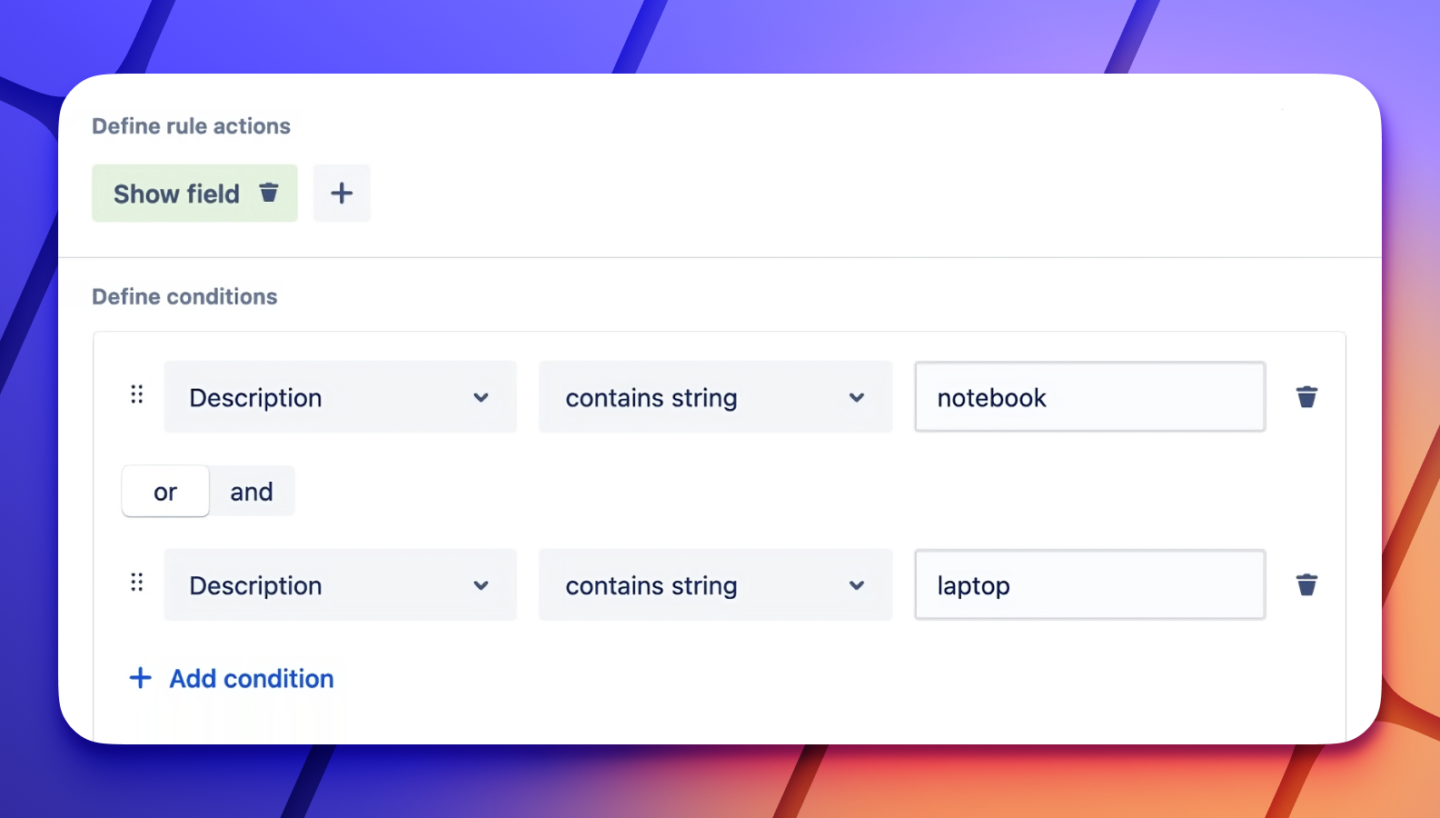
Dynamic Forms enhances Jira’s issue creation and editing experience by introducing conditional logic for fields. Instead of presenting static forms with all fields visible at all times, teams can control which fields appear, become required, auto-populate, or switch to read-only based on defined conditions.
This allows organizations to simplify issue screens, reduce manual data entry, and improve submission accuracy. Fields can be shown or hidden depending on user input, project context, or workflow state. Default values and dynamic value-setting help standardize data capture and reduce repetitive configuration.
Dynamic Forms is commonly used in ITSM, HR, onboarding workflows, incident reporting, and structured request management where intake quality directly affects resolution speed and downstream processing.
Key Capabilities
- Editions available for different scale and feature needs
- Conditional field visibility based on defined rules
- Show or hide options within select and multi-select fields
- Automatically set or update field values
- Make fields required based on conditions
- Set fields to read-only dynamically
- Group multiple fields into bundled custom fields
- Configure behavior for Create screen and Issue View
- Support structured request scenarios across projects
7. Issue History for Jira (Work Item History) by SaaSJet
Issue History for Jira extends Jira’s native changelog with structured, exportable, and restorable history tracking. While Jira records field updates, this app centralizes change data into dedicated reports that make audits, investigations, and compliance reviews significantly easier.
Teams can generate full history reports across projects, track changes to both standard and custom fields, and review activity by specific users. Deleted issues can be monitored and restored, and bulk revert capabilities allow administrators to roll back changes when necessary. History data can be exported to Excel, CSV, or PDF for external analysis or regulatory documentation.
The app also provides dashboard gadgets for real-time activity visibility and includes tools to scan issue content and change history for sensitive data exposure, which is relevant in regulated environments or internal data protection initiatives.
Key Capabilities
- Configurable access and permissions
- Full changelog reporting across projects
- Track changes to standard and custom fields
- User activity and team activity reporting
- Monitor and restore deleted issues
- Bulk revert of selected changes
- Export history reports to Excel, CSV, or PDF
- Dashboard gadget for recent activity tracking
- Status change visualization over time
- Sensitive data detection within issue history
8. Risk Radar for Jira (Risk Management, Assess & Track) by TypeSwitch
Risk Radar for Jira introduces risk assessment and tracking directly inside Jira issues. Instead of relying on external spreadsheets or separate risk registers, this app lets teams evaluate and visualize risk levels in the context of their work. Each issue can display a numeric risk score and visual indicator based on configurable assessments.
Risk scoring is quick to perform: users answer a few structured questions about likelihood, impact, and fix difficulty, and the app generates a risk score and label. The scores are stored on the issue or in associated comments, creating a lightweight risk register that evolves with the project. Teams can review and revise risk assessments as work progresses, helping identify and monitor higher-impact risks without leaving Jira.
This approach is particularly useful for Agile, Scrum, and Kanban teams that want to integrate risk awareness into backlog refinement, sprint planning, and issue prioritization. While not a full compliance or governance suite, it adds a visible risk dimension to operational planning.
Key Capabilities
- Compatible with Jira workflows and team practices
- Numeric risk scoring per issue based on defined criteria
- Visual risk indicators in the issue view
- Fast risk assessment via simple question workflows
- Store risk data in issues or comments to build a risk register
- Update and review risk scores as work evolves
- No external tools or spreadsheets required
9. Reports – Charts and Graphs for Jira Dashboard (Free & Paid) by Bloompeak
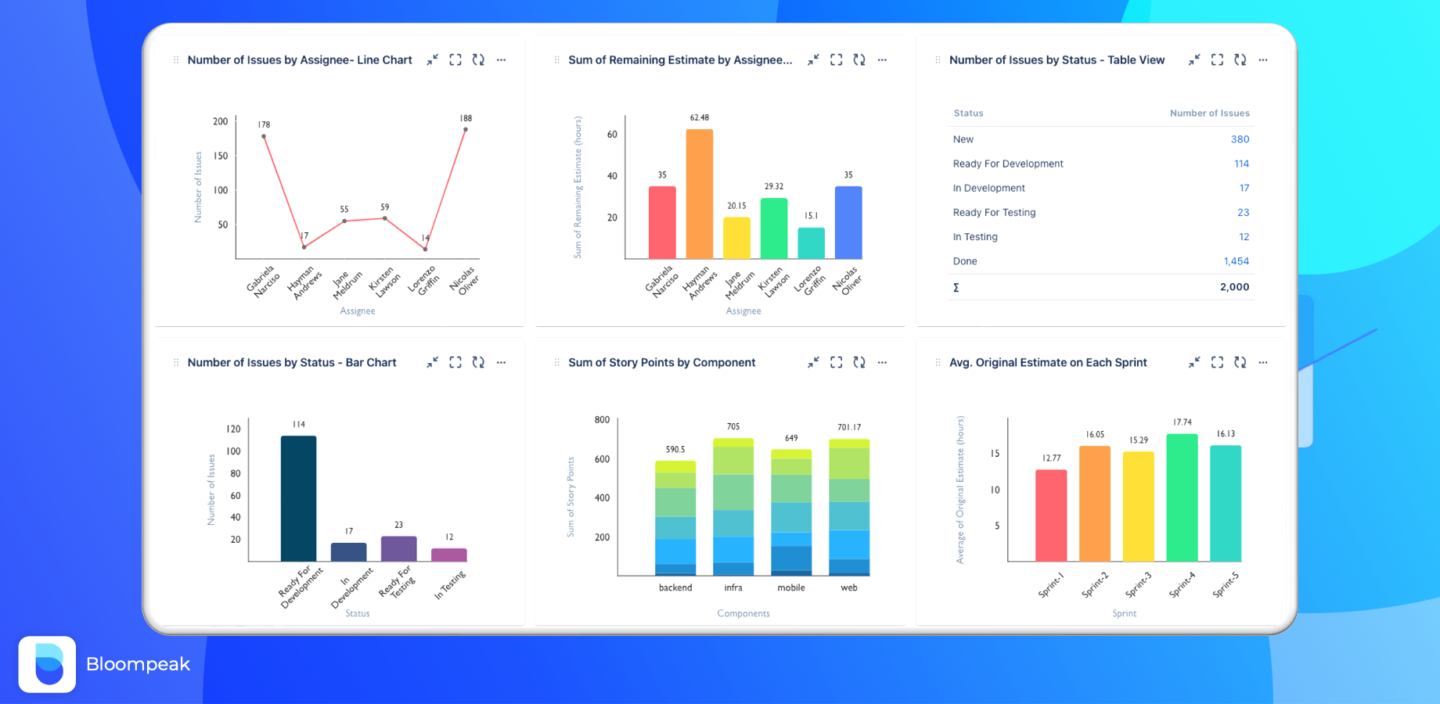
Reports – Charts and Graphs extends Jira dashboards with configurable visual reporting gadgets. Instead of exporting data to external BI tools, teams can build bar charts, stacked charts, and structured table views directly from Jira issues.
Charts are added as dashboard gadgets and configured without coding. Users can define X and Y axes based on fields such as Sprint, Assignee, Status, Component, Version, or Created date. Metrics can include issue count, sum of story points, remaining estimates, or averages. Data sources can be projects, saved filters, or advanced JQL queries.
The Free version provides the same core functionality with usage limits, making it suitable for smaller teams. The Paid version removes rate limits and adds expanded date range controls and more flexibility for larger dashboards and broader reporting needs.
Key Capabilities
- Create bar, grouped, and stacked charts directly in Jira dashboards
- Configure X and Y axes using standard Jira fields
- Aggregate metrics such as issue count, sum, and averages
- Use Projects, Saved Filters, or advanced JQL as data sources
- Group data by Sprint, Status, Assignee, Component, Project, and more
- Modify segments and combine multiple filters
- Drag-and-drop ordering of results
- Date range filtering (Paid version)
- Dashboard gadget-based reporting with no external tools required
10. Advanced Portal Reports for Jira Service Management by Nemetschek Bulgaria
Advanced Portal Reports extends Jira Service Management by adding structured reporting capabilities directly into the customer portal. Instead of relying on agents to export data or provide manual updates, customers can generate and filter reports on their own within the portal interface.
Users can build reports based on SLA metrics, custom fields, linked issues, assignees, resolution dates, priorities, and more. Reports can be filtered by period, searched using free text, and exported to Excel or CSV for further analysis. Administrators retain full control over which projects and fields are exposed, allowing organizations to increase visibility without compromising security.
Beyond reporting, the app allows additional custom fields to be displayed in the request details view, making ticket context more transparent for customers. This reduces back-and-forth communication and helps stakeholders monitor performance metrics such as SLA compliance or request resolution trends independently.
Key Capabilities
- Self-service report builder within the JSM customer portal
- Filtering by SLA metrics, custom fields, priorities, and date ranges
- Free-text search across report data
- Export reports to Excel or CSV
- Display additional custom fields in request detail view
- Admin control over visible projects and fields
- Visual chart representation of service metrics
- Configurable access points within the portal
Conclusion: A Broader View of the Jira Ecosystem
The Runs on Atlassian badge simplifies one important decision: trust. It signals that an app operates fully within Atlassian’s cloud infrastructure and aligns with defined data residency and egress standards. For many teams, that architectural consistency reduces evaluation friction and accelerates adoption.
What differentiates the apps above, however, is not only their technical alignment but the range of capabilities they represent. Together, they illustrate how the Jira ecosystem now spans far beyond issue tracking. Customer lifecycle management, portfolio oversight, structured intake, execution control, time visibility, auditability, risk awareness, advanced data modeling, and service transparency can all coexist within a single environment.
This breadth reflects a larger shift. Jira is increasingly used as an operational platform that supports multiple dimensions of work: technical, commercial, governance, and customer-facing. Atlassian Marketplace continues to evolve accordingly, with partners building deeper, more specialized layers on top of the core platform.
This list is not exhaustive, nor is it ranked. It is a curated snapshot of apps that represent meaningful capability layers within today’s Jira Cloud ecosystem. For teams evaluating how to extend Jira responsibly and strategically, these solutions demonstrate what is possible when architectural alignment and practical functionality meet.
Ultimately, the value of the ecosystem lies in its flexibility. Different organizations will prioritize different layers. The strength of the platform is that it allows those layers to be added deliberately without fragmenting infrastructure or compromising trust.