Enterprise
Mria CRM for Enterprise Jira Teams
An Enterprise Deal Is a Cross-Functional Project
If your revenue is delivered rather than transacted, closing a deal pulls in teams across the business long before anyone signs — solution engineering, legal, finance, security review, delivery planning — and keeping the customer pulls in even more long after. Most of them work in Jira, not in the CRM.
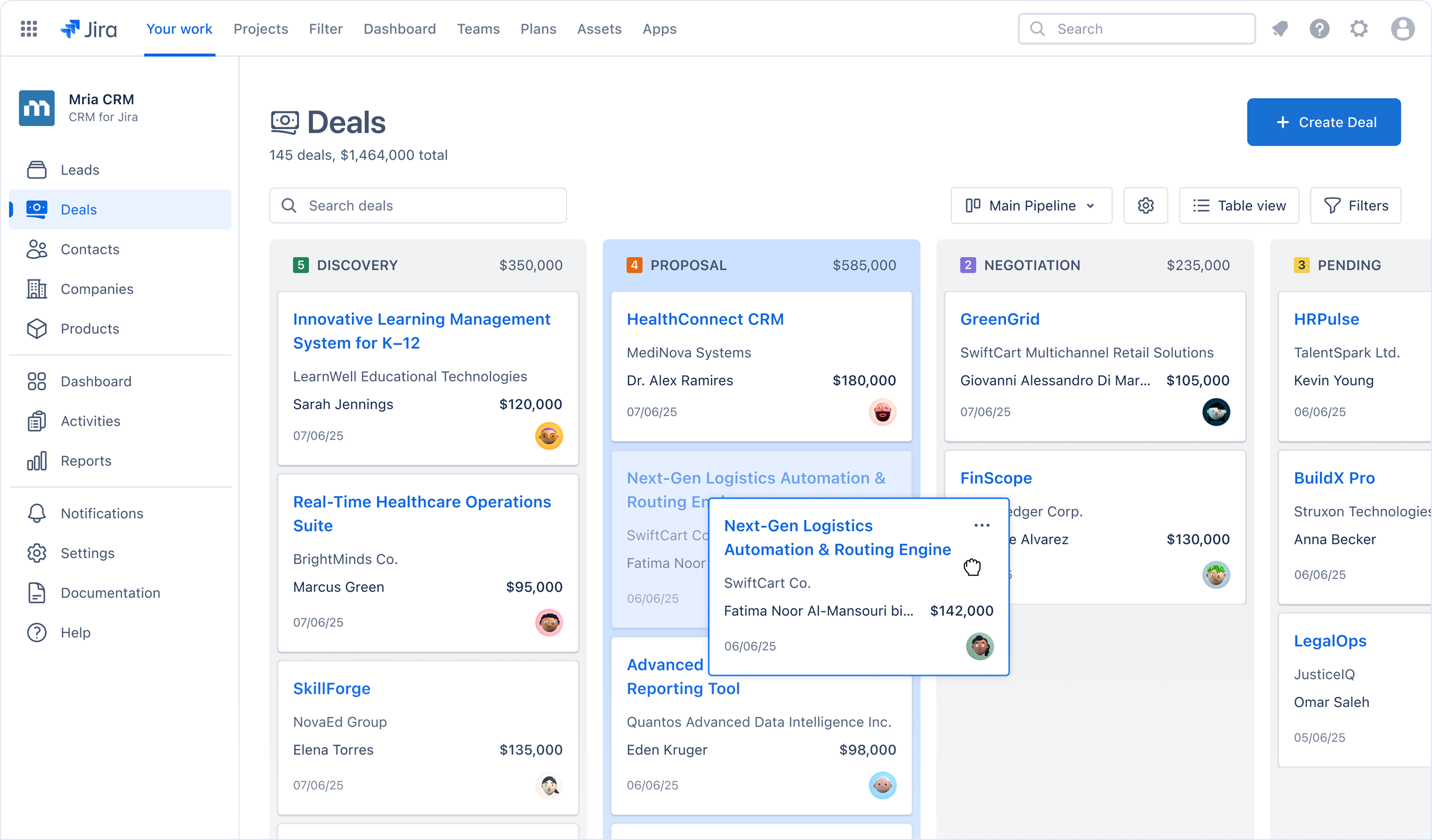
Mria CRM keeps the deal where the work is: customer records live in Jira, next to the issues, licensed for everyone on your site.

Why Large Jira Sites Choose Mria
Three Decisions You Do Not Have to Make
CRM evaluations at this size stall on the same three questions: where the data goes, who gets a seat, and how deep the integration really runs.

No Data Egress by Design
Verified, not claimed. Mria CRM declares no external resource domains. Atlassian checks this programmatically from the app manifest and applies the Runs on Atlassian badge automatically — your CRM data sits on the same infrastructure as your Jira data.

One Site-Wide Licence
No seat-by-seat decisions. No allocation, no internal chargeback, no renegotiation when a team grows. The licence matches your Jira user tier, and at 5,000 users the average lands at $0.28 per user per month.

Native, Not Integrated
Nothing to keep in sync. Mria CRM is built on Atlassian Forge and runs inside Jira. No sync job to monitor, no middleware to maintain, and no second system of record to reconcile when the two drift apart.
Is This a Fit
Who Mria CRM Is For — and Who It Isn’t
Enterprise CRM platforms are built for organisations where selling is the business. Plenty of large companies are not shaped that way — and this page is written for them, not for everyone.
A strong fit if
- Your revenue is delivered rather than transacted — services, consulting, agency work, or software with substantial implementation
- Your commercial team is small relative to total headcount
- Jira is already the operational backbone, not one tool among many
- Accounts are won or lost after the signature, in delivery and support
- Your pipeline runs to dozens or low hundreds of open deals, not thousands
- Your current CRM is, in practice, a store of companies, contacts, and a pipeline
Not a fit if you need
- Territory management, quota hierarchies, or commission calculation
- Configure-price-quote, complex quoting, or contract lifecycle management
- Marketing automation tightly coupled to the CRM record
- High-volume inside sales tooling — dialers, sequencing, an SDR stack
- A large third-party app ecosystem or industry-specific vertical clouds
- Partner or customer portals living outside Jira
If three or more of these are on your list, a full enterprise CRM platform is probably the right answer — and we will tell you so on the call rather than let you spend a month finding out.
Per-seat pricing is why most organisations end up under-licensed: when every seat costs, you buy fewer seats than you have people touching customer work. Mria CRM is priced per Jira site — at 500 users that is $6,000 a year covering all 500. See the full pricing table, or compare us with a specific product in the Comparison Hub.
Security & Data
There Is No Third-Party Processor to Assess
Most vendor security reviews exist to answer one question: what happens to our data once it reaches someone else’s servers. With Mria CRM it never does.
| What your security review asks | Mria CRM |
|---|---|
| Where is our CRM data stored? | In Atlassian-hosted Forge storage, tied to your Jira site installation. There is no partner-operated database. |
| Does data leave our Atlassian tenant? | No. The app declares no external resource domains in its Forge manifest. Atlassian verifies this and grants the Runs on Atlassian badge on that basis. |
| Does it respect our data residency setting? | Yes. Forge storage inherits the data residency configuration of the host Atlassian product, so your CRM data follows the same region as your Jira data. |
| Who are the sub-processors? | For application data at rest, none beyond Atlassian. |
| Can we get our data back out? | Yes. CRM records export to CSV at any time, without asking us. |
| How is access to CRM data controlled? | Through role-based permissions you configure. The licence controls who the app is available to; roles control what each person can see and change, so commercially sensitive fields need not be visible site-wide. |
| Has anyone independently reviewed the vendor? | Yes. Cloud Fortified requires participation in the Atlassian Security Self-Assessment Programme — an annual assessment Atlassian reviews and approves — plus continuous Ecoscanner vulnerability scanning, Marketplace Bug Bounty participation, and an incident management process integrated with Atlassian’s. The badge is renewed annually. |
Scope note. Runs on Atlassian describes where the app runs and stores data. It does not replace your own review of the permissions the app requests at installation. Our security, compliance, and privacy information is published in the Mria Labs trust center, and we are happy to walk your security team through the exact scopes we request.
What You Get
The Enterprise Onboarding Programme
Included with your licence, not sold as a services package. A site-wide licence only pays for itself if the site actually uses it, so getting several hundred people to adopt this is our problem as much as yours.

A Named Contact
One person assigned to your account who knows your configuration. Not a shared inbox, and not a queue where you re-explain your setup on every ticket.

Priority Support
Your tickets go to the front of the queue, ahead of the 24-hour critical-issue response time that Cloud Fortified already commits us to.

Sessions for Each Team
Sales, support, and delivery need different things from a CRM. Each gets its own working session on how they specifically will use Mria CRM — one all-hands demo is how apps end up unused.

Configuration & Import Guidance
We cannot touch your Jira — the app runs in your tenant and we have no access, which is the whole point of the architecture. What we do provide: import templates, a field-mapping guide, a review of your mapping before you run it, and a call with you while you do.

Materials You Can Circulate
Admin runbooks, short role-specific walkthroughs, and an internal announcement template. Everything your champion needs to roll this out to several hundred people without writing it themselves.
Security Review Support
A walkthrough of the permissions the app requests, written answers to your security questionnaire, and whatever else your review process needs on paper.
Available for larger Jira sites. Tell us your site size and we will confirm what applies to you.
Design Partner Programme
Influence What Gets Built Next
We are a focused team, and that carries one advantage a large vendor cannot match: your requirements can actually change the product. Design partners get a quarterly roadmap call, priority consideration on feature requests, and early access to what is coming. Our roadmap is public, so you can see exactly where your input would land before committing to anything.
Evaluation & Rollout
What the First 30 Days Look Like

Step 1
Install & Scope
Install from the Marketplace, review the requested permissions with your security team, and pilot on a single project.

Step 2
Import & Configure
Bring across Companies, Contacts, and Deals using our templates, then shape pipelines and permissions around how your teams already work.

Step 3
Extend Site-Wide
Run the per-team sessions and open access to delivery, support, and product. No additional licences to buy — the licence already covers them.
See how an IT services company connected sales and delivery inside Jira in our NXI use case, or how a SaaS company improved support triage and sales visibility in Jira Service Management. Full product documentation and the roadmap are publicly available, so your team can judge the depth before installing anything.
Procurement
Buy It the Way You Already Buy Jira
Mria CRM is purchased on the Atlassian Marketplace and billed by Atlassian, so it arrives as a line item on the invoice you already receive. There is no separate contract to negotiate with us and no new payee to set up.

Billed Through Atlassian
Purchase orders, invoicing, and payment terms follow whatever you have already agreed with Atlassian or your Solution Partner. We remain the app partner behind the product — support, privacy policy, and the roadmap are ours — but the commercial paperwork stays where it already is.

Published Pricing at Every Size
Every tier up to 100,000 Jira users is published on the Marketplace. You can build the budget without a discovery call, a quote, or a conversation with us — and the number you find is the number on the invoice.

Growth Does Not Surprise You
Your licence tier follows your Jira user count, so hiring moves you up the table. Because the whole table is public you can model that before it happens — and if you want the rate held for the length of your commitment, ask and we will tell you exactly what is possible.

Evaluate First
Every Jira Cloud site gets a 30-day evaluation of the full app before billing starts. If your review cycle needs longer, talk to us — we can arrange a promo code covering the extra period.
FAQs
Questions Security and Procurement Ask First
Do you hold SOC 2 or ISO 27001 certification?
No, and the reason is architectural rather than a gap we are working through. Those certifications give assurance about a vendor’s own infrastructure and processes for handling your data. Mria CRM does not operate infrastructure that holds your data: the app runs on Atlassian-hosted compute and stores data in Atlassian-hosted Forge storage, with no external resource domains declared in its manifest. Atlassian verifies that programmatically and applies the Runs on Atlassian badge on that basis. In practice the environment holding your CRM data is Atlassian Cloud, which your organisation has already assessed. If your procurement policy requires a partner-level certification regardless of where data resides, tell us early and we will be straightforward about whether we are a fit.
What exactly does the Runs on Atlassian badge guarantee?
Atlassian defines it as three things: the app uses only Atlassian-hosted compute and storage, it supports data residency matching the host Atlassian product, and customers can control external data egress through admin controls. Eligibility is detected automatically from the app manifest rather than applied for, so it is a verified technical fact rather than a marketing claim. It describes where the app runs and stores data; it does not replace reviewing the permissions the app requests at installation, which we are glad to walk through with your team.
How is Runs on Atlassian different from Cloud Fortified?
They answer different questions. Runs on Atlassian is a technical statement about data: no egress, Atlassian-hosted storage, data residency support. Cloud Fortified is about how the partner operates — support responsiveness, reliability commitments, security self-assessment, and bug bounty participation. Apps can hold either badge or both. Mria CRM holds both.
Do the Gmail and Outlook Connectors also run without data egress?
No, and that distinction matters. The connectors exchange data with Google or Microsoft over OAuth, so by definition they reach outside your Atlassian tenant. Both carry the Cloud Fortified badge, but neither can carry Runs on Atlassian — no app that talks to an external mail provider can. They are separate, optional apps: Mria CRM works fully without them, and installing one is a decision your organisation makes deliberately rather than something that arrives with the core app. If email context is not worth the egress for your security posture, do not install them and nothing else changes.
How do people get access, and what happens when they leave?
They are your Jira users. SSO, SCIM provisioning, and offboarding behave exactly as they do for Jira itself, because there is no second account system to keep in step. Administration happens in the Atlassian admin console your team already operates — licensing, installation, and updates are all handled there, with no separate vendor portal and no separate user directory. Forge storage is scoped to your app installation on your Jira site, and that isolation is enforced by the platform rather than by our code.
What support and reliability commitments come with the app?
Cloud Fortified commits us to responding to critical (T1) support tickets within 24 hours, five working days a week — an Atlassian programme requirement verified annually, not a number we set ourselves. On reliability, Cloud Fortified apps must meet Atlassian-defined Service Level Objectives on a rolling 28-day window, with alerting when a metric is breached, so problems surface through monitoring rather than through you reporting them. Atlassian admin controls also govern external data egress for Forge apps independently of us.
What if we outgrow Mria CRM?
Then you should move, and we would rather you could. Your records export to CSV at any time without going through us, so leaving does not require our cooperation or a data-retrieval request. We would also rather you knew before signing whether we are likely to be outgrown — the fit criteria above are published to make that judgement possible up front.
Does a site-wide licence mean everyone can see every deal?
No. The licence determines who the app is available to; role-based permissions determine what each person can see and change. Commercially sensitive information can be restricted to the commercial teams while operational customer context stays available to the people delivering the work.
Does the Enterprise Onboarding Programme cost extra?
No. It is included with your licence and there is no separate services line item. That is a deliberate choice rather than generosity: a site-wide licence renews only if the site actually adopts the product, so a rollout that works is in our interest as much as yours. We do not sell implementation as a revenue stream.
How do we buy it, and can we use a purchase order?
Mria CRM is purchased through the Atlassian Marketplace and billed by Atlassian, so it is added to your existing Jira subscription. Purchase orders, invoicing, and payment terms follow the arrangement you already have with Atlassian or your Solution Partner rather than requiring a separate agreement with us.
Our evaluation cycle is longer than 30 days. What then?
The standard 30-day evaluation cannot be extended self-service. If your review process needs longer, contact us — we work with evaluating teams individually and can issue a promo code for an extended evaluation period.
Find out in one call whether this fits
Tell us your Jira site size and how your commercial team is set up. We will come back with the permissions your admins will see, the number your procurement will need, and a straight answer if you would be better served elsewhere.