We’ve released Mria Contacts: Contact Management in Jira & JSM, a new app from Mria Labs, now available on the Atlassian Marketplace.
Mria Contacts adds a dedicated contact and company management layer to Jira and Jira Service Management. It enables Jira teams to store, manage, and maintain contacts and companies in one central location, define relationships between individuals and organizations, and utilize this data consistently across Jira issues and JSM requests. Contacts and companies can be browsed, searched, filtered, segmented, edited, and governed independently of issues, while remaining tightly connected to Jira and JSM workflows where customer context is required.
This is the second app from Mria Labs. Our first product, Mria CRM: CRM for Jira Teams, is a Jira-native CRM designed specifically for teams that want to run sales inside Jira.
Mria Contacts was created for a different, equally common reality inside Jira: teams that work with many external customers and organisations every day, where sales managed outside Jira, but structured contact and company management and reliable customer context are still required within Jira.

Why We Built Mria Contacts
Teams using Jira and Jira Service Management interact with external customers and organizations every day. Service requests are submitted through Jira Service Management, while the resulting work often continues in Jira issues across engineering, delivery, or internal projects.
Jira Service Management exposes requester identities at the service desk level, such as names and email addresses. Jira issues themselves do not have a native concept of customers, contacts, or organizations. This creates a structural gap between where customer interactions start and where work actually happens.
Limits of built-in customer handling in Jira Service Management
Jira Service Management includes Customers and Organizations, primarily designed for portal access, request participation, and visibility. These objects are not designed to function as a reusable customer data layer across Jira.
Teams commonly encounter limitations such as:
- External customers must be invited by email before they exist as records
- Bulk import and creation of customers and organizations with full attributes is not supported upfront
- Customer data is tied to service projects and access mechanics, not treated as an operational dataset
- Internal context, segmentation, and governance of customer data remain limited
As a result, customer information often exists outside Jira, or is reconstructed manually on a per-ticket basis.
Customer context does not follow work across Jira
Jira issues do not have a native concept of customers, contacts, or organizations. Regardless of how work is created – through Jira Service Management or directly in Jira projects – issues themselves are not aware of who the work is for. As a result, customer-related information is handled inconsistently. Names, email addresses, or background details are copied into fields, descriptions, or comments, if they are captured at all. This information is not structured, not reusable, and not governed.
What this means in practice is that teams lose critical context at the point where decisions are made.
Without reliable customer context inside issues, teams cannot easily determine:
- whether work relates to a new or existing customer
- whether multiple issues involve the same customer or organization
- whether there is prior history, ongoing work, or open risks connected to this context
- whether the issue requires special handling based on internal knowledge or agreements
Each issue is treated as an isolated unit of work, even when it represents part of a broader customer relationship.
Over time, this leads to:
- fragmented customer history across issues and projects
- inconsistent handling of similar customer situations
- repeated internal clarification and manual cross-checking
- loss of continuity when work moves between teams
Jira remains effective at tracking tasks and workflows. But without a dedicated contact and company layer, issues lack the customer context needed to make informed decisions and coordinate work over time.
How Mria Contacts Introduces a Customer Data Layer in Jira
To address this gap, Mria Contacts introduces Contacts and Companies as managed records inside Jira, available across Jira Service Management and Jira projects.
Instead of customer information being embedded in individual requests or issues, contacts and companies exist as standalone records that Jira work can reference.
Contacts and Companies
Mria Contacts defines two core record types:
- Contacts, representing individual people
- Companies, representing organizations those people belong to
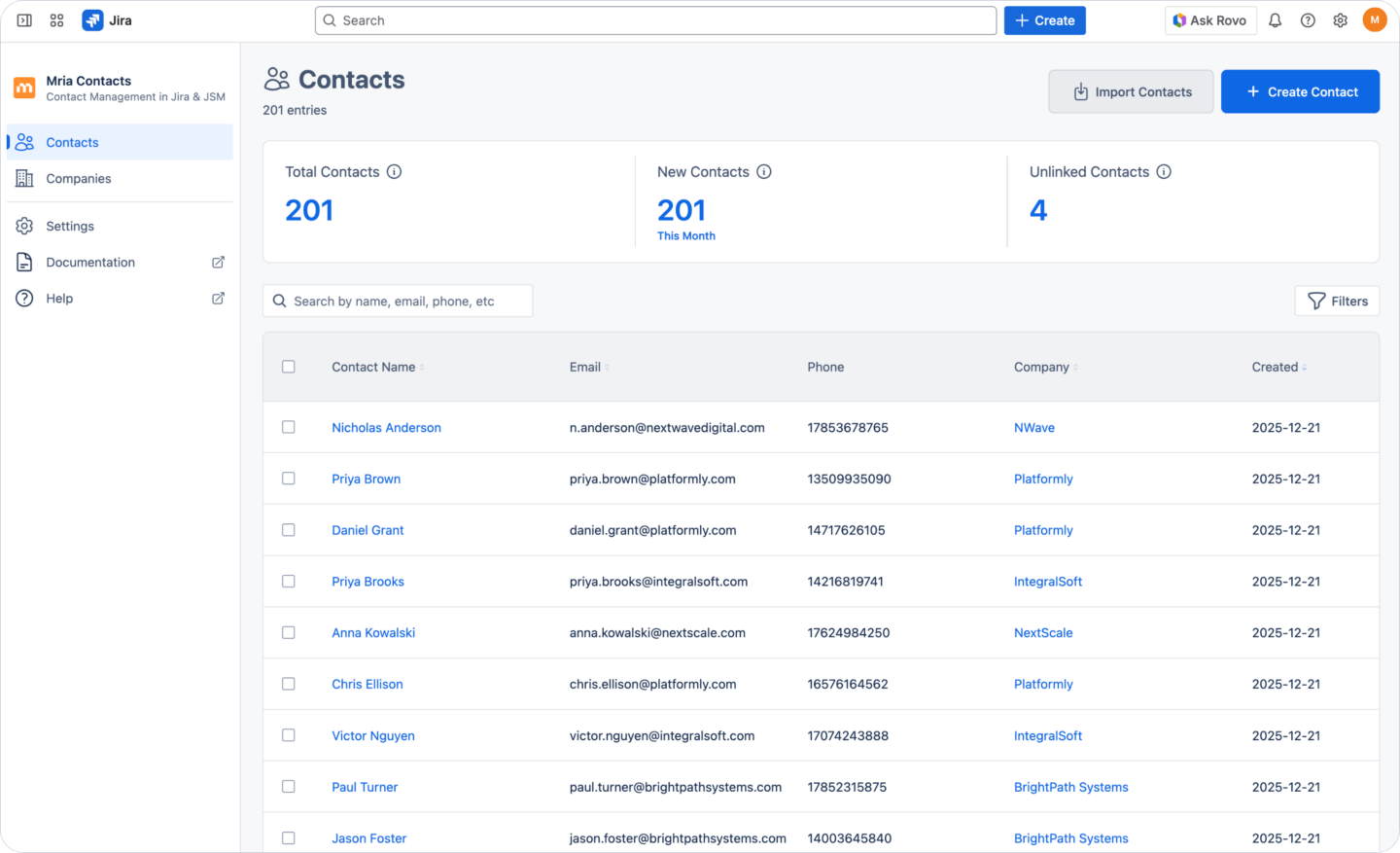
Contacts and companies are maintained centrally and include structured fields, internal notes, tags, and explicit relationships between people and organizations. Access to these records is controlled through roles and permissions. Teams can establish this dataset manually or populate it in bulk using structured imports.
How Mria Contacts Works with Jira and Jira Service Management
Mria Contacts integrates into Jira Service Management requests and Jira issues through a dedicated Mria Contacts panel, which is where matching, linking, and record creation takes place.
Using Mria Contacts in Jira Service Management requests
When a Jira Service Management request is opened, Mria Contacts automatically checks the requester’s email address against the existing contacts and companies stored in Mria Contacts.
The result of this check is displayed directly in the Mria Contacts panel and may include:
- an existing contact and company
- no existing contact, but a known company identified by email domain
- no existing records
Based on these results, support agents can act immediately from the request:
- link the existing contact and company to the request
- create a new contact for an existing company
- create both a new contact and a new company directly from the request
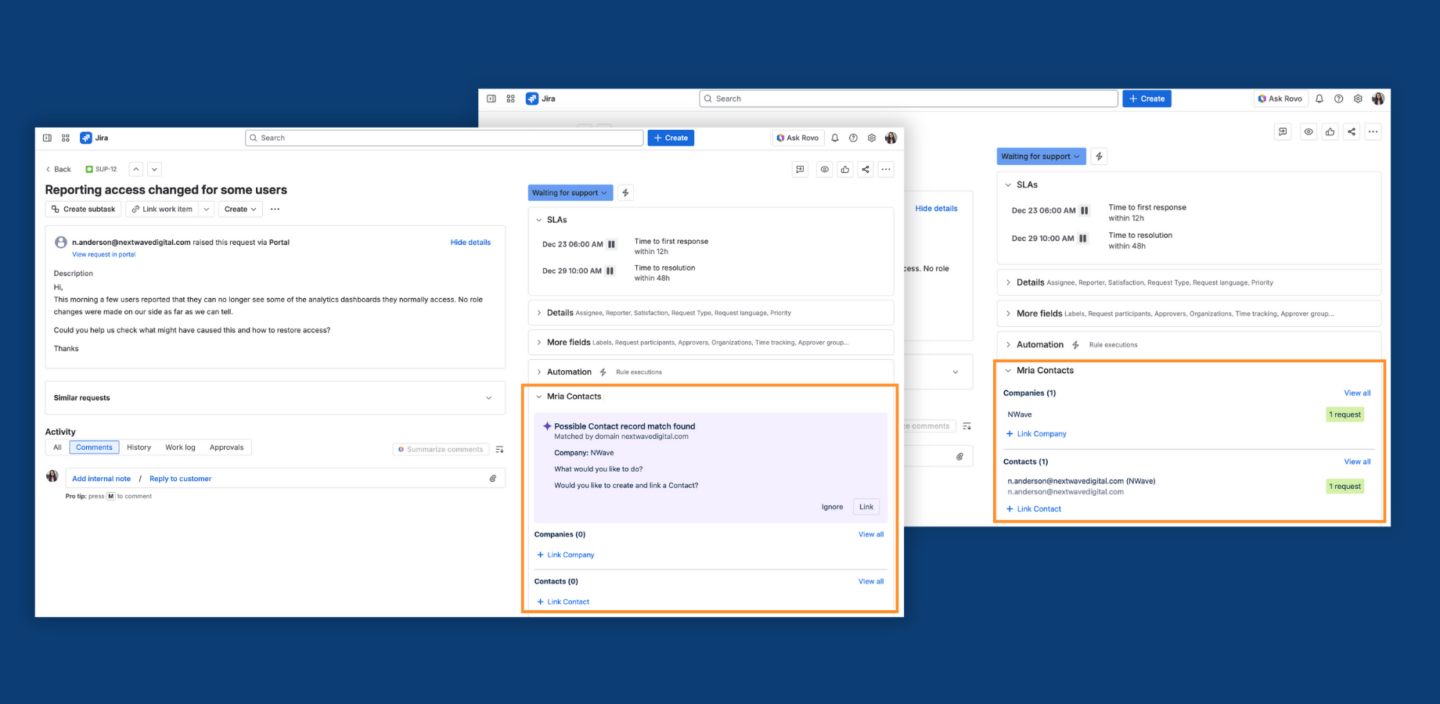
Once a contact or company is linked, the agent can see the full customer record directly in the ticket, including structured fields such as contact details, company attributes, tags, and internal notes.
This allows support teams to understand who they are working with from the first interaction, recognize existing customers, and use internal context when responding, rather than relying solely on the requester’s email address.
Each request linked in this way becomes part of the customer’s ongoing history.
Using Mria Contacts in Jira issues
The same Mria Contacts panel is available in Jira issues.
This is critical because much of the customer-related work, such as delivery tasks, implementation work, escalations, follow-ups, and customer-specific issues, often requires additional customer context, beyond just specific notes in the issue comments.
In Jira issues, users can link one or multiple contacts and companies, depending on what the issue represents. This supports scenarios such as:
- issues involving several stakeholders from the same customer organization
- work that affects multiple contacts, such as onboarding or rollout activities
- coordination or delivery tasks without a single requester
- follow-up work related to earlier requests or projects
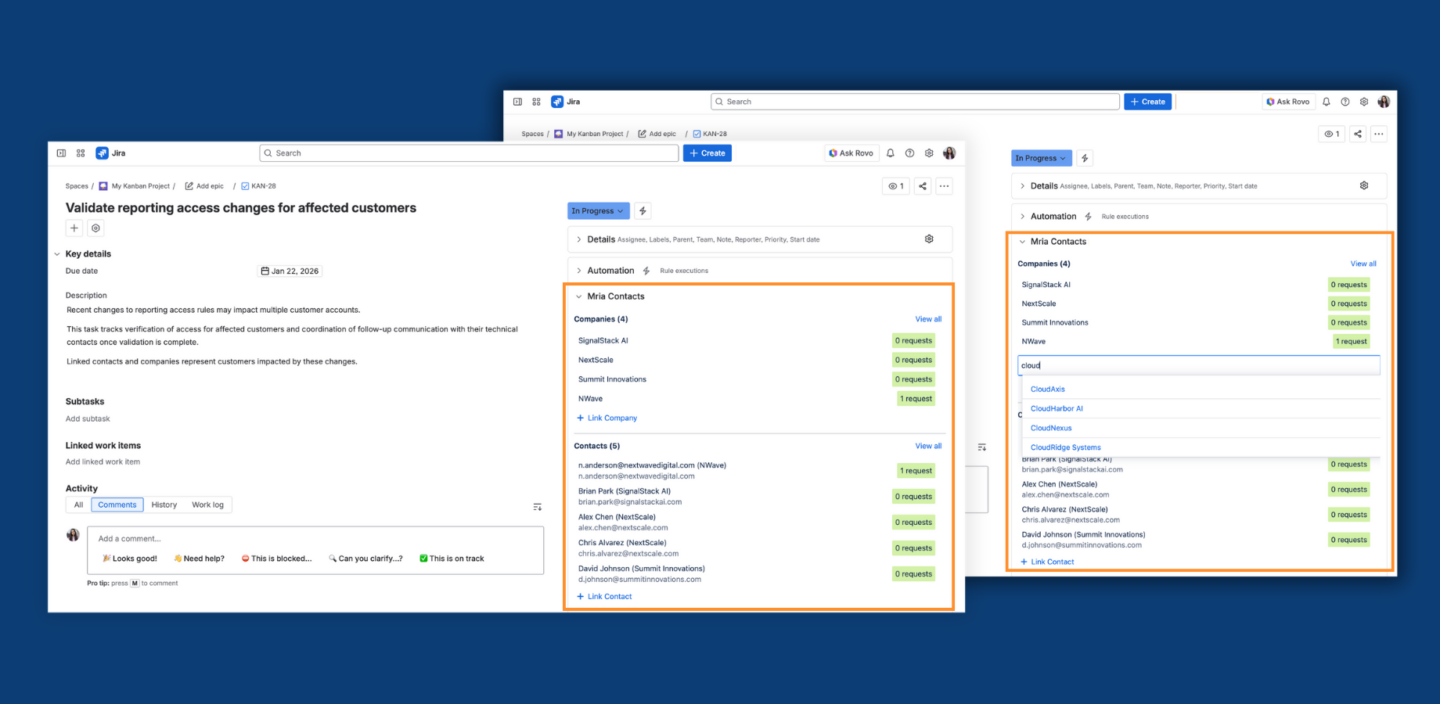
By linking contacts and companies directly to issues, customer context remains explicit and consistent.
A Shared View of Customer-Related Work in Jira
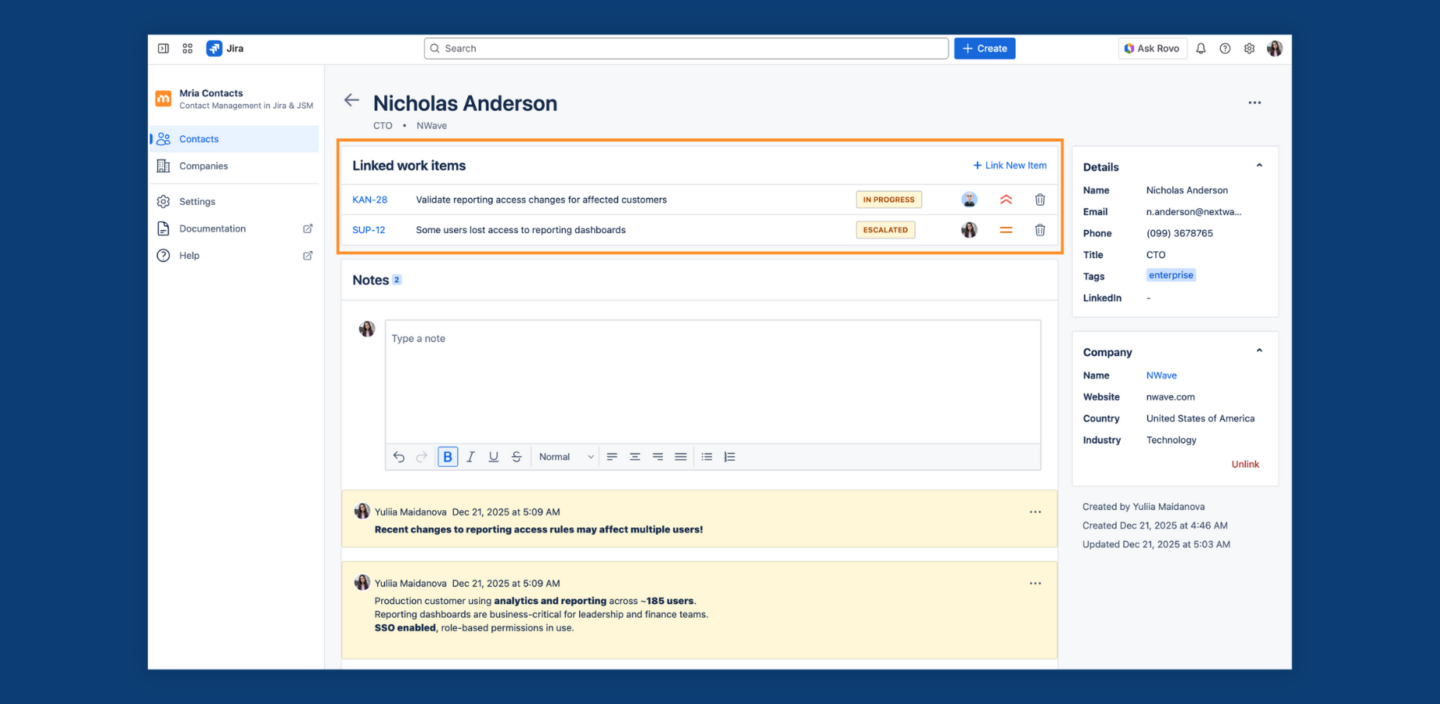
Links work in both directions. From a contact or company record, users can see all related issues and requests, including historical work. This provides a consolidated view of customer activity across teams and projects and removes the need to reconstruct context manually.
This makes it easy to:
- understand what is currently in progress for a customer
- review previous issues and requests before responding
- see patterns or repeated topics over time
- keep context when work moves between teams
- prioritize work and support based on customer context
Why This Changes Day-to-Day Work in Jira
With contacts and companies managed centrally and referenced consistently, teams spend less time clarifying who work relates to and more time making informed decisions.
Support teams respond with better context. Delivery teams understand who they are working for. Customer history accumulates naturally instead of being rebuilt repeatedly.
This is the practical outcome Mria Contacts was built to deliver.
Mria Contacts vs. Mria CRM: When to Use What
Mria Contacts and Mria CRM address different levels of customer management inside Jira. The distinction is not about team size or maturity. It is about scope.
Use Mria Contacts if you need:
- Structured contact and company management inside Jira or Jira Service Management
- A centralized directory of customers and organizations
- Reliable customer visibility for support, service, or delivery workflows
- Clean, governed customer data without sales processes
- A focused solution centered on people and organizations, not commercial execution
Typical scenarios include:
- Support teams working in Jira Service Management
- Internal service teams supporting external users or partners
- Delivery and implementation teams working with customer organizations
- Jira environments where sales is handled outside Jira
Use Mria CRM if you need:
- Everything provided by Mria Contacts, plus sales execution inside Jira
- Lead management and qualification
- Deal and pipeline tracking
- Sales activities and ownership
- Revenue visibility and long-term customer lifecycle management
- Products management linked to deals and leads
- Notifications and reminders for sales activities and deal progress
Typical scenarios include:
- Sales teams operating directly in Jira
- Account and customer success teams managing opportunities and renewals
- B2B organizations consolidating sales and delivery workflows in Jira
- Teams replacing or reducing dependency on external CRM systems
Mria Contacts vs. Mria CRM: Capability Comparison
| Capability | Mria Contacts | Mria CRM |
|---|
| Contact management | ✔️ | ✔️ |
| Company management | ✔️ | ✔️ |
| Contact–company relationships | ✔️ | ✔️ |
| Centralized contacts and companies directory | ✔️ | ✔️ |
| Search, filters, tags, and notes | ✔️ | ✔️ |
| Roles and permissions | ✔️ | ✔️ |
| Bulk import of contacts and companies | ✔️ | ✔️ |
| Linking contacts and companies to Jira issues | ✔️ | ✔️ |
| Linking contacts and companies to JSM requests | ✔️ | ✔️ |
| Bidirectional visibility of related Jira and JSM work | ✔️ | ✔️ |
| Smart contact and company suggestions in JSM | ✔️ | ✔️ |
| Confluence Integration | ✔️ | ✔️ |
| Lead management and qualification | ✖️ | ✔️ |
| Deal and pipeline management | ✖️ | ✔️ |
| Sales activities and ownership | ✖️ | ✔️ |
| Products management | ✖️ | ✔️ |
| Notifications and reminders | ✖️ | ✔️ |
| Revenue tracking and forecasting | ✖️ | ✔️ |
| Long-term customer lifecycle management | ✖️ | ✔️ |
One Product Line, Different Jobs to Be Done
Mria Contacts and Mria CRM are built on the same principles:
- Designed specifically for Jira and Jira Service Management
- Aligned with real Jira workflows, not generic CRM patterns
- Focused on clarity, structure, and long-term maintainability
However, they serve different jobs.
- Mria Contacts answers: Who is this person, which organization do they belong to, and where are we interacting with them in Jira?
- Mria CRM answers: What is our commercial relationship with this customer, and how do we manage it end-to-end inside Jira?
This separation allows teams to adopt exactly the level of functionality they need, without introducing unnecessary concepts into their Jira environment.
How to Get Started with Mria Contacts
Mria Contacts can be introduced into Jira gradually and without disrupting existing workflows. Teams can start with basic setup and expand usage as customer data and processes mature.
1. Install Mria Contacts
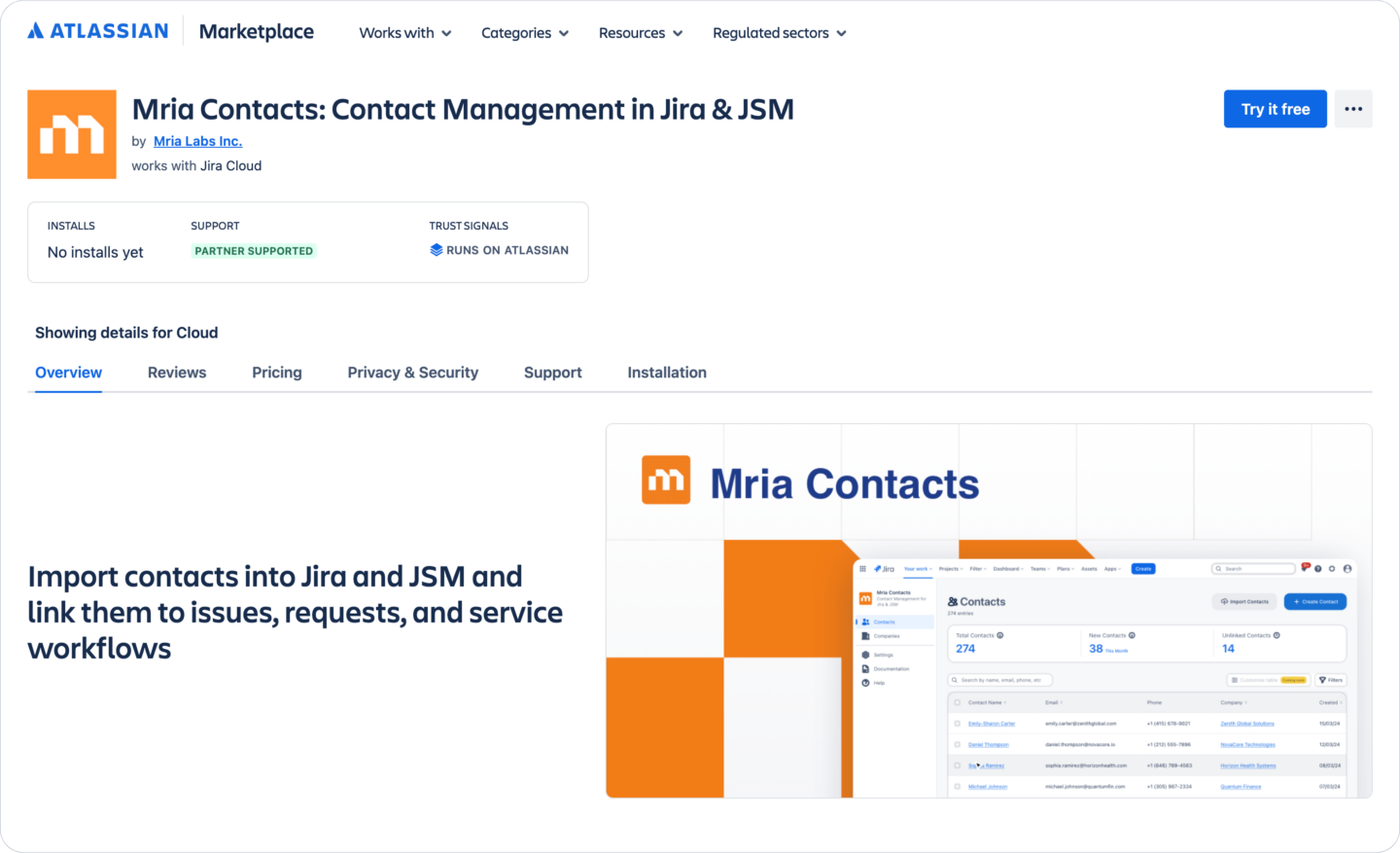
Start by installing Mria Contacts from the Atlassian Marketplace. After installation, Mria Contacts becomes available in JIRA under Apps -> Mria Contacts, and the Mria Contacts panel appears in Jira Service Management requests and Jira issues.
No complex configuration is required at this stage. The app is ready to use immediately after installation.
👉 Mria Contacts Installation Guide
2. Set roles and permissions
Before actively managing customer data, define who can view, create, and edit contacts and companies. Mria Contacts provides role-based permissions that allow teams to control access to customer records and internal information.
This ensures that customer data is governed appropriately from the beginning, especially in environments where multiple teams work in Jira.
👉 Mria Contacts Roles & Permissions
3. Import contacts and companies
If your team already has a centralized customer list, contacts and companies can be imported in bulk using structured fields. During import, contacts can be linked to their respective companies, allowing relationships to be established upfront.
If no centralized customer list exists, teams can skip imports and let the dataset grow naturally. Contacts and companies can be created directly from Jira Service Management requests.
Both approaches can be combined. Teams can start without imports and introduce bulk imports later if needed.
4. Use customer context in daily work
As Jira Service Management requests and Jira issues are opened, teams can link contacts and companies using the Mria Contacts panel.
In Jira Service Management, the panel automatically checks the requester’s email address and suggests existing contacts or companies when matches are found. Once linked, contact and company records is visible directly in the ticket.
In Jira issues, users can link one or multiple contacts and companies, depending on what the issue represents. This ensures that customer context is available wherever work happens in Jira.
5. Manage and keep customer data up to date
Contacts and companies can be reviewed and managed in their dedicated views. Records can be searched, filtered, segmented with tags, enriched with notes, and updated as customer information changes.
Bulk imports can be repeated on a regular basis to keep data up to date. When importing updated files, existing records are updated with changed information, and new contacts or companies are added if they did not exist before. For example, teams may choose to re-import updated data weekly to ensure customer information remains accurate.
Because Jira issues and Jira Service Management requests reference these records, customer history remains intact as data is updated over time.
For detailed setup and usage instructions, see the Mria Contacts documentation.
Mria Contacts: Contact Management in Jira & Jira Service Management is now available on the Atlassian Marketplace.
If your teams need structured contact and company management inside Jira without introducing CRM or sales workflows, Mria Contacts provides a focused and reliable foundation.
For teams that also need lead management, deal tracking, and sales execution inside Jira, Mria CRM extends this same foundation into a full CRM.
👉 Explore Mria Contacts: Contact Management in Jira & JSM on the Atlassian Marketplace
👉 Learn more about Mria CRM: CRM for Jira Teams