Mria CRM continues to evolve as a CRM for Jira teams that manage sales workflows directly inside Jira. The latest update introduces custom sales pipelines with multi-pipeline support, allowing organizations to model different sales processes without forcing them into a single, system-defined flow.
In real Jira-based sales environments, Deals rarely follow one universal path. Enterprise and SMB Deals progress differently, renewals have different decision points than new business, and product-specific sales often require their own stages and approvals. With this release, Mria CRM makes pipeline structure flexible enough to reflect those realities while keeping sales execution and reporting inside Jira.

Custom Sales Pipelines for Jira-Based Sales Teams
With this update, sales pipelines in Mria CRM are no longer fixed system behavior. They become configurable structures that teams can adapt as their sales process evolves.
Instead of adjusting internal workflows to match predefined stages, teams can now define pipelines that match how they actually sell. This improves clarity for sales teams, consistency in Deal data, and accuracy in reporting.
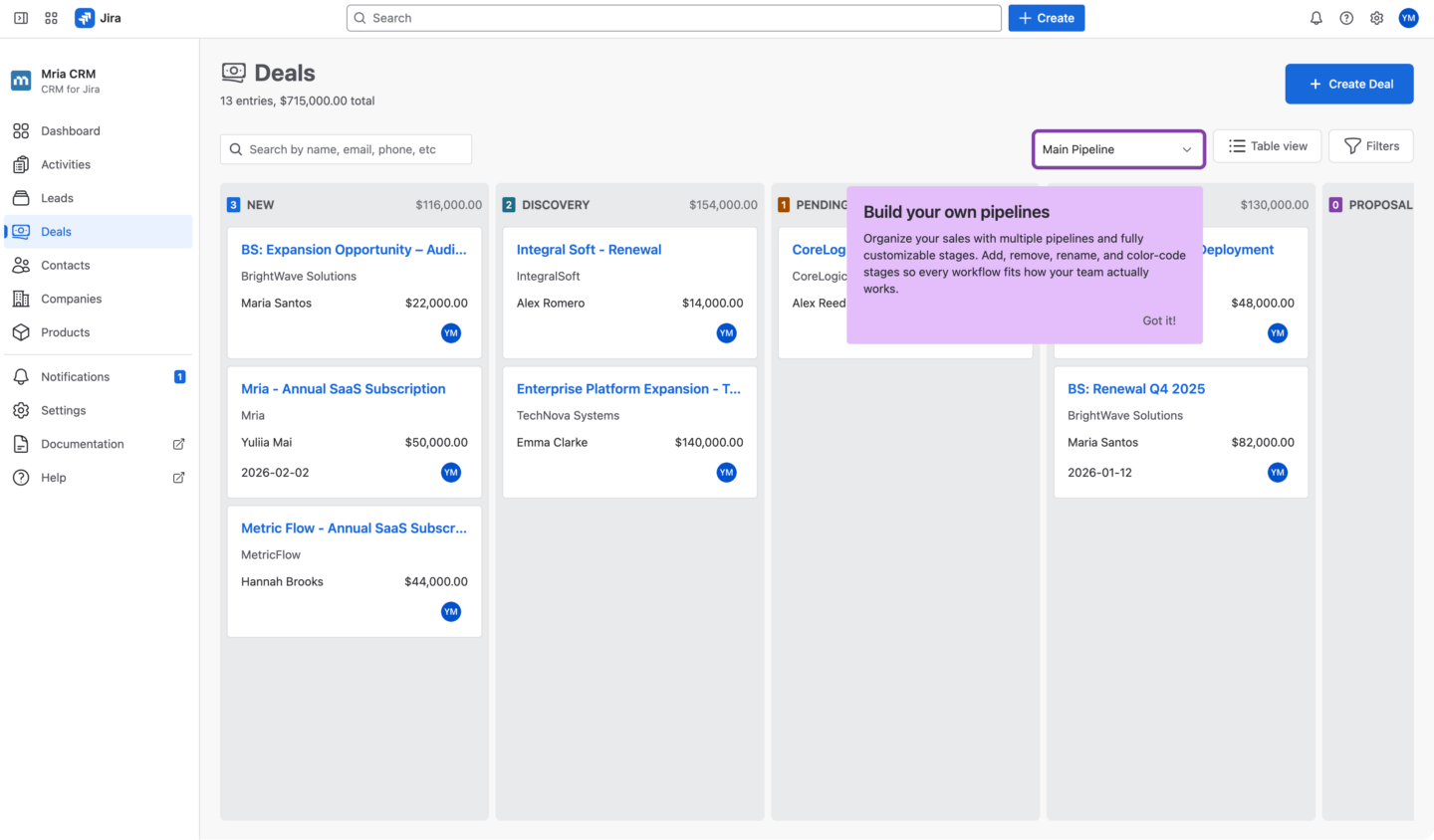
From a System-Defined Pipeline to Configurable Sales Pipelines in Jira
Previously, Mria CRM included a single main pipeline with stages predefined by the system. This approach ensured consistency and simplicity, especially for teams just getting started.
However, as sales operations mature, a single pipeline often becomes a constraint. Teams compensate by overloading stages, skipping steps, or using stages inconsistently across Deals. Over time, this reduces data quality and makes reporting less reliable.
With this release, pipelines become configurable sales models, allowing structure to adapt to the business rather than the opposite.
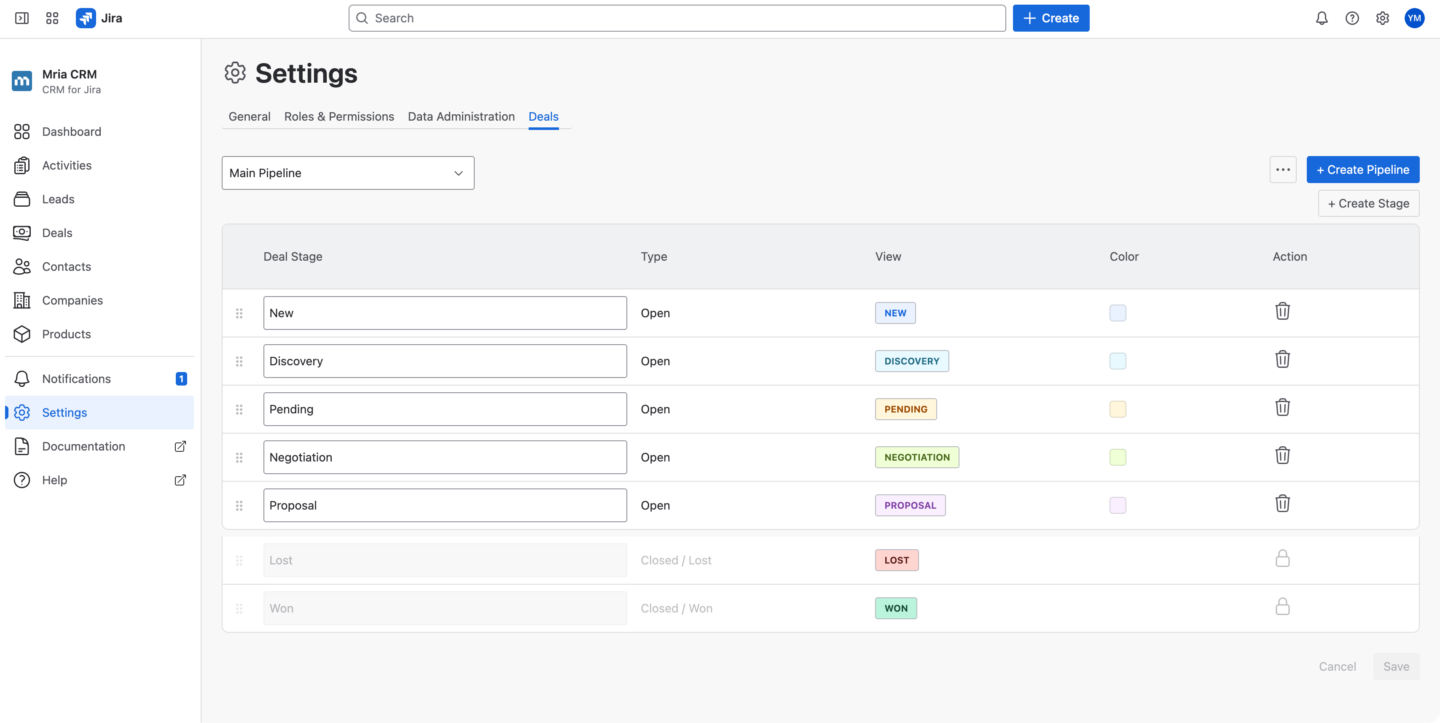
Sales Pipelines as a Core CRM Concept in Mria CRM
In Mria CRM, pipelines now function as a core CRM concept that defines how Deals progress through a sales process.
Each pipeline represents a specific sales motion. Its structure directly influences how Deals are qualified, how progress is tracked, and how outcomes are analyzed. Treating pipelines as configurable entities makes it possible to maintain clarity across different types of sales activity without fragmenting the CRM system.
What You Can Configure in Sales Pipelines in Mria CRM
Mria CRM provides full control over pipeline configuration, allowing teams to define sales processes precisely.
1. Custom Pipeline Stages
For each pipeline, teams can define their own stage names based on internal terminology and decision points. This removes ambiguity and ensures that stage changes reflect real progress in the sales process.
Clear, meaningful stage names reduce confusion and help sales teams apply stages consistently across Deals.
2. Stage Order and Visual Cues
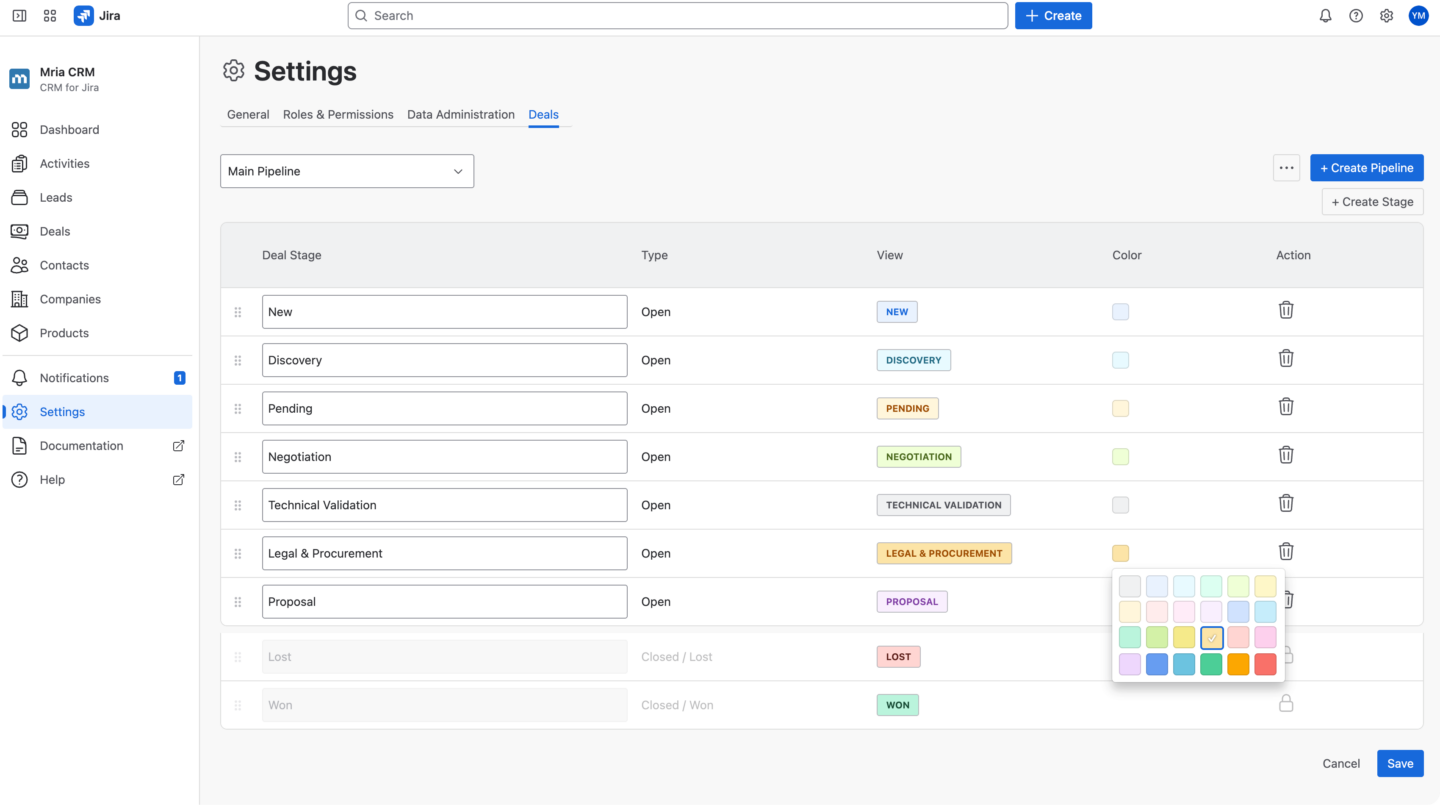
Stages can be reordered to reflect the correct progression of a Deal. Teams are no longer constrained by a predefined sequence and can align pipeline flow with their actual sales logic.
In addition, stages support color configuration. Visual indicators make pipeline views easier to scan and help teams quickly distinguish early, mid, and late stages, as well as identify risk or stalled Deals.
3. Multiple Pipelines for Different Sales Processes
Mria CRM now supports multiple sales pipelines, each with its own stages, colors, and structure.
This allows teams to run different sales motions in parallel, such as:
- separate pipelines for different products or services
- distinct pipelines for SMB and enterprise Deals
- dedicated pipelines for renewals, expansions, or upsells
- region-specific pipelines with unique approval steps
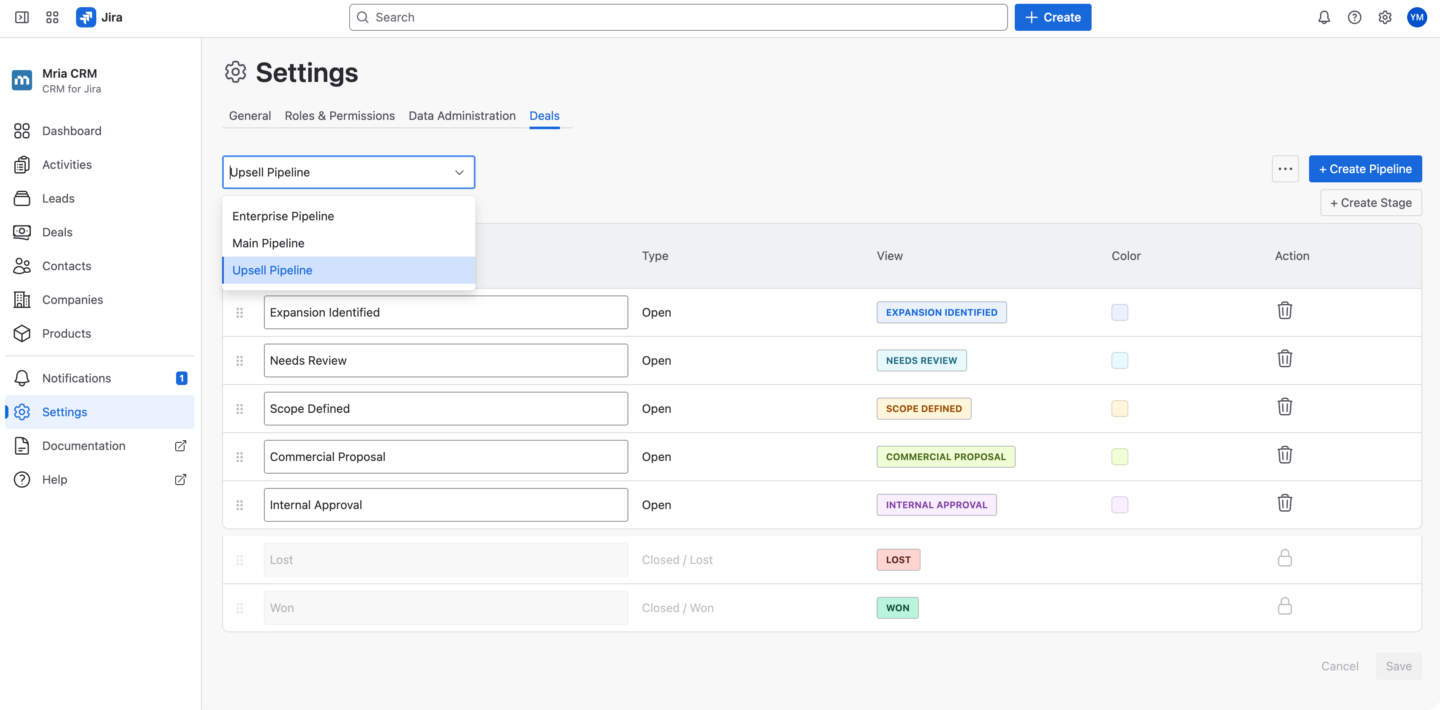
Each pipeline remains internally consistent, without forcing unrelated Deals into the same flow.
How to Configure Sales Pipelines in Mria CRM
Pipeline configuration is available directly in Mria CRM → Settings → Deals.
From this section, teams can:
- create new pipelines
- edit existing pipelines
- add or customize stages, order, and colors
Keeping pipeline management inside Mria CRM ensures that sales process changes do not require external tools, data migration, or workflow rebuilds.
How Custom Sales Pipelines Improve Deal Management in Jira
When pipelines reflect the real sales process, Deal management becomes more intentional.
Sales teams understand what each stage represents, when a Deal is ready to move forward, and what actions are expected at each step. This reduces inconsistent stage usage and improves overall data quality inside Jira.
Clear pipelines also make onboarding easier for new team members, as the sales process is visible and structured rather than implied.
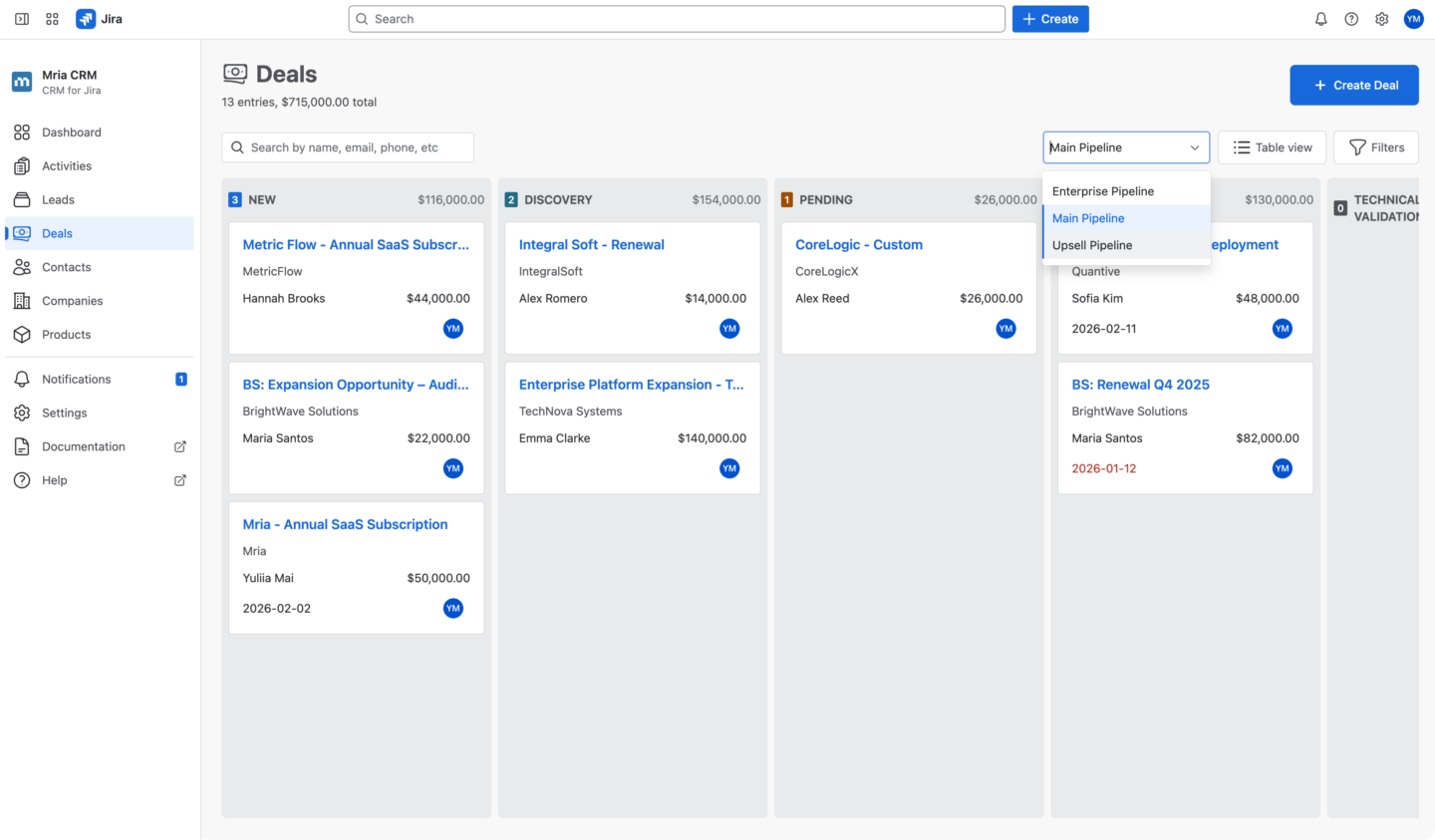
Impact of Multiple Pipelines on Sales Reporting and Dashboards
Pipeline structure directly affects reporting accuracy. With multiple pipelines, metrics and dashboards reflect the correct sales motion instead of aggregating incompatible Deal types. Pipeline funnels show meaningful stage distributions, and performance metrics remain comparable within the same logical flow.
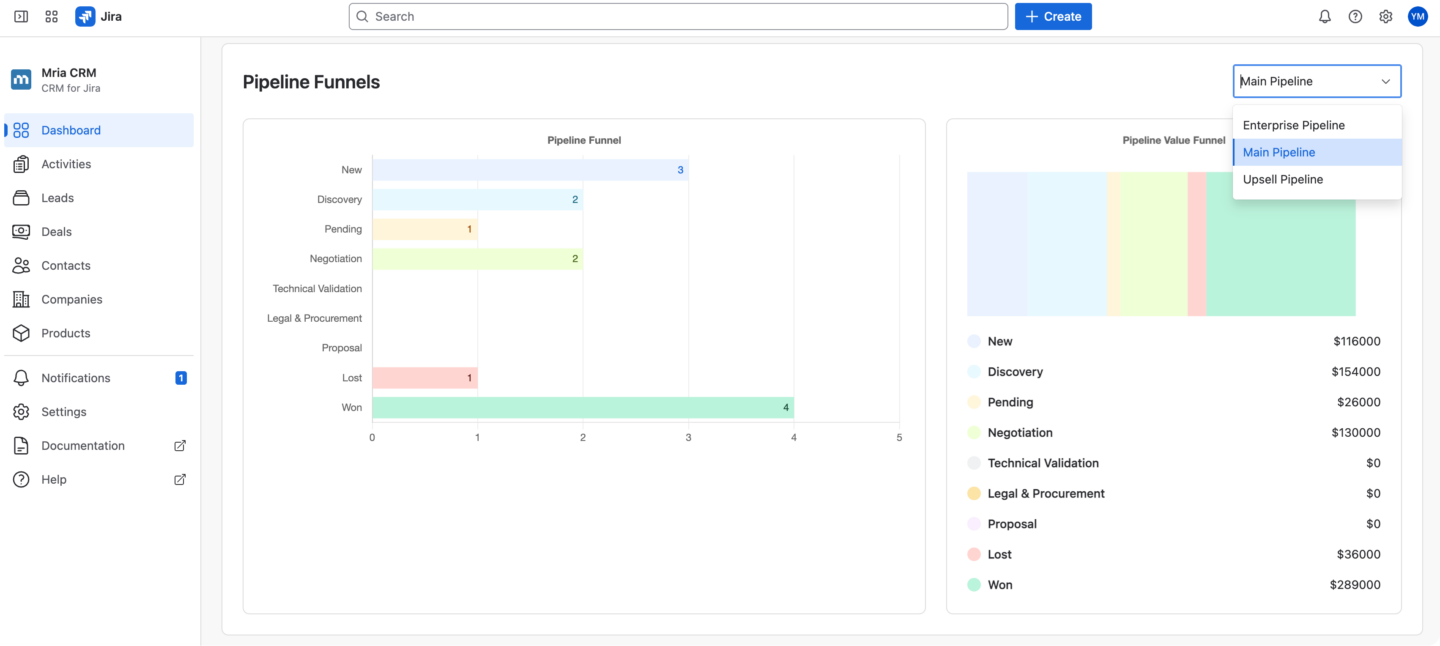
This is especially important when using the Sales Dashboard in Mria CRM, where pipeline selection ensures that pipeline health, revenue distribution, and conversion performance are evaluated in the right context.
Custom Sales Pipelines as a Foundation for Advanced CRM Reporting
This update also lays the groundwork for deeper reporting and analysis in Mria CRM.
When pipelines are clearly defined:
- conversion rates become more meaningful
- stage-level analysis becomes reliable
- trends can be evaluated per sales motion
Custom pipelines provide the structural integrity required for advanced reporting, rather than forcing teams to compensate later with manual segmentation or external tools.
How Mria CRM Adapts to Real Sales Processes in Jira
Sales processes evolve over time. Products change, markets shift, and customer expectations grow.
By supporting configurable pipelines and multiple sales flows, Mria CRM allows teams to adapt their CRM structure without changing tools or breaking data continuity. Sales execution, pipeline structure, and reporting remain aligned inside Jira as the business grows.
This reinforces Mria CRM’s approach to CRM for Jira: keeping sales work, structure, and visibility in one system, fully integrated with Jira.
Custom Sales Pipelines Are Available Now in Mria CRM
Custom sales pipelines with support for multiple pipelines are available now as part of Mria CRM.
Custom sales pipelines are configured under Mria CRM → Settings → Deals and are applied across Deals and reporting views, including the Sales Dashboard.
By introducing configurable sales pipelines and multi-pipeline support, Mria CRM removes a fundamental limitation of running sales inside Jira.
Sales teams no longer adapt their process to the tool. The tool adapts to the process.
This creates the structural foundation required for disciplined sales execution today and reliable reporting as Mria CRM continues to evolve.
New to Mria CRM?
Start a free trial and explore the latest version directly in your Jira environment:
👉 Try Mria CRM on the Atlassian Marketplace