Mria CRM continues to expand how Jira teams work with customers directly inside Atlassian tools. The latest release introduces Customer Context for Jira Service Management, a major step forward for support and service teams that need accurate customer information at the moment a request arrives.
This update strengthens Mria CRM’s role as a native CRM for Jira, extending customer visibility and CRM workflows into Jira Service Management without introducing new tools, sync delays, or disconnected systems.
Customer Context for Jira Service Management Tickets
Support requests often arrive with limited information. Agents see a subject, a description, and an email address, but still need to determine who the customer is, whether the company already exists, and how urgent the request might be from a business perspective.
With Customer Context for JSM Tickets, Mria CRM brings this understanding directly into the JSM workflow.
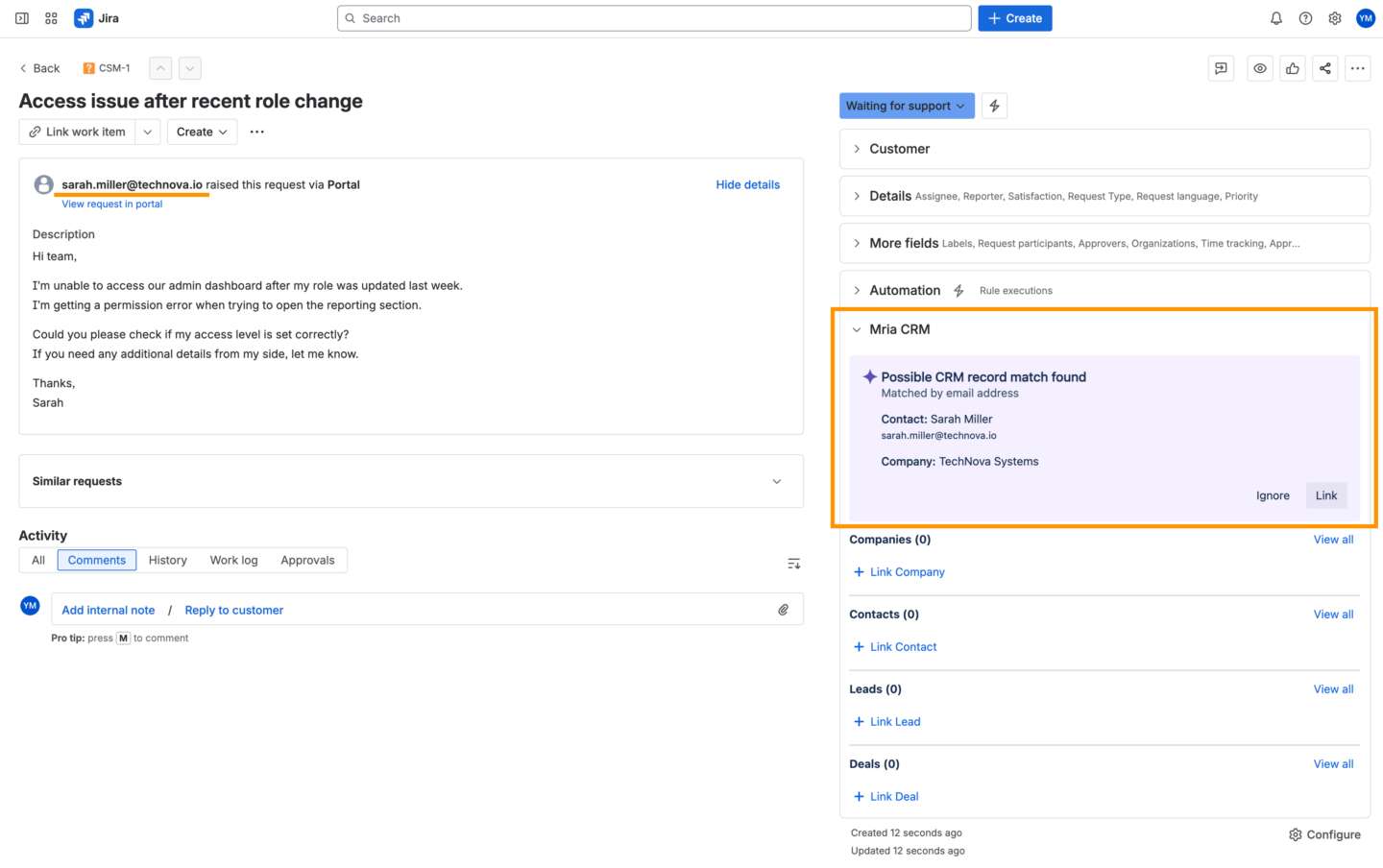
When a Jira Service Management ticket is opened, Mria CRM automatically checks the email address and company domain from the request against existing CRM data. Based on this check, the Mria CRM panel presents possible customer matches inside the ticket.
Step-by-Step: How Mria CRM and JSM Integration Works
In real support workflows, customer understanding happens gradually. Information becomes clearer as the ticket is reviewed, matches are identified, and decisions are made about how the request should be handled. Customer Context for JSM Tickets supports this process by revealing relevant customer data at each stage of ticket handling, allowing support agents to move from initial identification to informed action without leaving Jira.
1. Possible CRM matches are suggested
When a Jira Service Management ticket is opened, Mria CRM analyzes the email address and company domain from the request and checks them against your CRM data.
Based on what already exists in the CRM, the system surfaces the most relevant customer context in the Mria CRM panel. This can happen in several concrete ways:
- Email match to a Contact
The system recognizes the person as an existing Contact. If this Contact belongs to a Company, the Company is shown as well.
If there are active or past Leads or Deals associated with this Contact, this context is also visible to support once suggestions confirmed and laccepted.
- Domain match to an existing Company
If the person does not yet exist in the CRM, but the email domain matches a Company already in your CRM, the system surfaces that Company.
This allows support to immediately understand which account the request belongs to.
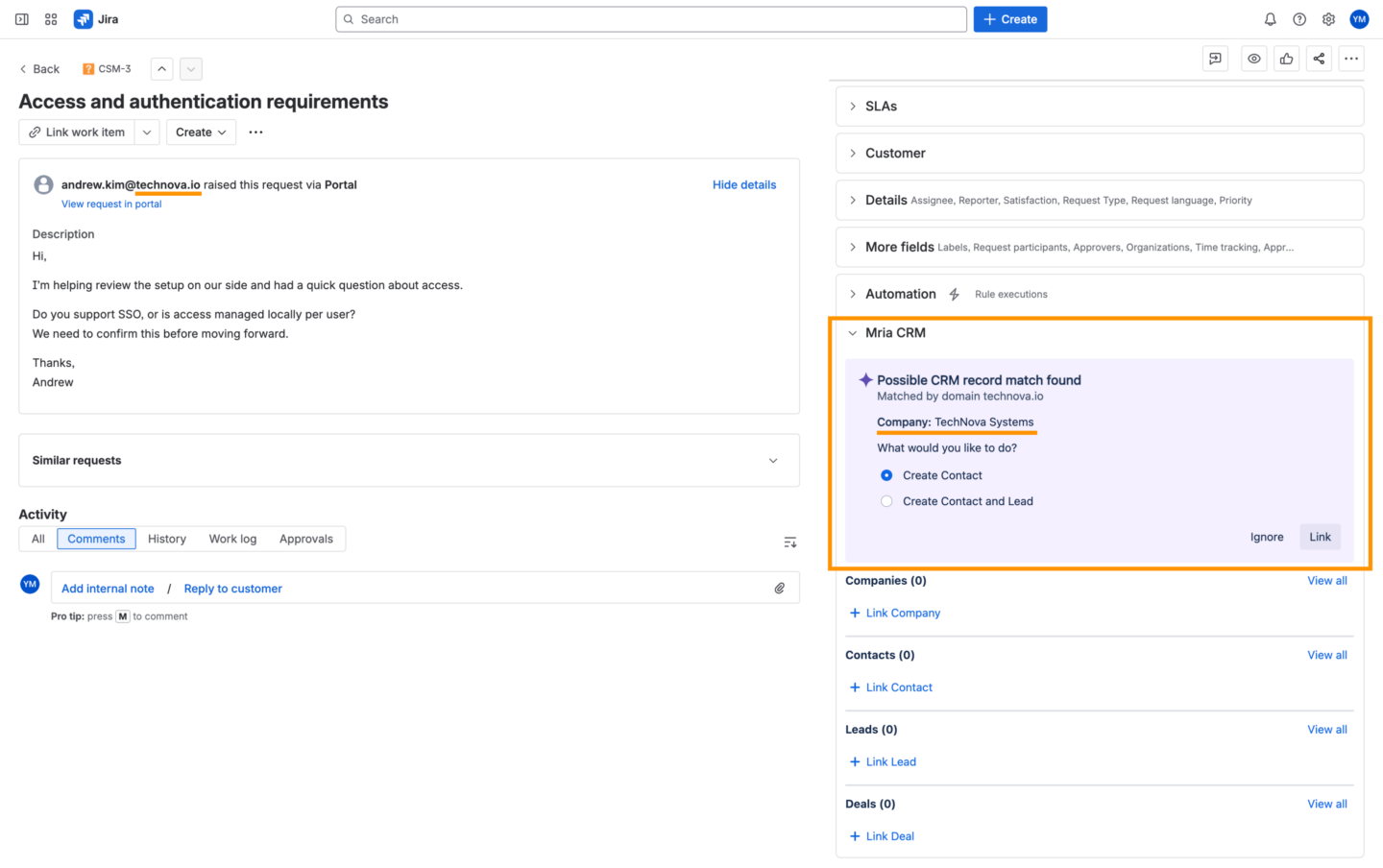
In all of these cases, support gets early visibility into whether JSM request is coming from:
- an active customer account,
- a known company with ongoing or past Deals,
- an inbound sales Lead, or
- a previously inactive or lost relationship.
This context helps support assess urgency and business impact before responding, for example, recognizing that a request is connected to a high-value Deal currently in progress.
2. Support confirms or ignores the suggestion
After reviewing the suggested customer context, the support agent decides whether to link it to the ticket or ignore the match.
If the agent chooses to link the suggested Contact and Company, the ticket becomes associated with those records. The related customer information is then available directly in the Mria CRM panel and stays connected to the ticket going forward.
If the agent chooses to ignore the suggestion, no customer records are linked. The agent can still see that the customer exists in the CRM, but the ticket remains unassociated and can be handled without applying CRM context.
This choice is deliberate and lightweight. Support stays in control and links customer records only when it is useful for the current request, regardless of the customer’s status.
Once a record is linked, the agent works with a clear customer context directly in the ticket, without additional searches or coordination.
3. Key customer details are visible directly in the JSM ticket
Once the customer context is confirmed, the Mria CRM panel switches from suggestions to customer details.
At this point, support can immediately see the information that matters for handling the request, without opening any additional screens. This typically includes:
- whether the customer or company is active, inactive, or previously lost
- whether the request is connected to a Lead or an ongoing or won Deal
- whether there is a business impact that makes the request more urgent, such as a deal in progress or a high-value account
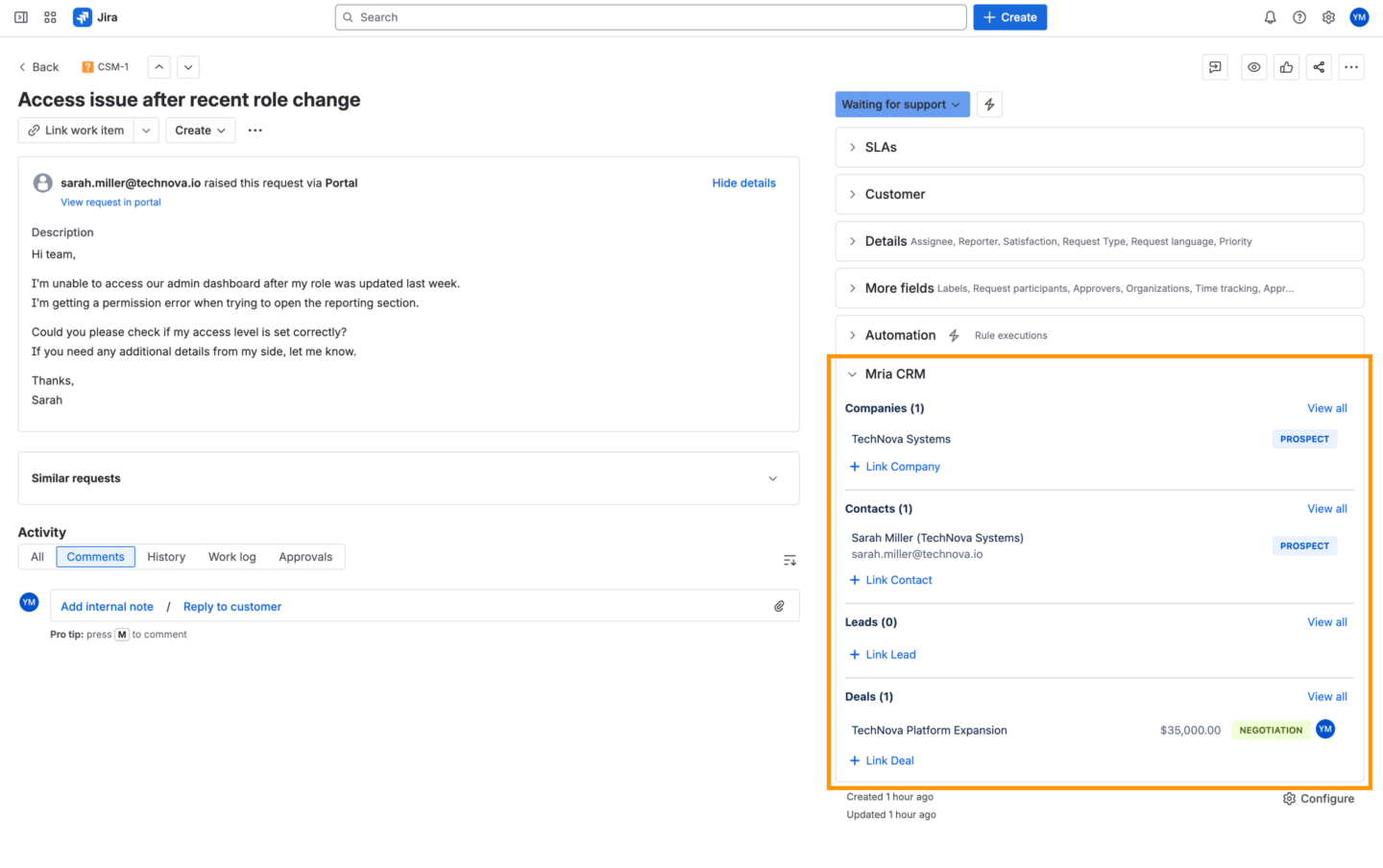
In many cases, this high-level context is enough for support to make the right decision: how quickly to respond, whether to escalate, and whether to involve sales or account teams.
When more detail is required, support can open the full CRM record directly from the ticket. This allows agents to see additional context such as:
- which product or service the customer is associated with
- who owns the Lead or Deal on the sales side, making it clear who to contact internally for clarification or coordination
This makes it easy for support to collaborate with sales or account teams using shared, up-to-date customer information, without guessing or searching across tools.
4. Support activity becomes visible to sales and account teams
Once customer context is applied to the ticket, the support request also becomes visible inside Mria CRM under the relevant Contact, Company, Deal or Lead.
From the CRM side, sales and account teams can now see:
- that a support request exists
- what the customer is asking about
- and how the ticket is progressing
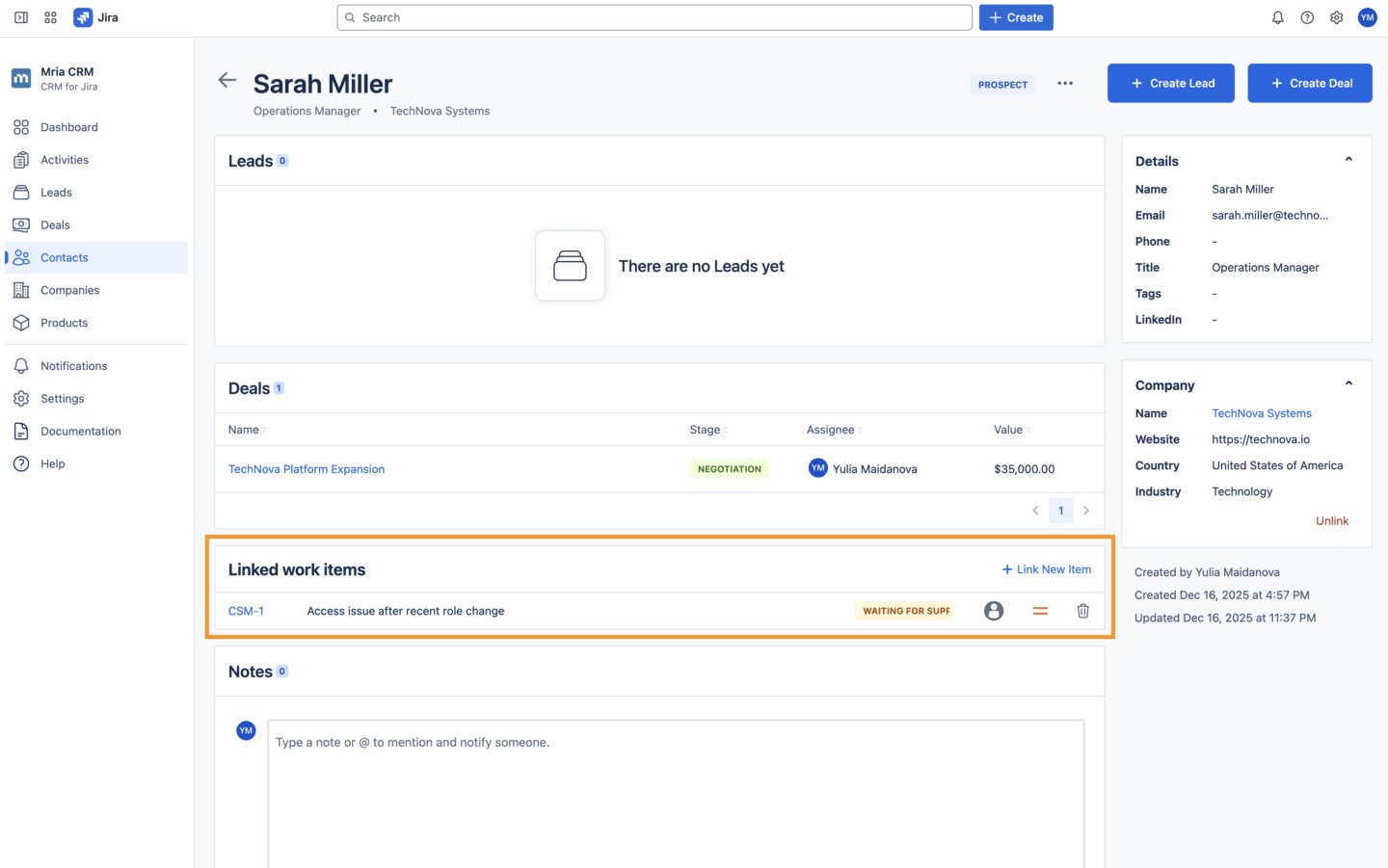
This creates shared visibility without additional coordination. Sales does not need to ask support for updates, and support does not need to manually inform sales about customer issues.
Support activity becomes part of the customer timeline alongside Leads, Deals, and previous interactions. This is especially valuable when:
- a customer has an active Deal in progress
- an issue may impact renewal or expansion
- sales needs awareness of ongoing support conversations
By connecting JSM tickets to CRM records, Mria CRM ensures that support and sales work from the same customer context, even though they operate in different workflows.
When No Match Is Found
Not every Jira Service Management request comes from an existing customer or known account.
If Mria CRM does not find a matching Contact, Lead, or Company based on the email address or domain, the Mria CRM panel provides clear next actions directly in the ticket.
Support can immediately:
- create a new Contact,
- create a new Contact and a Lead when the request appears to be sales-related,
- add a new Contact to an existing Company when the company is already known, but the person is new.
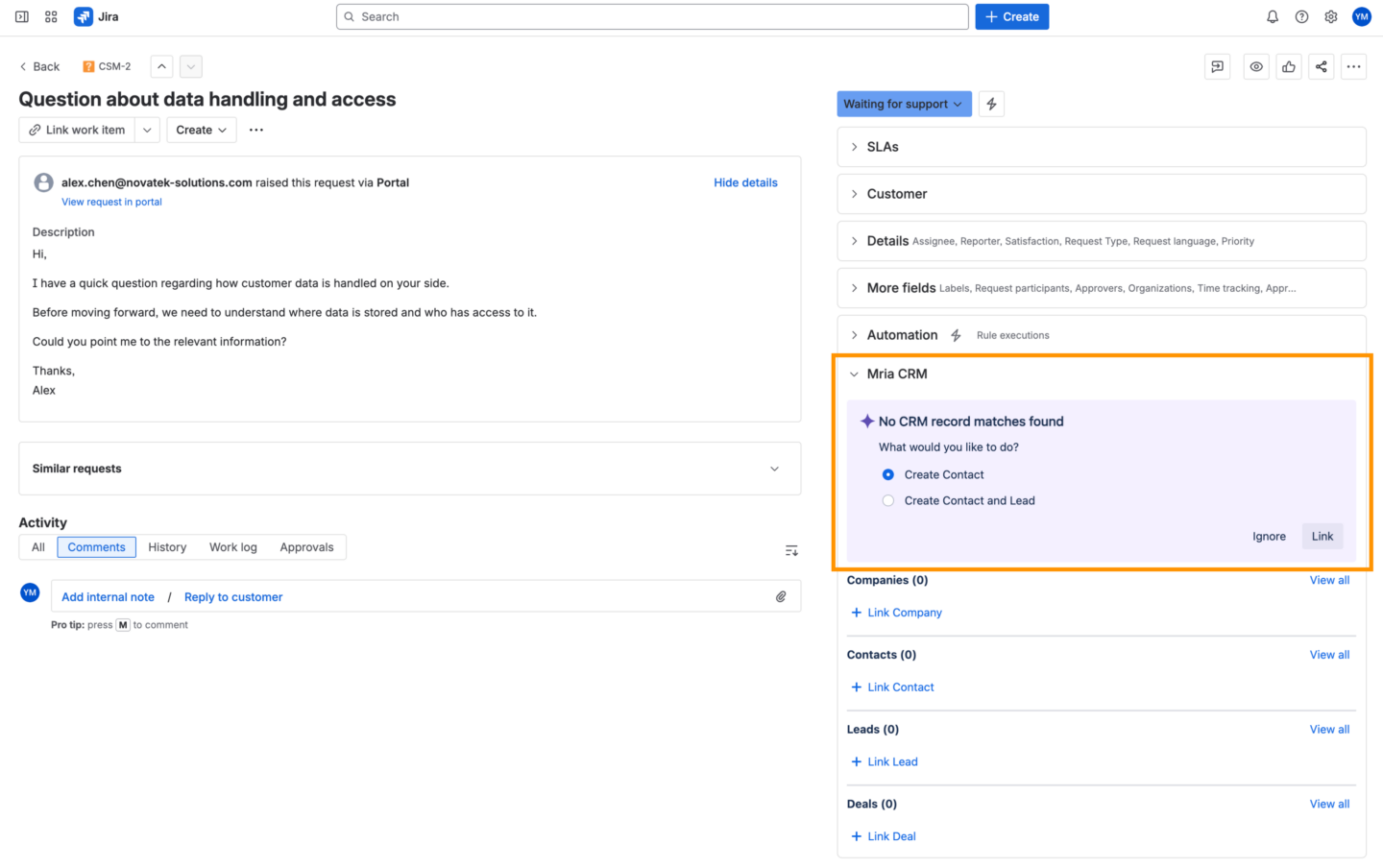
This allows teams to capture new customer information at the moment it enters the system, without waiting for handoffs or follow-up tasks.
This scenario is especially useful when:
- a support request turns out to be a sales-related inquiry,
- a new prospect contacts the team through a service channel,
- a person from an existing company submits a request, but does not yet exist as a Contact in the CRM,
- an existing customer contacts support using a new email address or from a different role.
Built on Mria CRM’s Jira Integration
Customer Context for JSM Tickets builds on Mria CRM’s existing Jira integration capabilities:
- a dedicated CRM panel inside Jira
- linking Companies, Contacts, Leads, and Deals to work items
- clear customer status indicators
- one-click navigation to full CRM records
- consistent, bidirectional sync between Jira and CRM
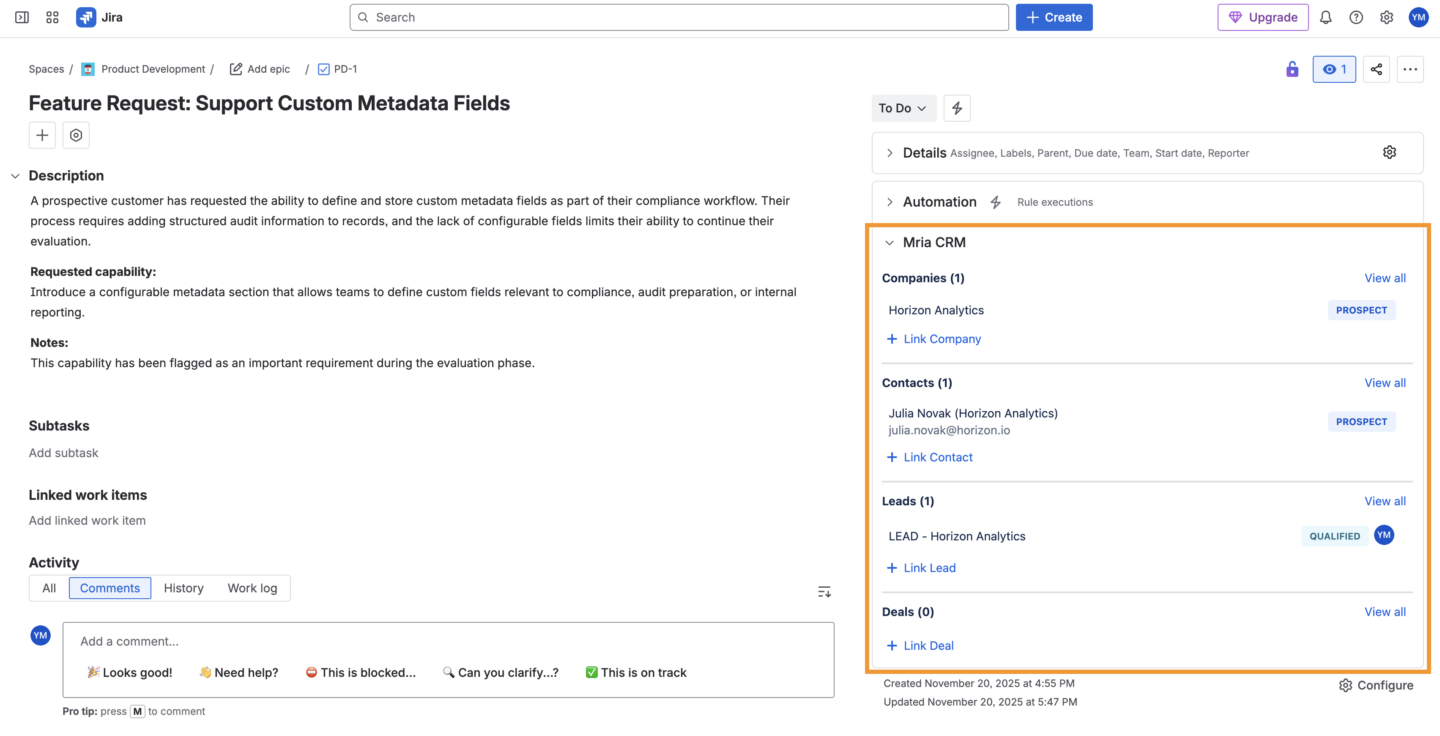
The JSM-specific experience extends this foundation by adding early customer identification and guided CRM actions directly into the service workflow.
Why This Matters for Support and Sales Teams
Customer Context for JSM Tickets changes how service requests are handled across teams.
Support teams benefit from:
- immediate understanding of who they’re helping,
- clearer prioritization based on customer status or deal activity,
- less internal back-and-forth to identify accounts.
Sales and account teams benefit from:
- real-time visibility into support conversations,
- shared awareness of customer issues during active deals,
- a complete customer timeline that includes service interactions.
JSM tickets stop being isolated tasks and become part of an ongoing customer relationship.
Mria CRM for Jira Service Management
For many organizations, Jira Service Management is where customer conversations begin, but customer decisions are made elsewhere. Support teams work in JSM, sales teams work in a CRM, and leadership relies on fragmented reports to understand what is really happening with customers.
Mria CRM addresses this gap by making Jira Service Management part of a single, connected customer system.
With Mria CRM, customer data is no longer isolated in a separate tool that support teams cannot easily access or update. Contacts, Companies, Leads, Deals, and service requests are connected inside Jira, allowing organizations to manage customer relationships and customer work in one place.
At an operational level, this leads to the following outcomes:
- Better prioritization of support work
Requests from active customers, high-value accounts, or deals in progress are immediately visible, allowing teams to respond based on business impact, not just ticket order. - Reduced risk during sales and renewals
Sales and account teams see support activity as it happens. Issues that could block a deal, delay onboarding, or affect renewal are no longer hidden inside the service desk. - Faster alignment between teams
Support, sales, and account management work from the same customer context. There is less manual coordination, fewer internal questions, and fewer missed signals. - Cleaner customer data without extra overhead
Customer records are created and updated as part of normal support workflows, reducing duplicates, gaps, and outdated information without introducing new operational burden. - Lower tool complexity and operational cost
By keeping CRM functionality inside Jira, organizations reduce reliance on external CRMs, custom integrations, and synchronization layers that are expensive to maintain and difficult to scale.
Customer Context for JSM Tickets strengthens this value by ensuring customer identification happens at the earliest point in the service workflow. Support teams no longer operate without context, and leadership gains visibility into how service interactions affect revenue, retention, and customer health.
Mria CRM enables Jira Service Management to function not just as a support tool, but as a core part of the customer lifecycle — where service, sales, and account teams stay aligned around the same data, the same priorities, and the same outcomes.
What’s Next for Mria CRM
Customer Context for Jira Service Management is part of a broader roadmap focused on making Mria CRM a complete, Jira-native system for managing customer relationships across sales, support, and delivery.
Upcoming areas of development include:
Gmail integration
Email communication directly connected to CRM records, so customer conversations are visible alongside Leads, Deals, and service requests.
Dashboards
Centralized visibility into pipeline, activity, and customer health, giving teams and leaders a clear operational view.
Multiple pipelines
Support for different sales motions and business models within the same CRM, allowing teams to manage separate pipelines for products, regions, or customer segments.
These additions continue the same direction: reducing fragmentation, improving visibility, and keeping customer-related work inside Jira.
Get Started with Mria CRM
Mria CRM is built for Jira teams that want to manage customer relationships without leaving Atlassian’s ecosystem.
Whether you work in sales, support, customer success, or delivery, Mria CRM helps you keep customer data, service requests, and project work connected in one system.
To get started:
- Try Mria CRM for free by installing it from the Atlassian Marketplace
- Book a demo to see how Mria CRM fits your Jira and JSM workflows
- Explore the documentation to learn how to configure CRM objects, Jira integration, and JSM features
Customer Context for JSM Tickets is available as part of Mria CRM and works alongside Leads, Deals, Contacts, Companies, Products, and Activities – all natively inside Jira.