Mria CRM has introduced a series of updates across recent releases that expand how teams operate their CRM inside Jira once the core data is already in place. These updates introduce reporting capabilities, full CSV export across core entities, deeper Jira integration, workflow improvements, and the first version of the Rovo AI assistant.
As teams begin using CRM in Jira on a daily basis, the focus shifts to understanding pipeline performance, working with larger datasets, and connecting customer records directly to delivery workflows. This release cycle supports that shift by adding tools for analysis, flexible data handling, and more direct interaction with the system.
Together, these changes define how CRM work continues in Jira, turning stored data into something teams can actively manage, analyze, and use across projects and workflows.
Mria CRM Reports Module: Built-in CRM Analytics for Jira Teams
The introduction of Reports in Mria CRM adds a structured analytical layer directly on top of CRM data, allowing teams to work with pipeline and performance metrics inside Jira without additional setup.
The initial set of sales reports in Mria CRM is built around the most common sales scenarios:
- Sales Performance by Assignee — to evaluate individual contribution and compare team results
- Sales by Period — to track outcomes over time based on closing dates
- Open Deals by Period — to review active pipeline and recently created opportunities
- Lost Deals by Period — to analyze lost deals and identify recurring patterns
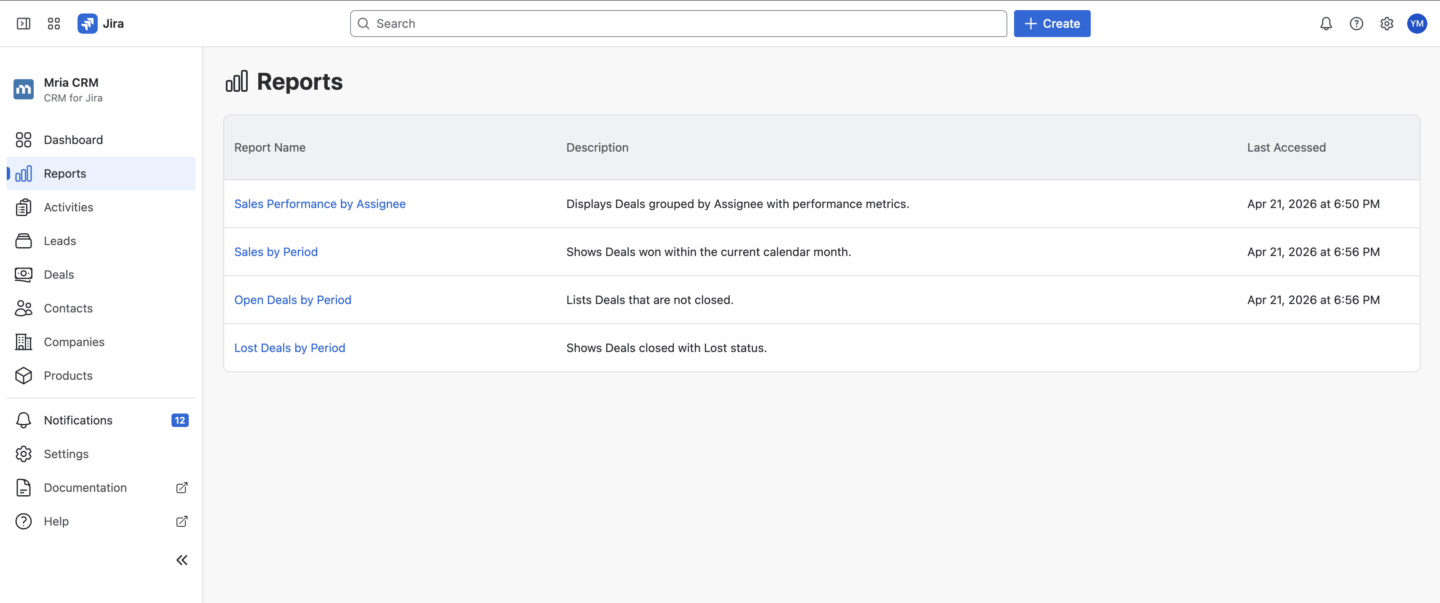
These reports provide consistent, predefined views of CRM data. Instead of working through lists of records, Jira teams can analyze distribution, trends, and outcomes across the pipeline in a structured format.
Data can be filtered by time range, pipeline, and assignee, and exported to CSV when deeper analysis is required. This keeps reporting workflows inside Jira while still allowing flexibility when needed.
This release establishes the foundation for reporting in Mria CRM, with further expansion planned across report types, metrics, and customization.
Learn more about Reports in the Mria CRM documentation.
Mria CRM CSV Export: Use Your CRM Data Beyond Jira
Recent updates in Mria CRM introduce CSV export across all core Mria CRM entities, including Leads, Deals, Contacts, Companies, and Products.
This expands how CRM data can be used once it is already structured in the system. Instead of being limited to a single interface, teams can extract data at any point and use it in other contexts, such as reporting, internal sharing, or further analysis.
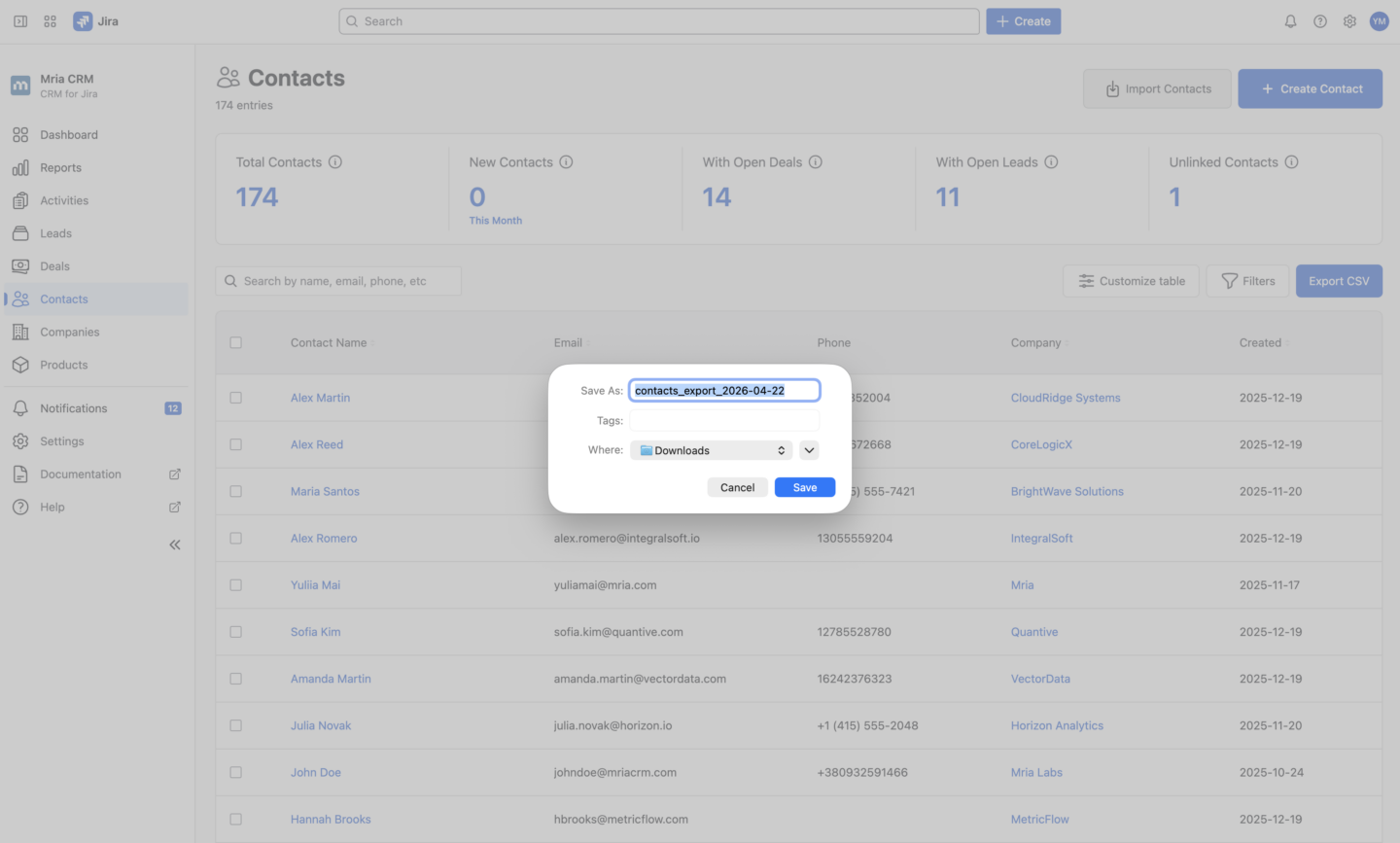
Export is available directly from entity table views, making it possible to retrieve CRM data without additional configuration or intermediate steps. Whether working with a filtered list of Deals and Leads, a set of Contacts and Companies, or Product data, the export reflects the current dataset and can be exported and reused immediately.
This capability becomes especially relevant as CRM data volume grows. Jira teams can move between working inside Jira and using external tools when needed, without duplicating effort or rebuilding datasets.
CSV export in Mria CRM is now consistently available across all major entities, providing a reliable way to access and reuse CRM data outside the system.
Mria CRM Jira Integration: Linking Jira Projects and Boards to CRM Records
Recent updates in Mria CRM expand how CRM records connect to work inside Jira by introducing the ability to link Jira spaces (projects) and boards directly to Leads, Deals, Contacts, and Companies.
This establishes a clear relationship between customer data and the environments where work is planned and executed. Spaces (projects) and boards can now be associated with CRM records, providing structured access to the delivery context directly from the CRM side.
In addition, users can create Jira work items while linking them to CRM records. Instead of creating issues separately, tasks can be created and connected to any CRM record in a single step, making it easier to move from customer context to execution.
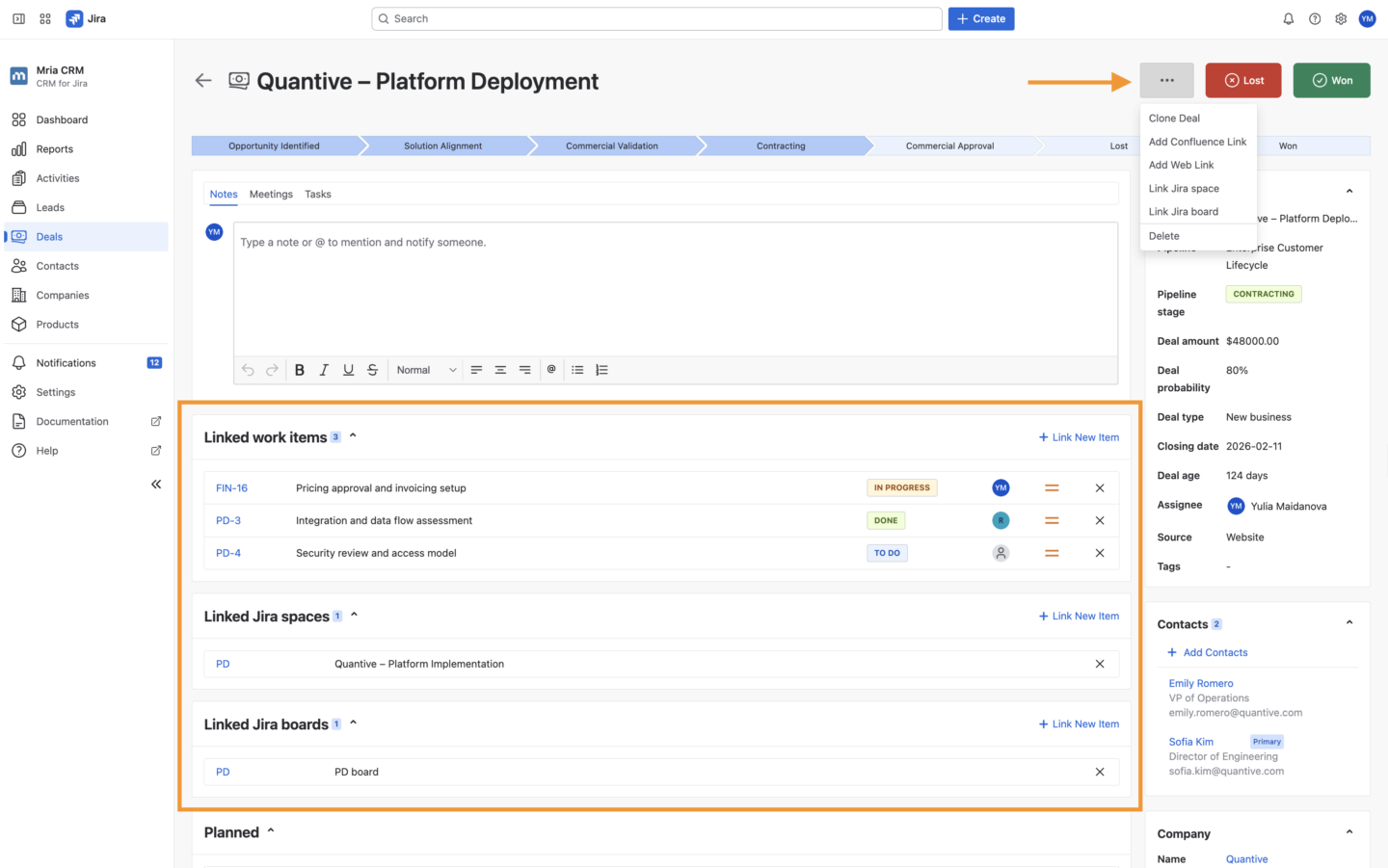
These changes define a more direct connection between CRM and Jira. Spaces and boards are linked to CRM records as execution environments, while issues represent specific units of work that can be created and tracked within that context.
As a result, CRM records are no longer isolated from delivery. They provide entry points into the actual work, with visibility into related spaces (projects), boards, and issues inside Jira.
Learn more about Jira integration in the Mria CRM documentation.
Mria CRM Rovo Agent: Introducing the Mria CRM Assistant in Jira
Rovo is Atlassian’s AI experience for search, chat, and agents across Jira, Confluence, and connected tools. In Jira, Rovo agents can help users perform actions through natural language instead of navigating manually through product screens.
Recent updates in Mria CRM introduce the Mria CRM Assistant in Rovo. This brings CRM-specific actions into the Rovo interface, allowing users to work with lead-related tasks directly from chat inside Jira.
The current version is focused on lead operations.
Available Capabilities
The current version of the Mria CRM Assistant in Mria CRM focuses on lead operations and supports the following actions:
- Create leads
From minimal input (name and email), with automatic assignment and default status applied - Create leads with additional details
Include company and status; valid values are applied, otherwise defaults are used with suggestions - Update existing leads
Modify key fields such as name, email, and status - Bulk lead creation from lists
Paste multiple entries in a structured format; records are created sequentially, with invalid entries skipped or flagged - Bulk lead creation from files
Upload a file with lead data; the system parses the content, creates records, and reports any errors or missing data
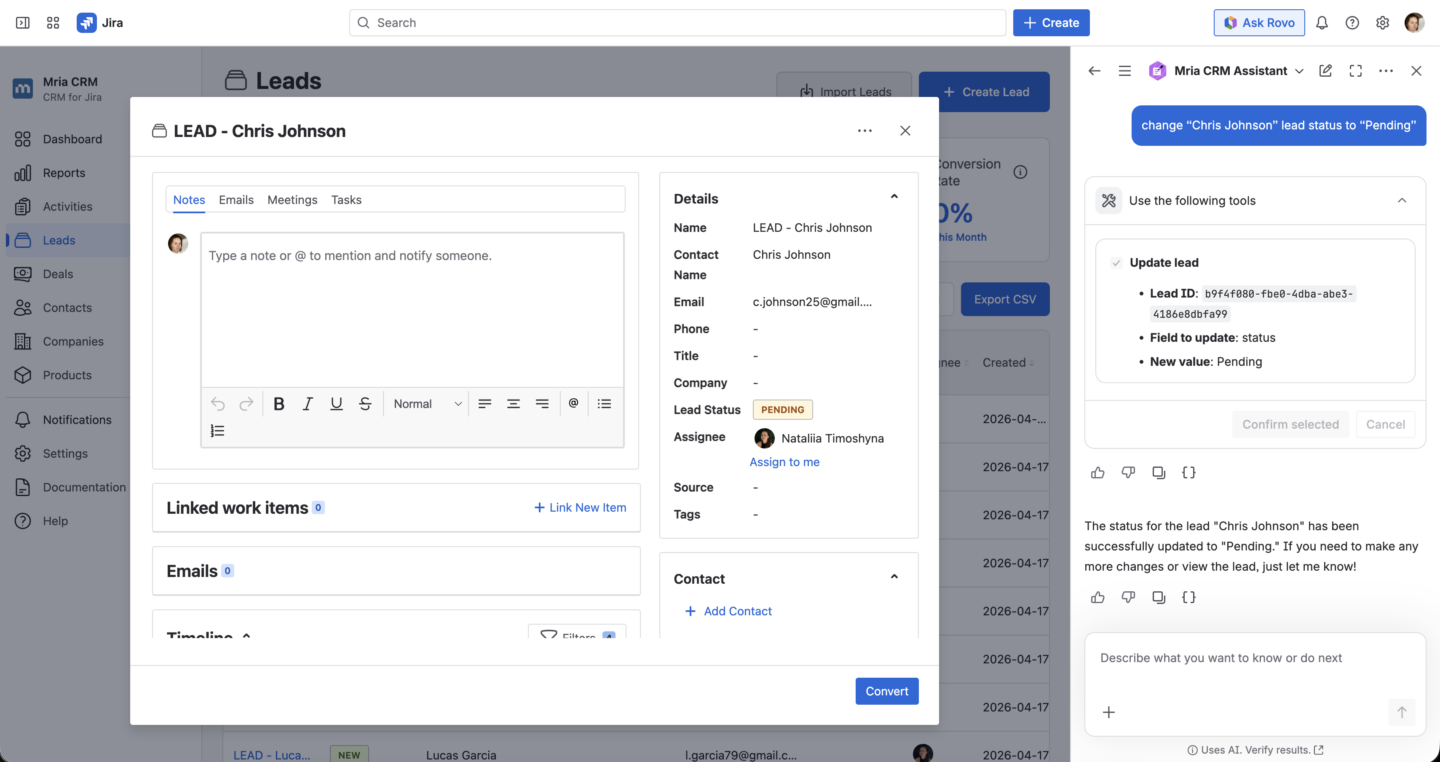
Rovo interprets natural language input, applies CRM logic (such as defaults and validation), and confirms the result after execution.
It is accessed via the “Ask Rovo” interface in Jira by selecting the Mria CRM Assistant, after which it remains active for continued use.
Commands are interpreted based on structure and clarity. Simple phrasing and consistent formatting improve accuracy, especially for bulk operations.
Rovo capabilities are continuously evolving, and additional CRM workflows will be introduced in future updates.
Learn more about Rovo in the Mria CRM documentation.
Mria CRM Workflows: Kanban-Based Lead Management and Improved Daily Operations
Recent updates in Mria CRM introduce a set of workflow changes that affect how teams work with CRM data on a daily basis.
A Kanban view is now available for Leads, allowing them to be managed by status and moved across stages directly. Instead of updating records through forms or tables, changes are applied through movement between columns. This makes it easier to track and update lead status as part of a continuous workflow.
In Deals, the Kanban view has been extended with additional controls and context. Deals can be sorted by created date, closing date, and amount, while probability is displayed directly on cards along with average probability per stage. This provides a clearer view of how deals are distributed and how likely they are to progress.
Products can now be filtered by key attributes, making it possible to refine lists based on specific criteria. This becomes increasingly important as the number of products grows, allowing teams to focus only on relevant subsets of data without rebuilding views.
Table views across Leads, Deals, Contacts, and Companies can now be customized to show only the fields relevant to a given workflow. This makes it easier to focus on key information when working with larger datasets.
These updates bring more structure and flexibility to everyday CRM work, especially when managing and reviewing larger volumes of data.
Mria CRM: What comes next
Across these releases, Mria CRM becomes less centered on record maintenance and more centered on continuous use. The system is no longer defined only by how customer data is stored, but by how that data can be analyzed, filtered, updated, connected to Jira work, and acted on through different interfaces depending on the task.
That changes the role of Mria CRM itself. It becomes a system teams return to not just to enter information, but to review it, work through it, and move decisions and execution forward from the same place.
The next stage of Mria CRM development focuses on extending these capabilities further. Reporting will expand with an additional set of reports, metrics and customization. Rovo support will grow beyond lead operations into broader CRM workflows. Integration points with communication tools, including upcoming Gmail support, will connect CRM data more directly to day-to-day interactions.
Get started with Mria CRM
Start a free trial — Install from the Atlassian Marketplace
Book a demo — Schedule a session with the team
Additional resources
Release notes — View all recent updates
Documentation — Explore product documentation
Support — Contact the support team
Roadmap — Explore upcoming features