Mria CRM has released one of its largest workflow updates to date, focused on reducing repetitive CRM work and giving teams more control over how sales records are structured inside Jira.
As CRM data grows, everyday work around it becomes more complex. The same change may need to be applied to hundreds of records, one Deal may involve several people and organizations, and recurring emails still need to stay personal.
This update introduces Bulk Update across all Mria CRM entities, reusable Email Templates, and more flexible ways to create Deals and manage the Contacts and Companies involved. It also expands the REST API and makes import errors easier to identify and resolve.
What’s new
- Bulk field editing for Leads, Deals, Contacts, Companies, and Products
- Deals with multiple Companies, with Contacts no longer tied to the linked Company
- Optional Contact and Company links when creating a Deal
- Email templates with CRM merge fields, private or shared
- Richer REST API data, with full records and created/updated timestamps
- Import errors that name the failing rows
Here is how the new functionality works and what it changes for teams using Mria CRM.
Bulk Edit Leads, Deals, Contacts, Companies, and Products in Mria CRM
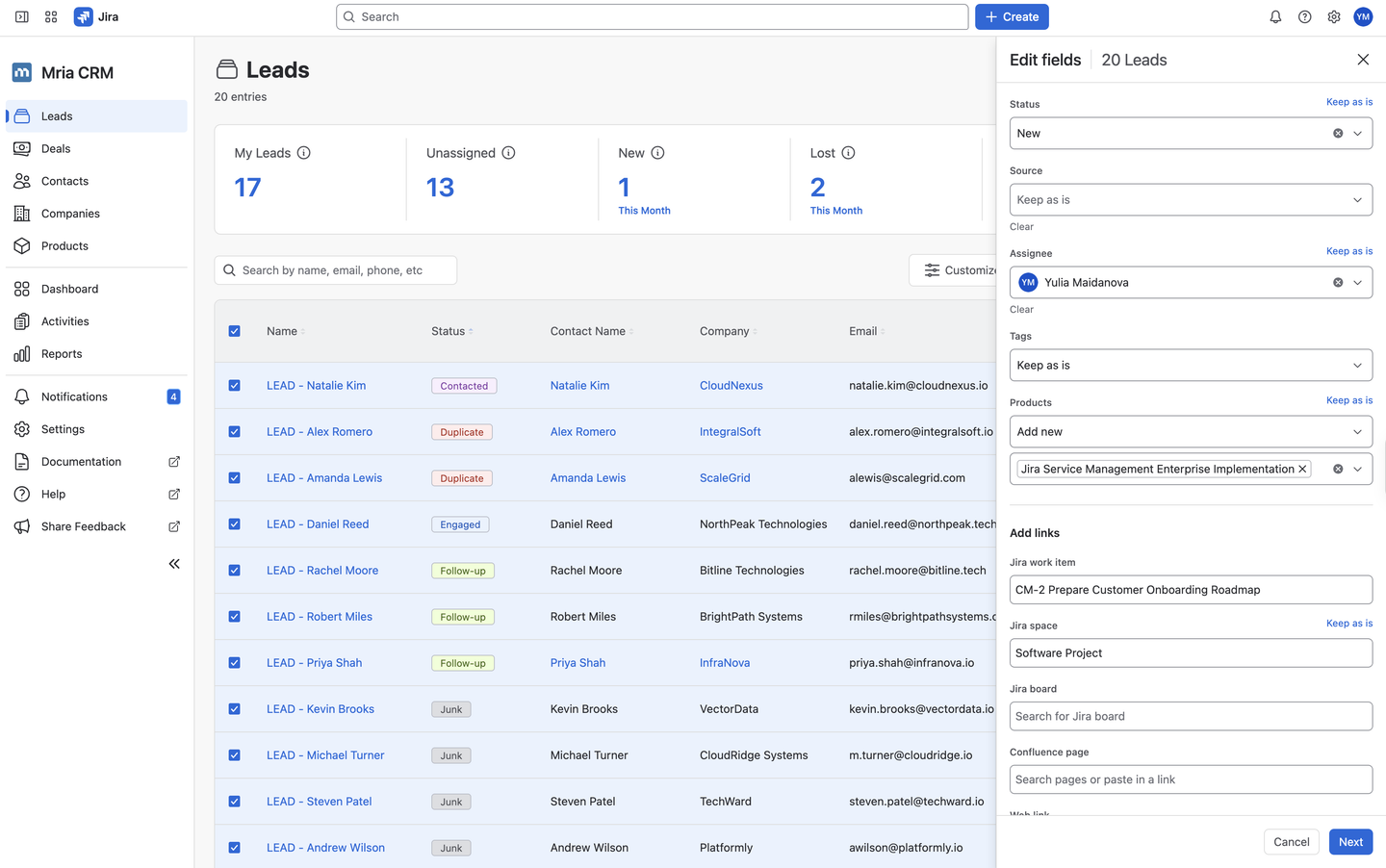
Mria CRM now supports bulk editing. Select Mria CRM records in table view, then update them all in one pass – no more opening records one at a time to re-assign a territory or re-tier a segment.
Every field starts at Keep as is, so only what you deliberately change is touched. Single-value fields also offer Clear to empty them across the selection. Multi-value fields let you choose how the change lands: Add new, Replace all, Find and remove, or Remove all.
Which Mria CRM Fields You Can Edit in Bulk
| Entity | Editable fields |
|---|---|
| Leads | Status, Source, Assignee, Tags, Products |
| Deals | Assignee, Deal type, Source, Pipeline stage, Tags |
| Contacts | Company, Tags, Products |
| Companies | Country, City, State, Company Size, Industry, Tags, Products |
| Products | Category, Unit Type, Tax Rate |
Link Mria CRM Records to Jira Work Items, Spaces, Boards, and Confluence Pages in Bulk
The same update adds a bulk Add links action, which attaches one Jira or Confluence item to every selected Mria CRM record in a single step:
- Jira work items
- Jira spaces
- Jira boards
- Confluence pages
- Web links
Three example use cases:
- A new Confluence page. You publish a security questionnaire or a contract template. Link it to every Company with the relevant Product in one go.
- A change in Jira. A new space per region, or a board split in two. Update every record still pointing at the old one at once.
- An onboarding group. Filter the Companies in the current wave, link the implementation space, done.
Example: Bulk Edit Hundreds of Event Leads
Say your team imports several hundred Leads into Mria CRM after a conference. In one pass, you can filter by Source, change the Status, assign the records to a salesperson, add a follow-up Tag and the relevant Product, and link the campaign’s Jira board.
The same pattern covers cleanup passes, reassigning records when responsibilities shift, moving Deals to a new stage, and categorizing Companies.
Create Reusable Email Templates in Mria CRM
Mria CRM has introduced email templates — reusable emails you can now insert while writing from any Contact, Lead, or Deal record in Jira. They live under Settings → Email Templates, and there is no admin setup: any user can create one.
Private and Public Email Templates
- Private — available only to the person who created it
- Public — anyone in the workspace can use it; only the owner can edit it
Private templates suit a rep who has worked out their own way of writing and wants it one click away. Public ones are for messaging the company has standardised — an approved proposal email, or wording legal has signed off on.
Merge Fields Supported in Mria CRM Email Templates
Merge fields work in both the subject line and the body:
{{contact.name}}{{company.name}}{{deal.name}}{{lead.name}}{{my.name}}
The composer’s Template button opens a picker with a live preview already filled in for the record you are on, so you see the real email before inserting it.
How to Create an Email Template in Mria CRM
- Go to Settings → Email Templates.
- Select New template.
- Name it and choose Private or Public visibility.
- Add the subject and body, inserting merge fields where CRM data should appear.
- Review the preview and save.
- Open the Emails tab in a Contact, Lead, or Deal.
- Select Template, preview the personalized message, and insert it.
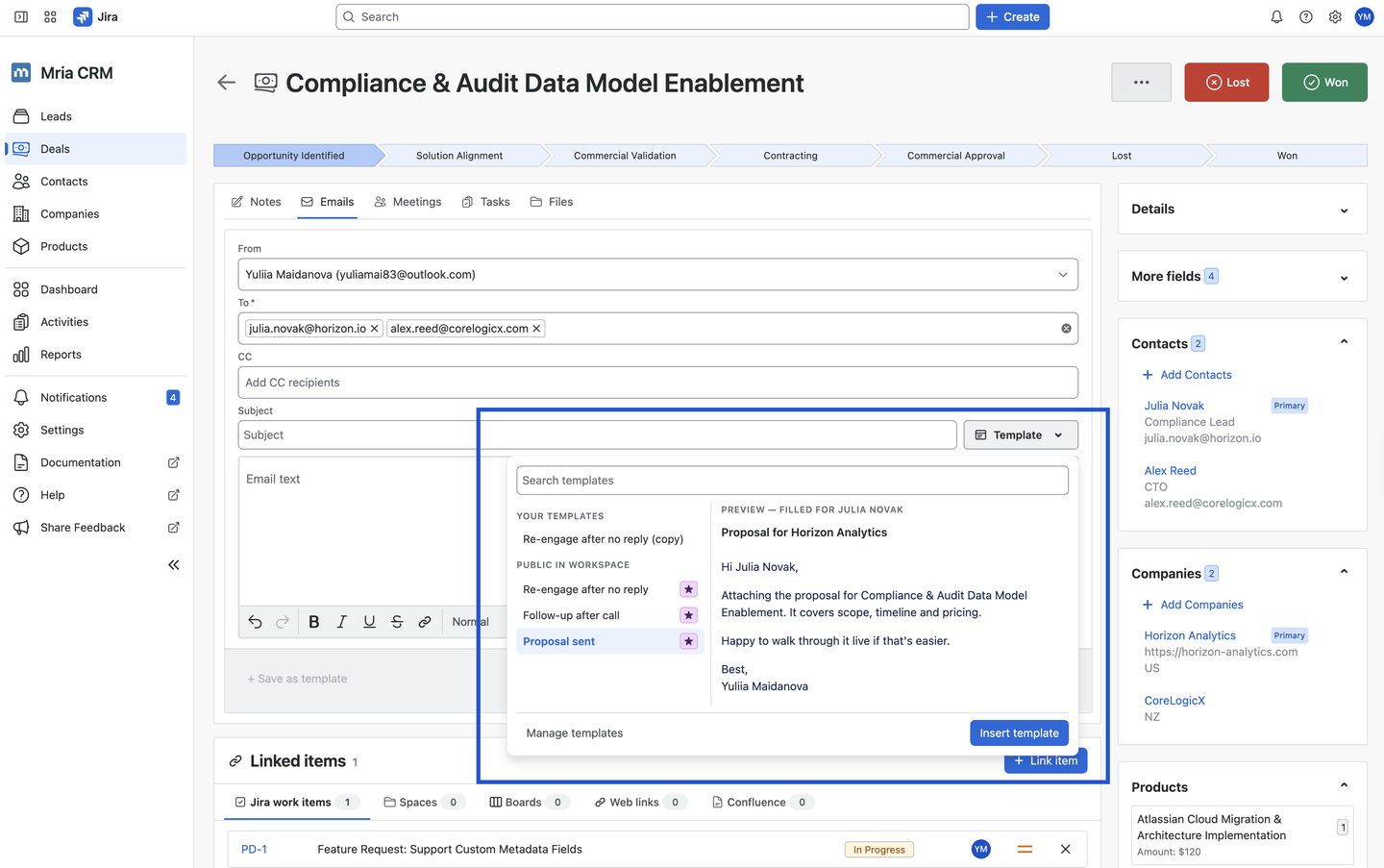
Email templates in Mria CRM can be reordered per user, duplicated, and moved between workspaces via Import / Export.
Link Multiple Companies and Contacts to One Deal in Mria CRM
A single Deal may involve a reseller and an end customer, a parent company and the subsidiary signing the agreement, or several decision-makers from different parts of the customer organization.
Deals in Mria CRM can now be linked to several Contacts and several Companies. Contacts and Companies have separate panels on the Deal, each with its own count and + Add action. One Contact and one Company can be marked as Primary, preserving a clear main relationship while keeping everyone else involved visible in the same Deal.
Contacts no longer have to belong to one of the Companies linked to the Deal. This gives teams more flexibility when an opportunity includes independent advisors, procurement intermediaries, implementation partners, or other organizations that participate in the sales process.
This is what multi-party deals needed:
- a reseller alongside the end customer
- a parent company and the subsidiary actually signing
- a procurement intermediary
- an implementation partner sitting next to the customer’s own team
Previously, teams had to choose one Contact and Company and record the remaining relationships in Notes. The new structure keeps the complete buying group attached to the opportunity where the team can find and manage it.
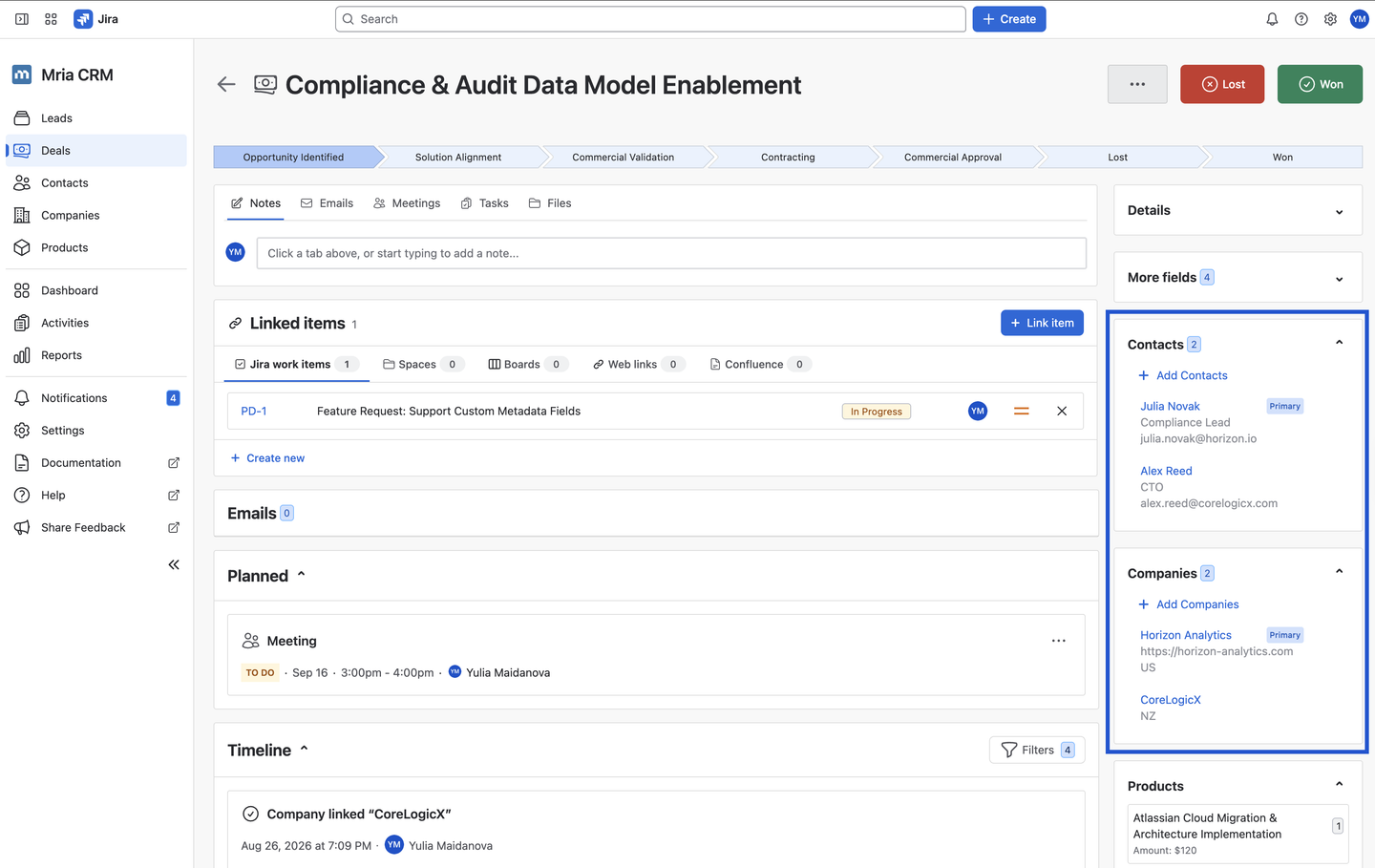
Create a Deal in Mria CRM Without a Contact or Company
Not every opportunity arrives with a complete customer structure. Sometimes the Deal is already real, but the team does not yet know who the main Contact will be or which Company will sign the agreement.
Creating a Deal in Mria CRM no longer requires a linked Contact or Company. Only Deal Name, Pipeline, and Pipeline Stage are required. The Contact also does not need to belong to the selected Company before both records can be connected to the Deal.
Teams can therefore record the opportunity as soon as it appears, begin managing it in the pipeline, and add the relevant people and organizations later. This supports different qualification processes without forcing users to create placeholder Contacts or Companies.
Mria CRM REST API Improvements: Full Records and Timestamps
List endpoints in the Mria CRM REST API can now return full record details instead of a trimmed summary. Records also include their created and updated timestamps.
These timestamps make incremental synchronization practical. An integration can identify records created or changed since its previous run instead of retrieving and processing the complete CRM dataset every time.
This supports more efficient integrations for reporting, data warehouses, finance exports, synchronization with other business systems, and automated data-quality checks.
Read the Mria CRM REST API documentation →
Import Errors Now Name the Failing Rows
When a CSV or XLSX import into Mria CRM contains invalid data, the validation error now reports the specific row numbers that failed, rather than just a count.
Small change, and it lands at the two moments that matter most. The first is week one, when a team is moving years of existing customer data into a new CRM and an import that refuses to complete is a real reason to abandon the trial. The second is every list that arrives afterwards — from an event, a partner, a spreadsheet someone kept on the side.
Both come down to the same thing: a handful of bad values in a file of several thousand rows. A row number turns an afternoon of scanning into a two-minute correction and a re-upload.
Applies to Leads, Contacts, Companies, and Products imports.
Try the Latest Mria CRM Features
The new functionality is available now in Mria CRM. The release notes list the smaller changes that didn’t make this post, and the documentation covers each feature in detail. Open the app to edit records in bulk, build your first email template, and structure Deals around the way your team actually sells.