As teams use Mria CRM across more of the customer lifecycle, the product needs to support both daily CRM work and the wider processes around it. Customer information should remain accessible when work moves into service workflows, usable when another business system needs it, and manageable as the CRM database grows.
The latest release moves Mria CRM forward in each of these areas. It expands how teams can use customer data inside and beyond Jira while improving the practical workflows used to maintain customer records every day.
What’s New in This Release
The latest Mria CRM release includes:
- Mria CRM REST API available in early access;
- integration with Customer Service Management projects;
- suggested Deals in Jira Service Management tickets;
- file attachments for Leads, Deals, Contacts, and Companies;
- Bulk Delete for all CRM entities;
- images in emails sent from Mria CRM;
- secondary email addresses for Contacts, including email synchronization;
- manual time entry for Meetings.
Mria CRM REST API for Custom Integrations and Automation
Mria CRM can now serve as the CRM system of record inside Jira while exchanging data with the other systems involved in the customer lifecycle.
The new REST API provides read and write access to Leads, Contacts, Companies, Deals, Products, Activities, relationships, custom fields, Jira and Confluence links, and CRM metrics. Its current OpenAPI specification covers 190 operations, including creating and updating records, searching with structured filters, converting Leads, managing Deal stages and Products, linking related records, and retrieving sales-performance data.
This makes it possible to build workflows such as:
- creating Leads automatically from website forms, events, partner portals, and other acquisition sources;
- synchronizing customer and sales data with internal platforms;
- launching onboarding or delivery work in Jira when a Deal is won;
- sending Company, Contact, Deal, and Product data to finance, billing, ERP, or provisioning systems;
- adding current pipeline, conversion, revenue, and sales-performance metrics to company-wide reporting;
- identifying and correcting incomplete or inconsistent CRM records at scale.
For example, when a Deal is won, an integration can retrieve its Company, Contacts, Products, commercial details, and custom fields, initiate the required delivery or finance process, and preserve the connection between that work and the original Deal in Mria CRM. Sales continues working with the commercial record, while other teams receive the information they need without recreating it manually.
The Mria CRM REST API is currently available in Early Access. We welcome feedback from customers and Atlassian Solution Partners building real integrations, particularly about the systems they need to connect and any additional data or operations their workflows require.
Explore the Mria CRM REST API documentation
Mria CRM Integration with Jira Customer Service Management (CSM)
The Mria CRM panel is now available in Customer Service Management tickets.
How the Mria CRM Panel Works in CSM Tickets
When an agent opens a ticket, the panel checks the requester’s email address and company domain against existing Mria CRM data. Based on what it finds, it can suggest matching customer records directly inside the ticket.
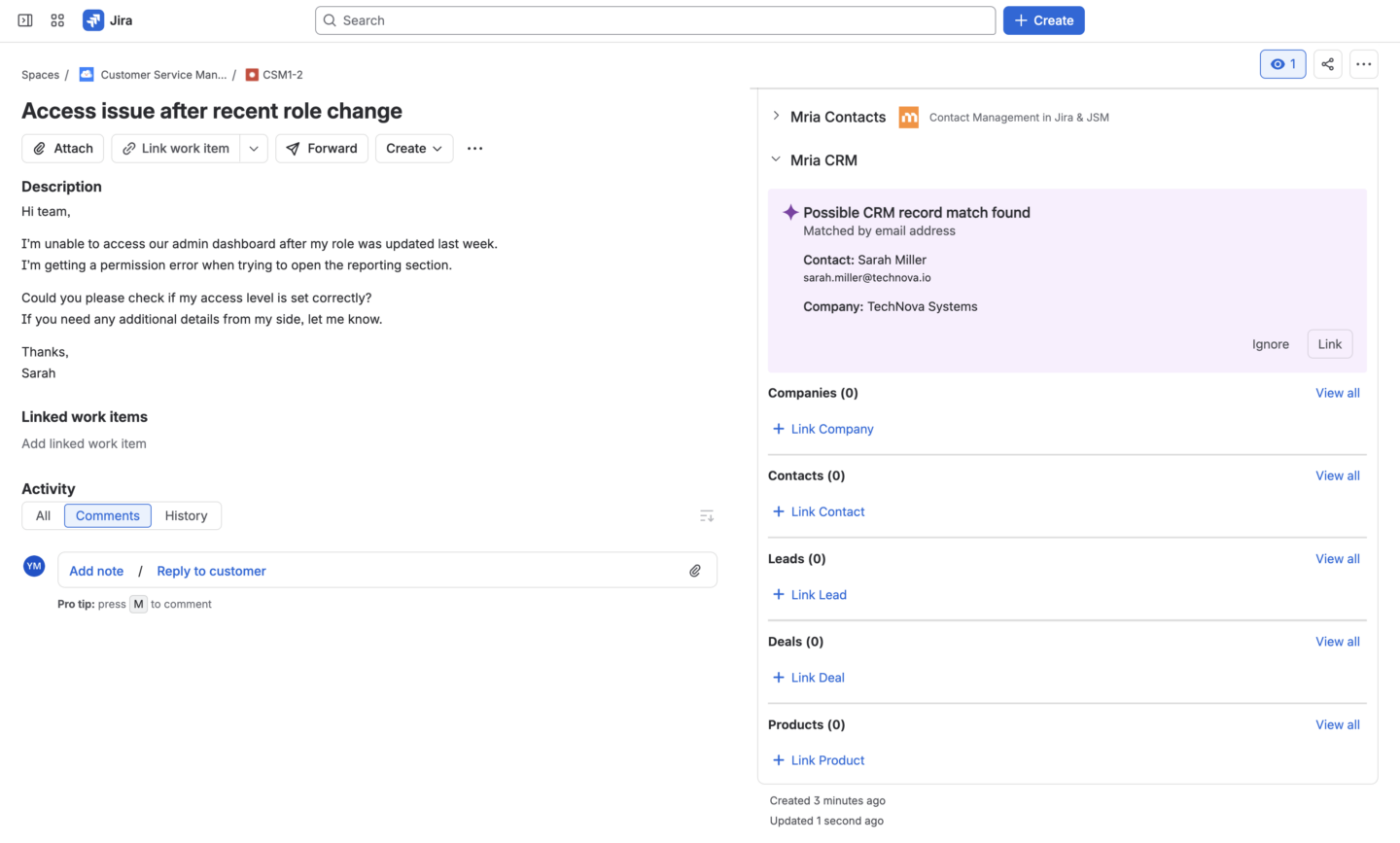
From the panel, agents can:
- review suggested matching Contacts, Companies and Deals;
- accept or ignore a suggested match;
- search for and link an existing Mria CRM record manually;
- create a new Contact or Lead when no matching record exists;
- access linked Leads, Contacts, Companies, and Deals without leaving the ticket.
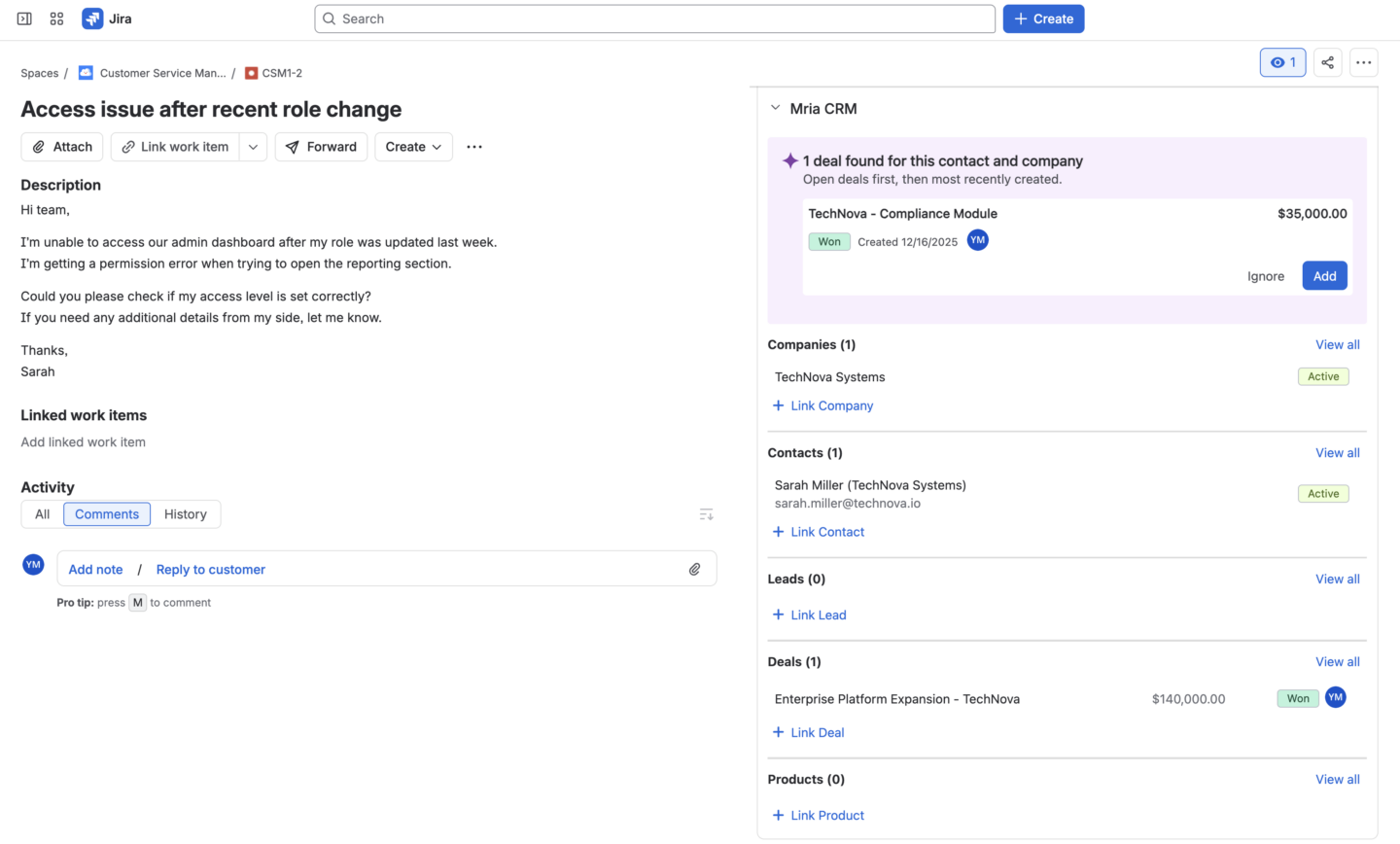
Once the relevant CRM records are linked, the CSM ticket carries the customer context needed by the service team. Agents can identify who submitted the request, which Company they belong to, and whether the request relates to an existing Lead or Deal before deciding how to handle it.
If no matching CRM record is found but the requester may represent a sales opportunity, the service team can create a new Lead and Contact directly from the Mria CRM panel. The sales team immediately sees the new records in Mria CRM together with the linked CSM ticket, so the opportunity can be followed up without a separate handoff.
Deal Suggestions in Jira Service Management Tickets
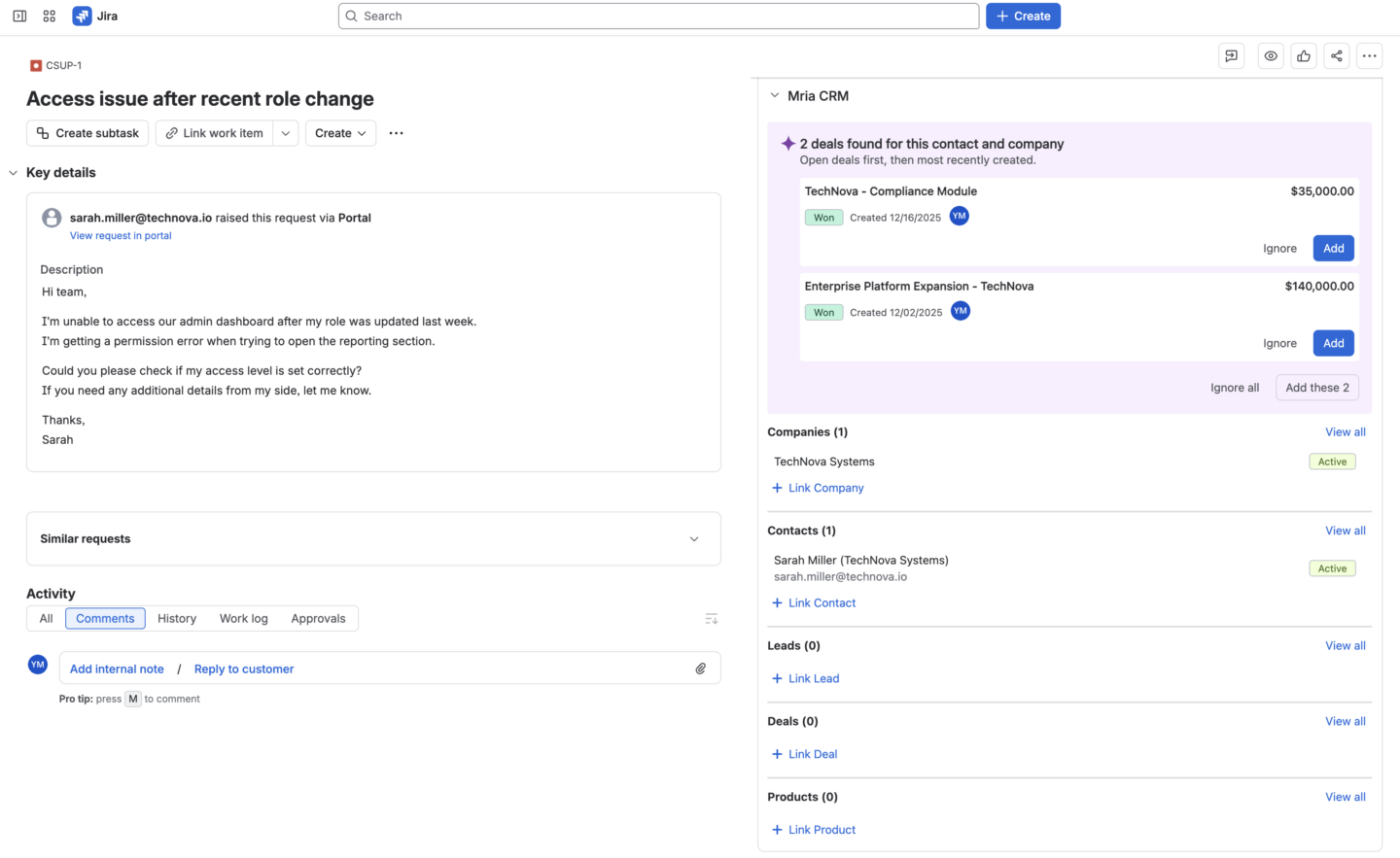
The Mria CRM panel in Jira Service Management can now suggest Deals associated with the customer identified in a ticket.
The panel already matches the requester with relevant Contacts and Companies using the email address and company domain. With this release, Mria CRM also checks for Deals related to the identified customer and surfaces them in the same panel.
This gives service teams direct visibility into the commercial context behind a request. An agent can see when the customer has an active opportunity and connect the ticket to the relevant Deal without searching through Mria CRM separately.
For requests related to an implementation, renewal, expansion, or ongoing sales process, the Deal provides useful context about what is currently happening with the customer and who owns the commercial relationship.
File Attachments for Leads, Deals, Contacts, and Companies
Files can now be attached directly to Leads, Deals, Contacts, and Companies.
A new Files tab appears alongside Notes, Emails, Meetings, and Tasks. Users can open the tab to upload and access documents connected to the customer or opportunity.
This provides a dedicated place for materials such as:
- proposals and commercial documents connected to a Deal;
- customer or account documents connected to a Company;
- files received from a Contact;
- requirements, screenshots, or supporting materials connected to a Lead.
Files remain attached to the Mria CRM record where the related work is managed, together with activity history and other customer context.
Supported File Types and Size Limit
Mria CRM accepts the following file extensions:
PDF, DOC, DOCX, XLSX, TXT, CSV, PNG, JPG, JPEG, GIF, JSON, and ZIP
The maximum size for a single file is 10 MB.
Secondary Email Addresses for Contacts in Mria CRM
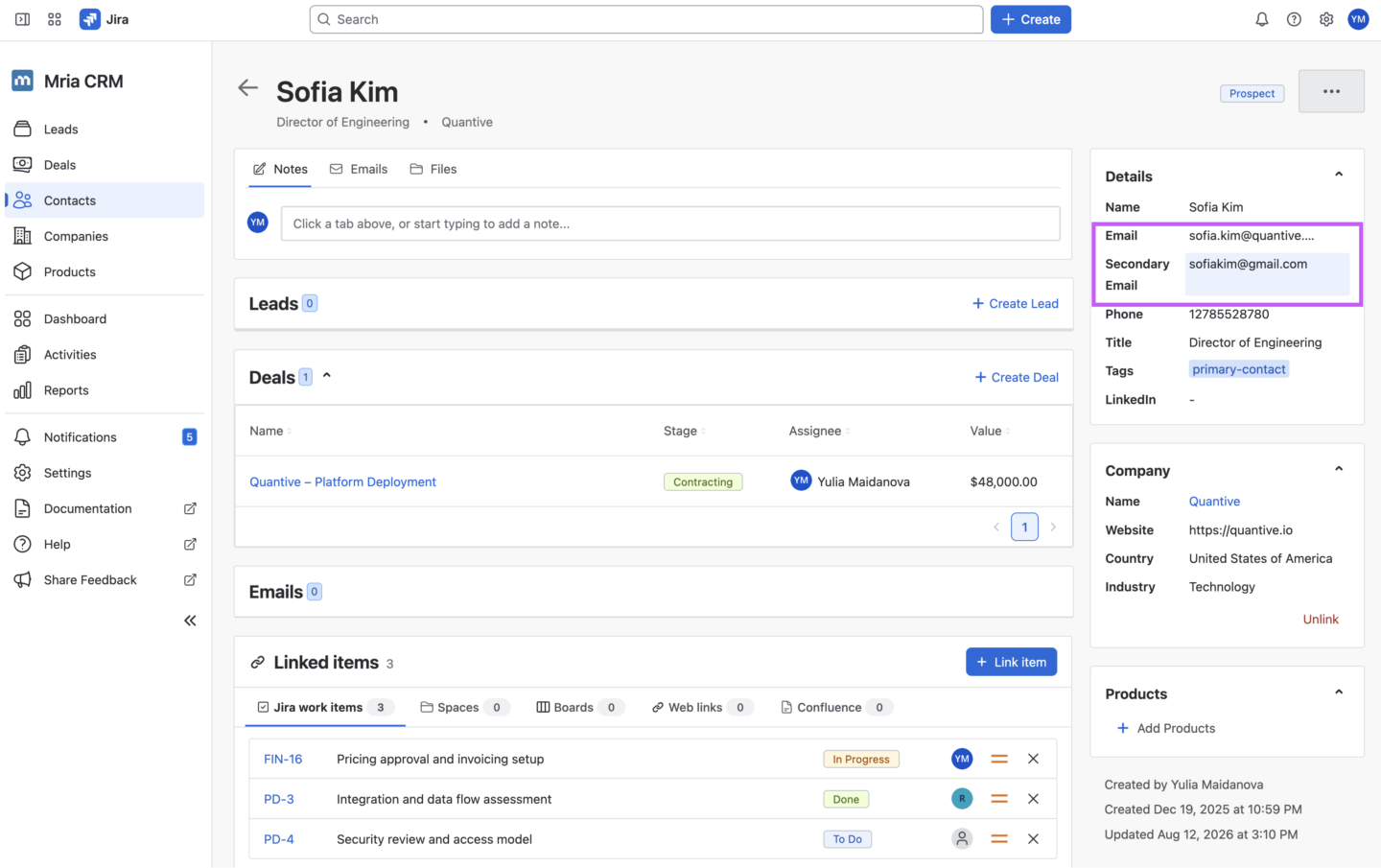
A Contact can now have both a primary and a secondary email address.
This is useful when the same person communicates from more than one inbox, for example, a primary work address and an alternative address. Both addresses stay connected to one Contact rather than requiring separate or duplicate records.
Email correspondence with the secondary address is also synchronized to the same Contact record. Whether the customer writes from the primary or secondary email, the conversation remains part of one email history in Mria CRM.
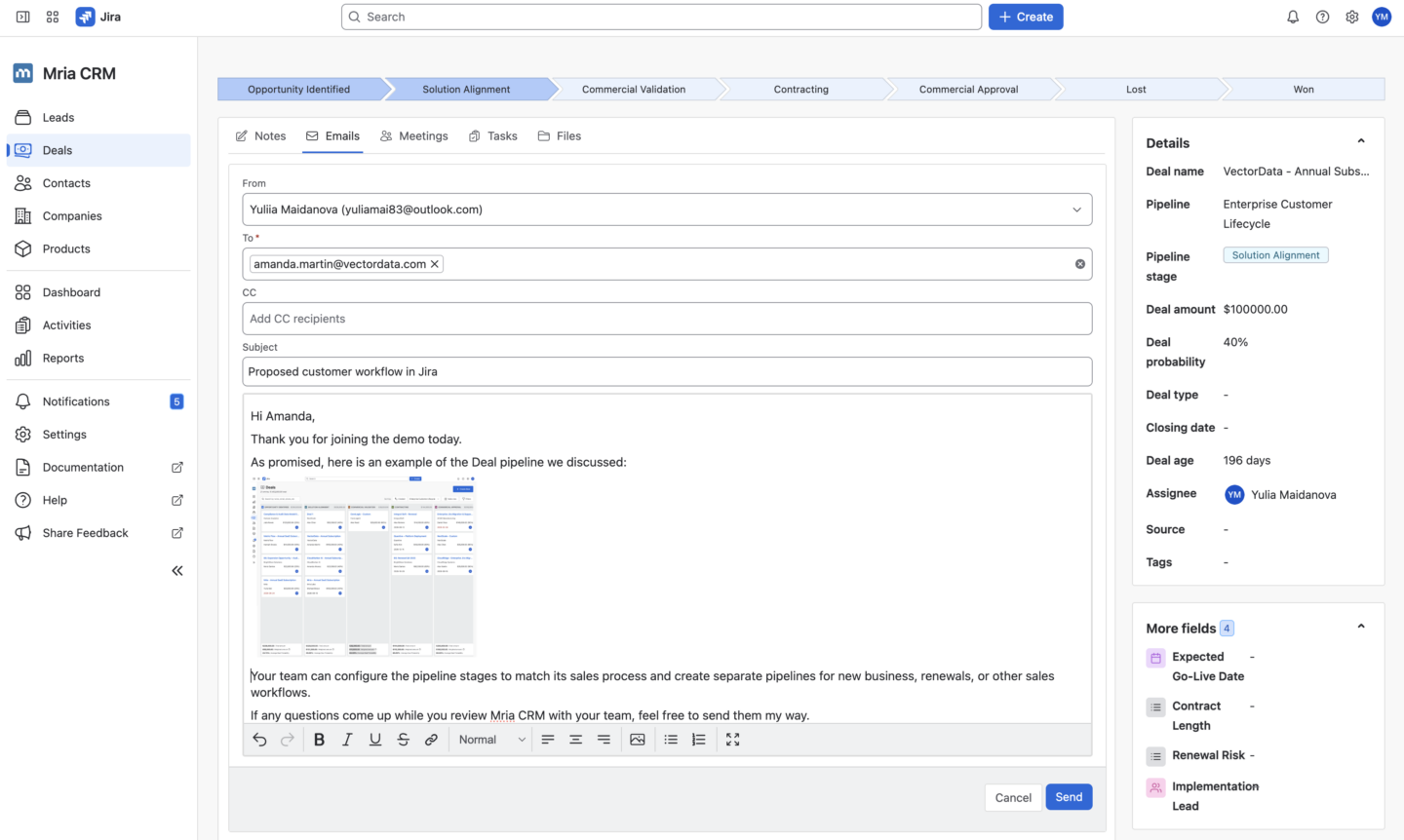
Images in Emails Sent From Mria CRM
The email editor in Mria CRM now supports images.
Users can add an image while composing an email from a CRM record, making it easier to include visual information directly in customer communication instead of relying only on text.
The image becomes part of the email sent through the connected Gmail or Outlook account and remains with the email conversation synchronized to Mria CRM.
Bulk Delete for Mria CRM Records
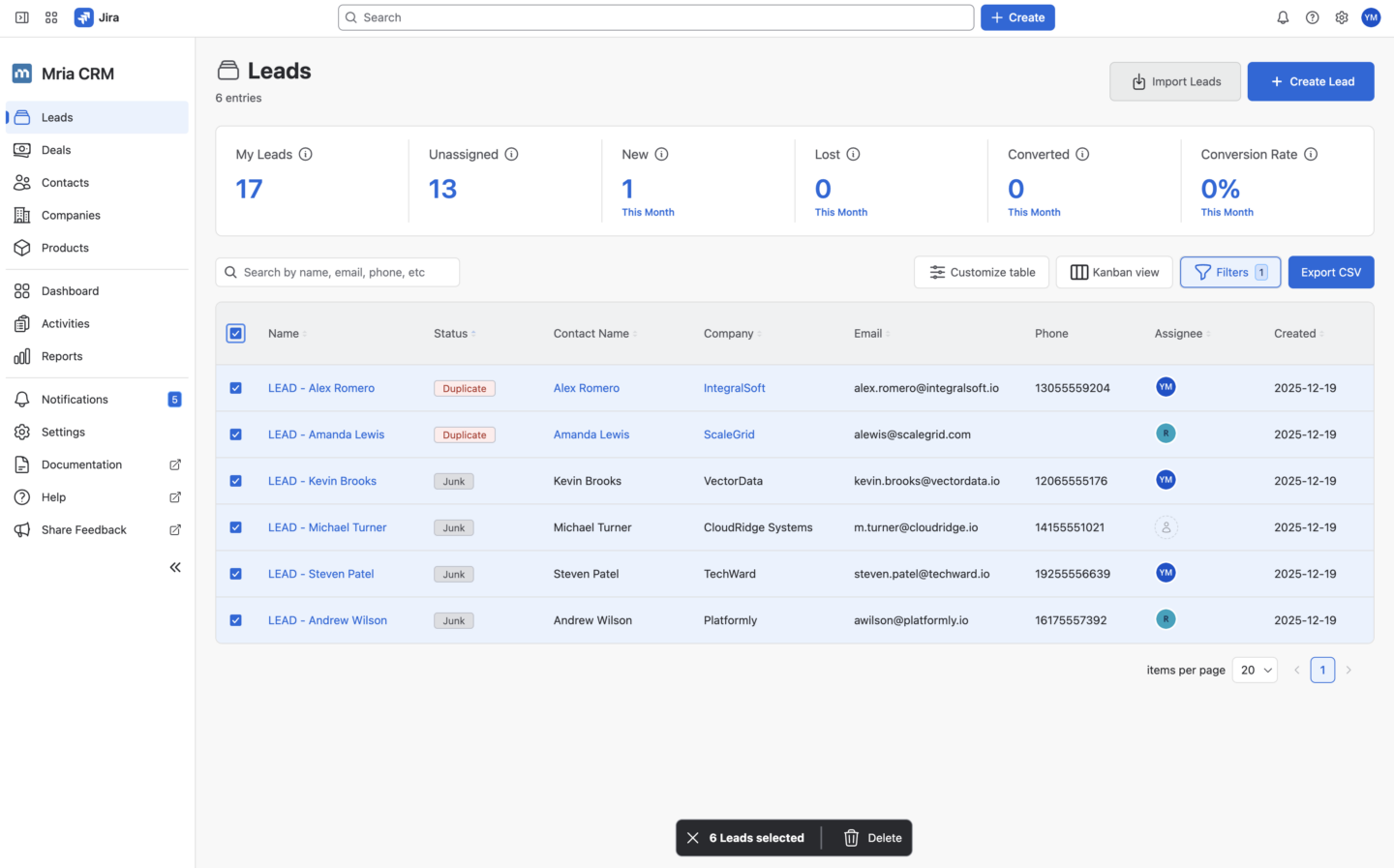
Bulk Delete is now available for teams that need to remove several CRM records at once.
Open an entity table view, select the records using the checkboxes, and choose Delete. The selected records can then be removed in one action instead of being opened and deleted individually.
This is useful when cleaning up duplicate, outdated, test, or incorrectly imported records. Because Bulk Delete is available in the table view, users can search or filter the dataset first and then select the exact records that should be removed.
Custom Meeting Times in Mria CRM
Users can now enter a custom time manually when creating or editing a Meeting.
This makes it possible to record the exact meeting time directly rather than being limited to the values available in the standard time selector.
What’s Next for Mria CRM
The next planned improvements focus on managing Mria CRM data at scale, representing more complex customer relationships, and bringing CRM context deeper into Jira workflows.
Bulk Update
Bulk Update will allow users to select multiple CRM records in a table and apply the same change to all of them at once. This will make it faster to organize imported data, update groups of records, and maintain a growing CRM database.
Multiple Companies and Contacts per Deal or Lead
Mria CRM already allows multiple Contacts to be added to a Deal, but they must currently belong to the same Company.
The upcoming update will allow users to link multiple Companies and Contacts from different Companies to the same Deal or Lead. This will support sales processes involving several customer organizations, partners, consultants, resellers, or other external stakeholders.
Jira Custom Fields
Planned support for Jira Custom Fields will make relevant Mria CRM data available directly in Jira work items. This will help teams include customer and sales context in the Jira views and workflows they already use.
Deal Import
Deal Import will allow teams to create multiple Deals from a file instead of entering them individually. It will be especially useful when migrating from another CRM, bringing an existing sales pipeline into Mria CRM, or uploading Deal data collected through other systems and processes.
Visit the public Mria CRM roadmap to explore upcoming features and follow the product’s development.
Get Started with Mria CRM
Together, these updates expand both where Mria CRM can be used and what teams can do with customer data every day. The REST API connects CRM data with wider business processes, the CSM and JSM improvements bring sales context into service work, and Files, Bulk Delete, secondary emails, email images, and custom Meeting times make daily CRM management more complete and efficient.
This release requires a manual app update. A Site or Organization admin can enable the new features here:
Jira Settings → Connected Apps → Mria CRM → View app details → Update
New to Mria CRM? Start a 30-day free trial on the Atlassian Marketplace and explore the latest version directly in your Jira environment.
This release makes customer information easier to use across the full lifecycle, from the first Lead and sales conversation to service requests, delivery work, and company-wide processes.