Every Mria CRM automation action, field by field #
This page lists every field, every output and the rules behind each of the nine Mria CRM actions in Jira Automation. For the big picture — connecting, who a step runs as, limits — start at Jira Automation.
Common to every action #
- Connection. The line
Logged in to Mria CRM as <name>at the top of each form names the account the step runs as. The pencil icon changes it. - Required fields are marked with *. The { } button next to a field opens the smart value panel.
- Pickers store ids. A pipeline, stage or lead status chosen from a list is stored by its id, so renaming the stage later does not break the flow.
- Lead source and tags store names, so a smart value can supply them. A lead source must match one configured in your workspace; tags that do not exist yet are created.
- Assignee is a user picker. Tick Use a smart value to enter an Atlassian account id instead, for example
{{issue.assignee.accountId}}. - Lists — tags, contacts, companies, work item keys — are comma-separated.
- Dates are ISO dates (
2026-10-31) or a date smart value such as{{issue.duedate}}or{{now.plusDays(14)}}. - Amounts are plain numbers in the workspace currency, up to two decimals.
1. Create lead #
Creates a Lead. The Lead is named after the contact — LEAD - Daniel Okafor — and starts in the workspace’s default status unless you pick one.
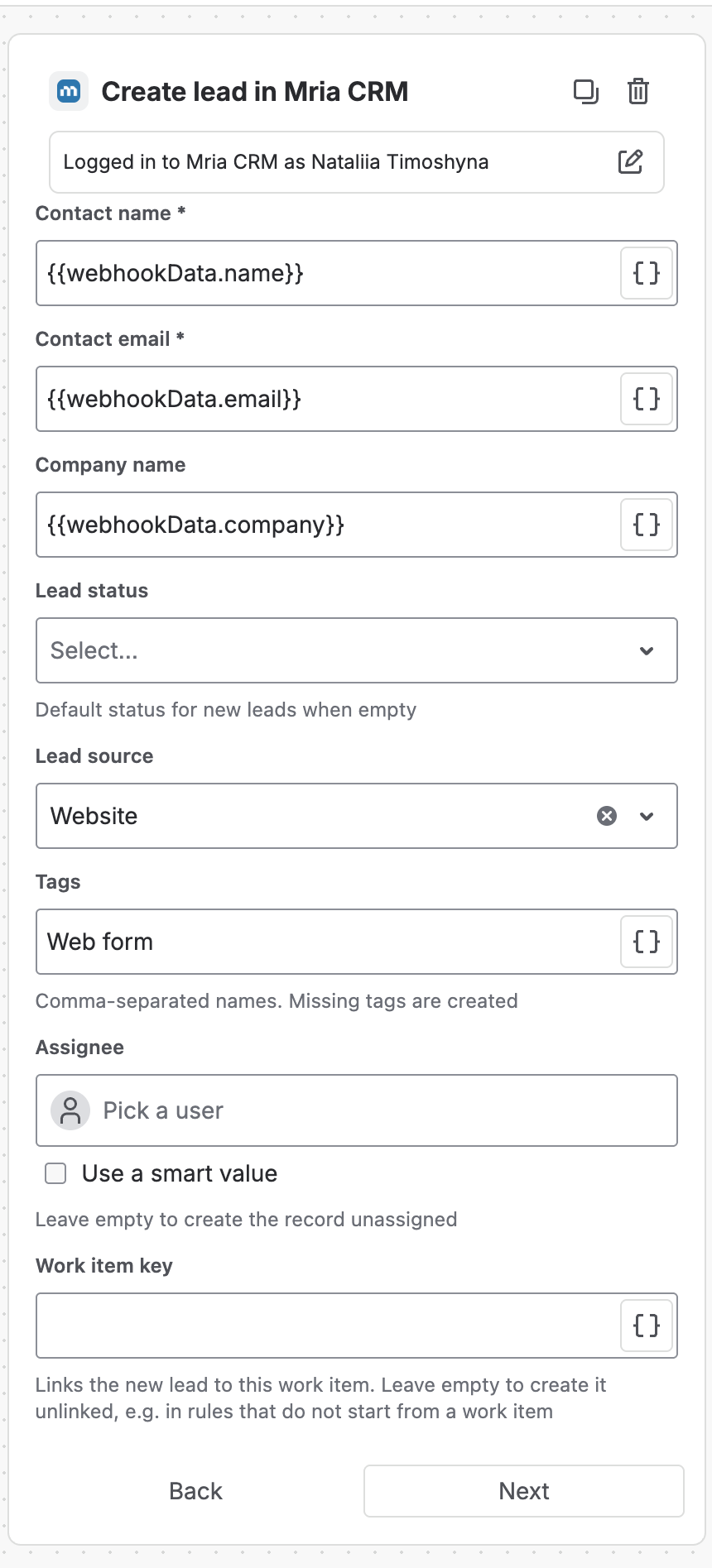
| Field | What it takes |
|---|---|
| Contact name * | The person’s name. |
| Contact email * | A valid email address. |
| Company name | Stored on the Lead as text. No Company record is created. |
| Lead status | Pick from your lead statuses. Empty uses the default status for new Leads. |
| Lead source | Pick from your lead sources, or supply a source name with a smart value. |
| Tags | Comma-separated names. Missing tags are created. |
| Assignee | The owner. Empty creates the Lead unassigned. |
| Work item key | Links the new Lead to this work item. Leave it empty in flows that do not start from a work item. |
Returns #
| Smart value | What it holds |
|---|---|
{{createdMriacrmLead.id}} | Id of the new Lead. |
{{createdMriacrmLead.name}} | Its name. |
{{createdMriacrmLead.url}} | A link that opens it in Mria CRM. |
{{createdMriacrmLead.warning}} | Set when a follow-up write — a link, tags, the source — was skipped. The Lead itself exists. |
The connection owner needs Create on Leads, and Edit as well when you set a source, tags or a work item. The check runs before anything is written, so a refusal creates nothing.
2. Create deal #
Creates a Deal in the pipeline and stage you pick. Only open stages are offered — a Deal cannot be created already Won or Lost.
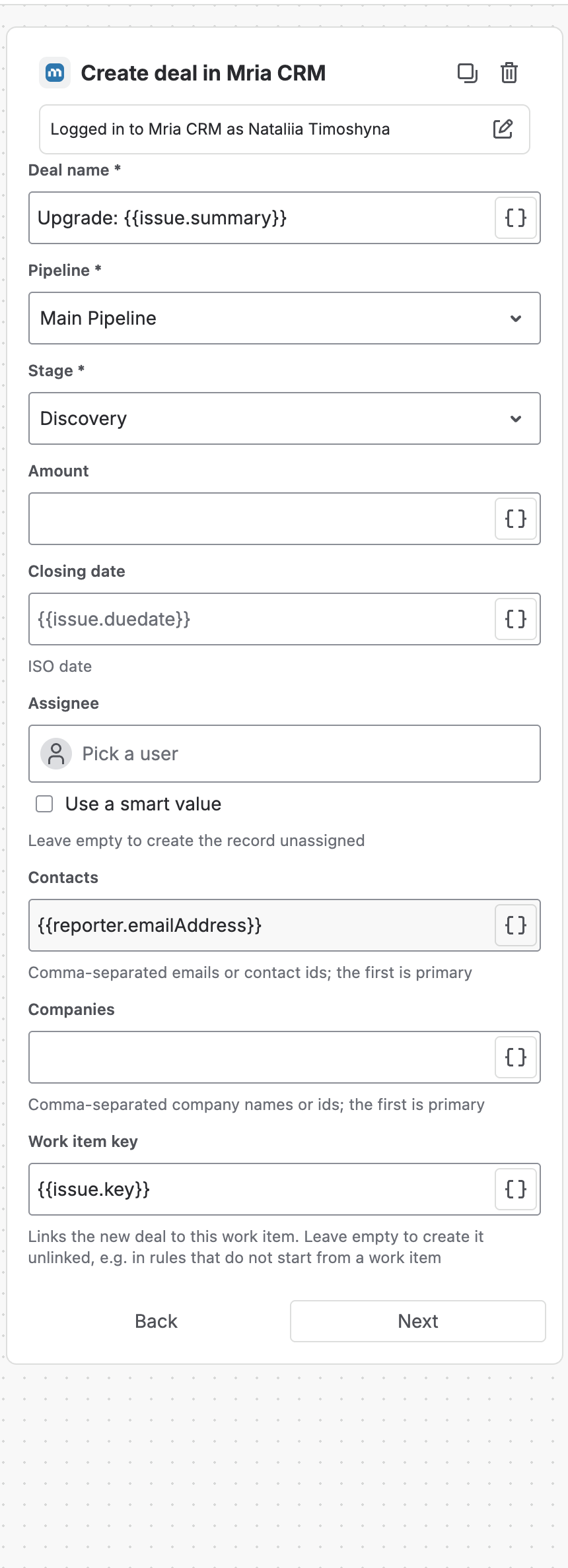
| Field | What it takes |
|---|---|
| Deal name * | Up to 150 characters. |
| Pipeline * | Pick from your pipelines. |
| Stage * | An open stage of that pipeline. |
| Amount | A number in the workspace currency. |
| Closing date | ISO date or a date smart value. |
| Assignee | The owner. Empty creates the Deal unassigned. |
| Contacts | Comma-separated emails or contact ids. The first one becomes the primary Contact. |
| Companies | Comma-separated company names or ids. The first one becomes the primary Company. |
| Work item key | Links the new Deal to this work item. Leave it empty to create the Deal unlinked. |
Returns #
| Smart value | What it holds |
|---|---|
{{createdMriacrmDeal.id}} | Id of the new Deal. |
{{createdMriacrmDeal.name}} | Its name. |
{{createdMriacrmDeal.url}} | A link that opens it in Mria CRM. |
{{createdMriacrmDeal.warning}} | Set when a follow-up write — the link, the closing date — was skipped. The Deal itself exists. |
- Every Contact and Company you list must already exist — matched exactly, ignoring case. An entry that matches nothing, or an email two Contacts share, stops the step before the Deal is created. Nothing is created on the fly.
- The Deal’s probability comes from its stage, as when you create a Deal by hand.
3. Create contact #
Creates a Contact and, if you give a company name, attaches it to that Company.
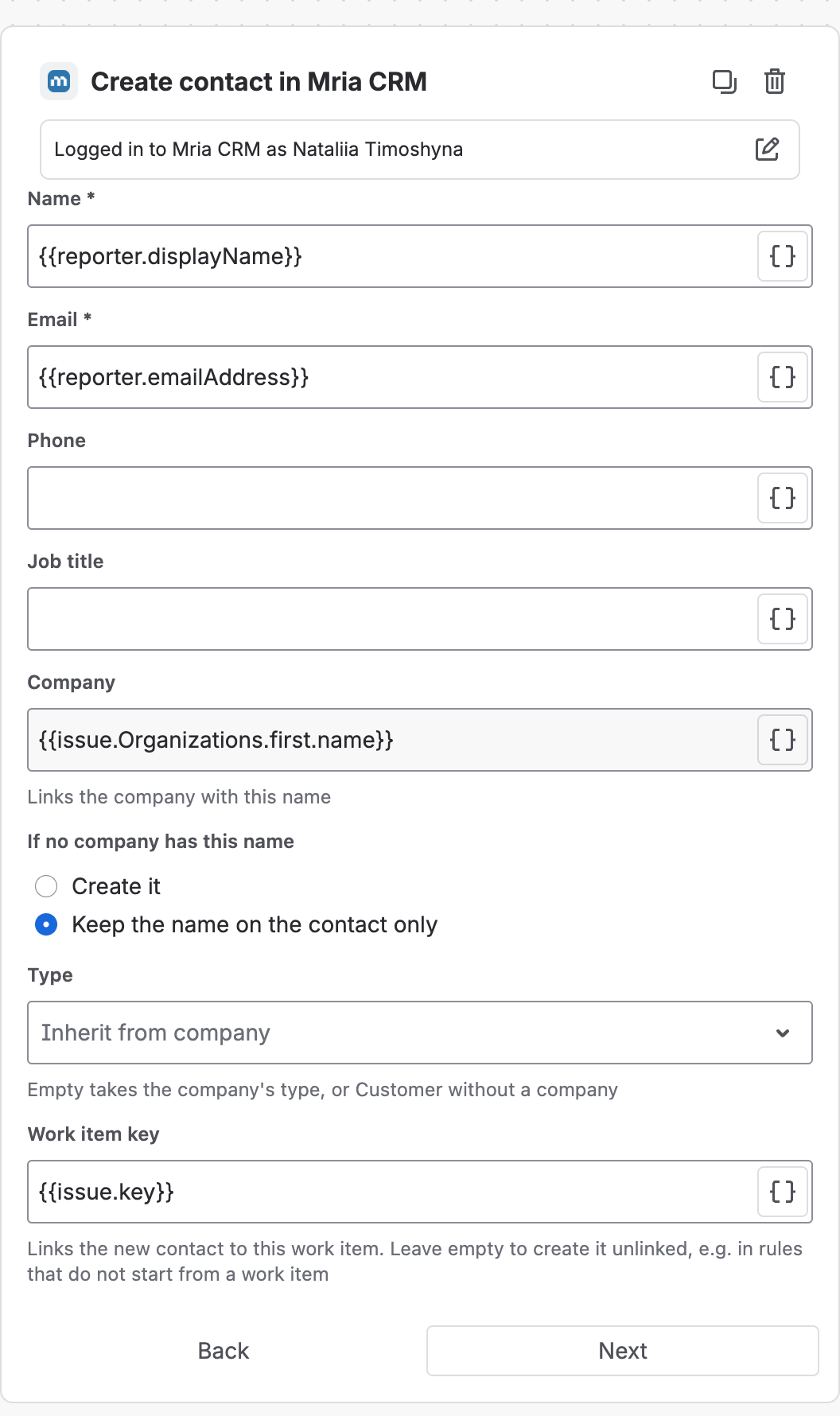
| Field | What it takes |
|---|---|
| Name * | Up to 150 characters. |
| Email * | Must not belong to another Contact in the workspace. |
| Phone | Up to 50 characters. |
| Job title | Up to 100 characters. |
| Company | A company name. The Contact is linked to the Company with exactly this name, ignoring case. |
| If no company has this name | Create it makes a new Company. Keep the name on the contact only stores the text on the Contact and creates no Company — useful when the names come from a public form. Appears once a company is entered. |
| Type | The contact type. Inherit from company (the default) takes the Company’s type, or Customer without a Company. |
| Work item key | Links the new Contact to this work item. Leave it empty to create it unlinked. |
Returns #
| Smart value | What it holds |
|---|---|
{{createdMriacrmContact.id}} | Id of the new Contact. |
{{createdMriacrmContact.name}} | Its name. |
{{createdMriacrmContact.url}} | A link that opens it in Mria CRM. |
{{createdMriacrmContact.warning}} | Set when a follow-up write was skipped. The Contact itself exists. |
A Contact’s email is unique, so a second Create contact for the same person fails. Put Find record by email in front of it and create only when nothing was found.
4. Link item to record #
Links things to any Lead, Deal, Contact, Company or Product — the same links you add by hand in the record’s Linked items section. Fill in one or more tabs; a tab you have filled shows a tick.
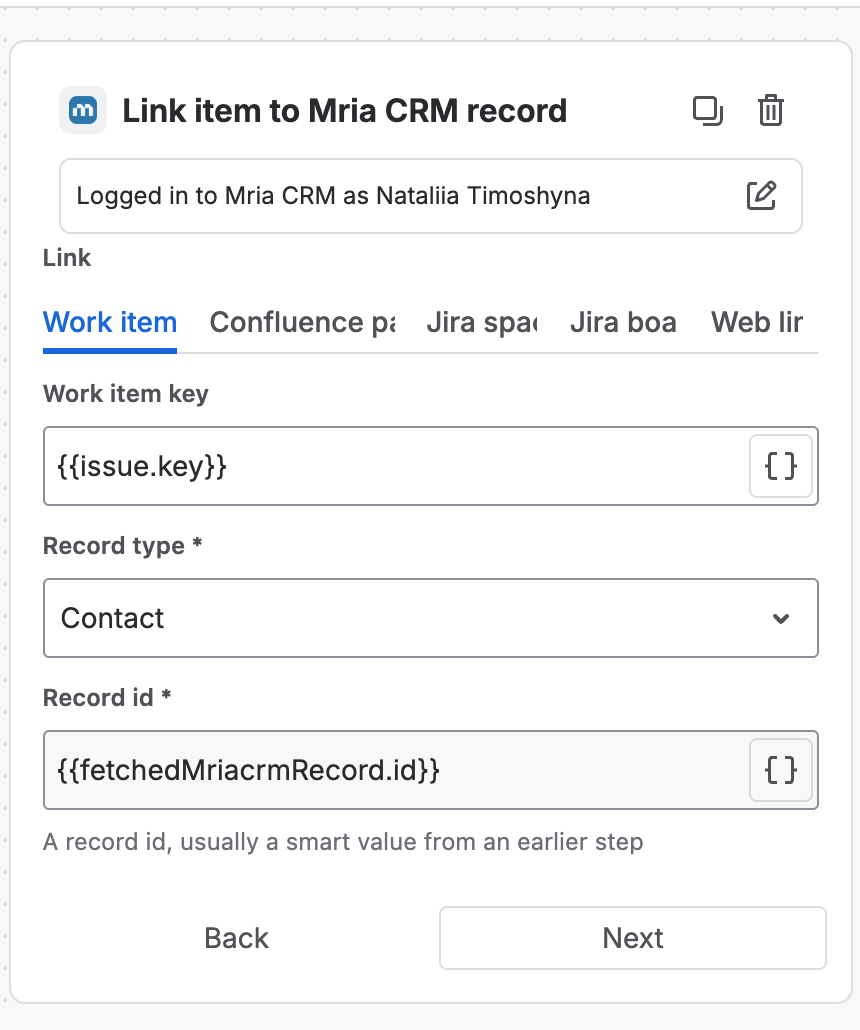
| Field | What it takes |
|---|---|
| Work item key | Tab Work item. The work item to link, for example {{issue.key}} or {{createdIssue.key}}. |
| Page | Tab Confluence page. A link to a page on this site, its id (the number after /pages/ in the URL), or a smart value. |
| Space key | Tab Jira space. Its name is read from Jira. |
| Board id | Tab Jira board. The number in the board’s URL. |
| URL and Link text | Tab Web link. A full http(s) address and the text to show for it. |
| Record type * | Lead, Deal, Contact, Company or Product. |
| Record id * | Usually a smart value from an earlier step, such as {{fetchedMriacrmRecord.id}}. |
Returns #
| Smart value | What it holds |
|---|---|
{{updatedMriacrmLink.linkedCount}} | How many targets are linked, including links that already existed. |
{{updatedMriacrmLink.linkTypes}} | Which kinds were linked, comma-separated: issue, page, space, board, web. |
{{updatedMriacrmLink.warning}} | Set when some targets were not linked; the others were. |
- A link that already exists is left alone, so re-running the step is harmless — except for web links, which are added again on every run.
- A space or board the connection owner cannot see in Jira stops the step before anything is linked.
5. Find record #
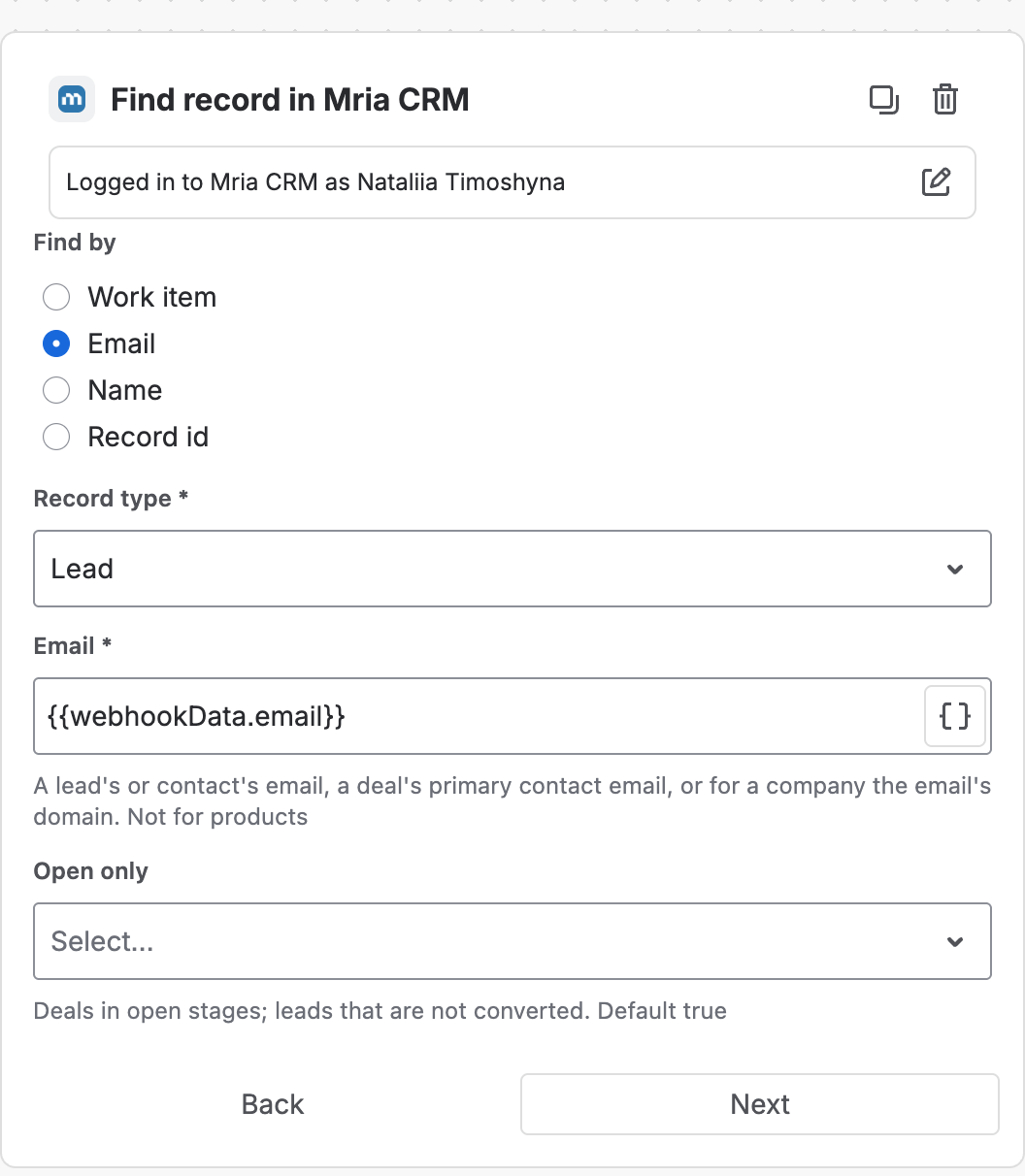
Looks up one record so later steps can use its fields. A miss is not an error: the step succeeds with found set to false, and the flow branches on it.
| Field | What it takes |
|---|---|
| Find by | Work item, Email, Name or Record id. |
| Record type * | Lead, Deal, Contact, Company or Product. Product is not available when finding by email. |
| Work item key * | When finding by work item: a record of this type linked to it. Default {{issue.key}}. |
| Email * | When finding by email: a Lead’s or Contact’s email, a Deal’s primary Contact email, or — for a Company — the email’s domain. |
| Name * | When finding by name: the exact name, ignoring case. |
| Record id * | When finding by id. |
| Open only | True (the default) skips Deals in a Won or Lost stage and Leads already converted. |
Returns #
| Smart value | What it holds |
|---|---|
{{fetchedMriacrmRecord.found}} | True when a record matched. |
{{fetchedMriacrmRecord.ambiguous}} | True when more than one matched; the most recently updated is returned. |
{{fetchedMriacrmRecord.id}} | Id of the record. |
{{fetchedMriacrmRecord.name}} | Name of the record. |
{{fetchedMriacrmRecord.url}} | A link that opens it in Mria CRM. |
{{fetchedMriacrmRecord.status}} | Lead status, Deal stage, or the Contact’s or Company’s status. |
{{fetchedMriacrmRecord.stageType}} | Deals only: OPEN, CLOSED_WON or CLOSED_LOST. |
{{fetchedMriacrmRecord.amount}} | Deal amount or product price. |
{{fetchedMriacrmRecord.email}} | Contact email, Lead contact email, or the Deal’s primary Contact email. |
{{fetchedMriacrmRecord.assigneeAccountId}} | Atlassian account id of the owner. |
To test the result, add a Compare two values condition — or an If/else block — with {{fetchedMriacrmRecord.found}} equals true or false. A record the connection owner cannot see counts as not found.
6. Search records #
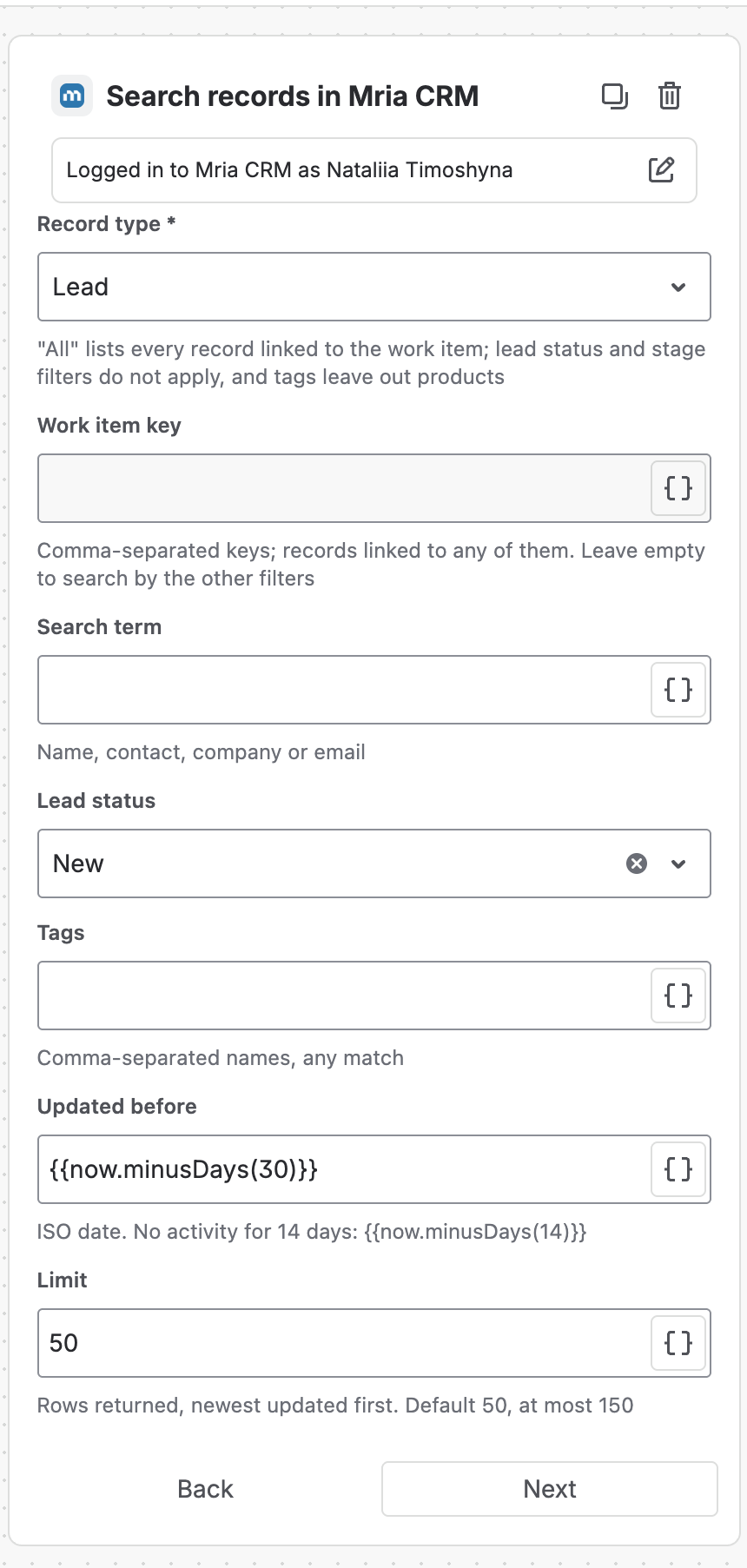
Returns a list of records rather than one. Set at least one filter besides Limit. Filters that do not apply to the chosen type — a stage for Leads, say — are refused by name, never silently ignored.
| Field | What it takes |
|---|---|
| Record type * | Lead, Deal, Contact, Company, Product, or All (linked to the work item). With All, lead status and stage filters do not apply and tags leave out Products. |
| Work item key | Comma-separated keys: records linked to any of them. Leave empty to search by the other filters. |
| Search term | Matches name, contact, company or email. |
| Lead status | Leads only. |
| Pipeline, Stage, Stage type | Deals only. Stage type is Open, Closed Won or Closed Lost. |
| Tags | Comma-separated; a record with any of them matches. |
| Updated before | An ISO date. For “no activity for 30 days” use {{now.minusDays(30)}}. |
| Closing date before | Deals only. |
| Limit | Rows returned, most recently updated first. Default 50, at most 150. |
Returns #
A list, {{fetchedMriacrmRecordsList}}. Every row carries:
| Field | What it holds |
|---|---|
entityType | lead, deal, contact, company or product. |
id, name, url | The record, and a link to it. |
status | Lead status, Deal stage, or the Contact’s or Company’s status. |
stageType | Deals only: OPEN, CLOSED_WON or CLOSED_LOST. |
amount | Deal amount or product price. |
closingDate | Deals only. |
email | Contact, Lead contact or primary Contact email. |
assigneeAccountId | Atlassian account id of the owner. |
Use the list in three ways:
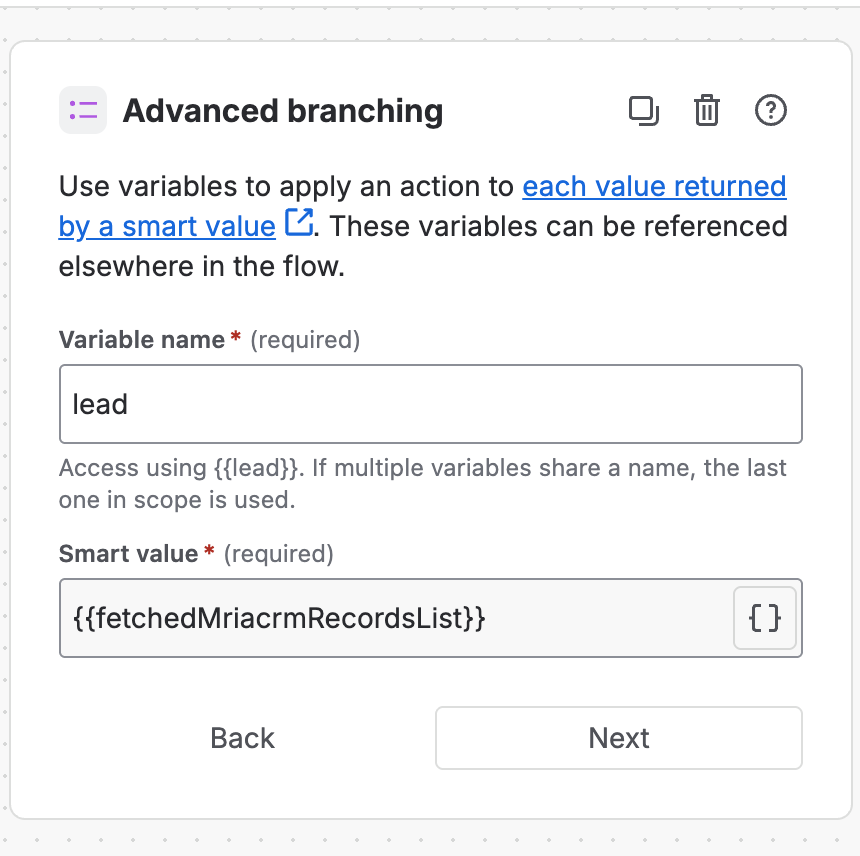
- Loop over it. Add an Advanced branching step with Smart value
{{fetchedMriacrmRecordsList}}and a variable name such aslead. Steps inside the branch run once per row and read it as{{lead.id}},{{lead.name}}and so on. - Count it.
{{fetchedMriacrmRecordsList.size}}is the number of rows — compare it with 0 to act only when something was found. - Pick one row.
{{fetchedMriacrmRecordsList.get(0).name}}reads the first row’s name.
7. Update lead #
Changes one Lead, or every open Lead linked to a work item. Set at least one field to change; fields you leave empty are not touched.
| Field | What it takes |
|---|---|
| Update | Leads linked to a work item, or One lead by id. |
| Work item key / Record id * | The reference for the option you picked. By work item, every linked Lead that is not converted is updated, at most 150. |
| Lead status | The new status. |
| Lead source | The new source. |
| Assignee | The new owner. Leave empty to keep the owner. |
| Tags | Comma-separated names. Missing tags are created. |
| Tags mode | Add (the default), Remove or Replace. Appears once tags are entered. |
Returns #
| Smart value | What it holds |
|---|---|
{{updatedMriacrmLead.id}} | Id of the updated Lead, or of the first when several were updated. |
{{updatedMriacrmLead.updatedCount}} | How many Leads were updated. 0 when the work item has no open Lead — the step still succeeds. |
{{updatedMriacrmLead.url}} | A link that opens the Lead. |
8. Update deal #
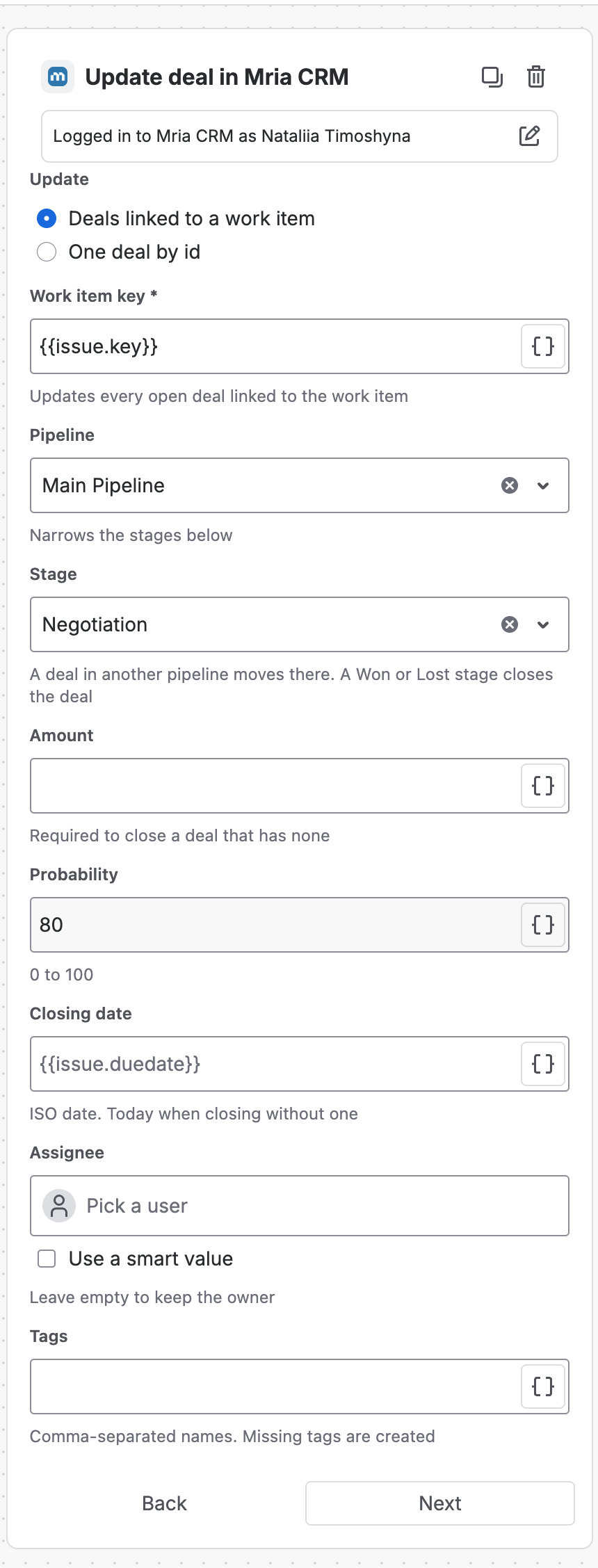
Changes one Deal, or every open Deal linked to a work item. Picking a Won or Lost stage closes the Deal.
| Field | What it takes |
|---|---|
| Update | Deals linked to a work item, or One deal by id. |
| Work item key / Record id * | By work item, every linked Deal in an open stage is updated, at most 150. |
| Pipeline | Narrows the stage list below. |
| Stage | A Deal in another pipeline moves to this one. A Won or Lost stage closes the Deal. |
| Loss reason | Appears under a Lost stage: No Budget, Chose Competitor, Product Fit Issue, Timing Not Right, No Decision, No Response or Other. |
| Amount | The new amount. Required to close a Deal that has none. |
| Probability | A whole number, 0 to 100. Overrides the stage’s default probability. |
| Closing date | ISO date. A Deal closed without one gets today’s date. |
| Assignee | The new owner. Leave empty to keep the owner. |
| Tags / Tags mode | As for Update lead. |
Returns #
| Smart value | What it holds |
|---|---|
{{updatedMriacrmDeal.id}} | Id of the updated Deal, or of the first when several were updated. |
{{updatedMriacrmDeal.updatedCount}} | How many Deals were updated. 0 when the work item has no open Deal — the step still succeeds. |
{{updatedMriacrmDeal.closed}} | True when this step closed at least one Deal. |
{{updatedMriacrmDeal.url}} | A link that opens the Deal. |
A Deal that is already Won or Lost is never reopened or closed a second time; by work item, closed Deals are simply skipped.
9. Add note #
Adds a plain-text note, the same kind you write on the record’s Notes tab.
| Field | What it takes |
|---|---|
| Add to | Records linked to a work item, or One record by id. |
| Record type * | Lead, Deal, Contact or Company — or, by work item, All (linked to the work item). Products have no notes. |
| Work item key / Record id * | By work item, every linked record of the type gets the note, at most 150. |
| Content * | Plain text, up to 10,000 characters. Smart values are filled in before the note is saved. |
Returns #
| Smart value | What it holds |
|---|---|
{{createdMriacrmNote.noteId}} | Id of the first note added. |
{{createdMriacrmNote.notesCreated}} | How many notes were added. 0 when nothing is linked — the step still succeeds. |
{{createdMriacrmNote.skippedCount}} | Linked records the connection owner could not write to — no edit right, or a Lead already converted. |
Line breaks in Content are kept. Text from the work item is added as text and never becomes formatting or a link.
When a step fails #
A failed step stops the flow. The audit log shows the step with Action failed due to invalid input and one line saying why — the missing permission, the record that could not be found, the field that did not validate — and Jira emails the flow owner as set in the flow’s details.
| You see | What to change |
|---|---|
Set exactly one of Record id and Work item key. | Clear one of the two fields. |
| A missing permission, such as Create on Leads | Give the connection owner that right in Roles & Permissions, or switch the step to another connection. |
| A Contact email that already exists | Find the Contact first and create only when found is false. |
| A lead source that does not exist | Pick a source from the list, or add the name under Settings. |
| Closing a Deal with no amount | Set Amount in the same step. |
Some outcomes are not failures, so the flow carries on: Find record with nothing found, an update or note by work item with nothing linked, and a create whose follow-up write was skipped (check the step’s warning).
Related Pages #
- Jira Automation — connecting, who a step runs as, limits and good habits.
- Capture Leads from Web Forms — Find record, Create lead and Add note working together.
- Mria CRM Custom Fields in Jira — reading CRM data in JQL and conditions without a Mria CRM step.


