Your CRM, usable by everything in Jira that understands a field #
Mria CRM adds five read-only custom fields to Jira work items — one per entity. Each holds the CRM records linked to that work item.
That sounds small. It is not. A custom field is the currency Jira trades in: the moment your Deals and Contacts are fields, every part of Jira that has ever worked with fields works with your CRM too — search, filters, boards, sorting, bulk changes, dashboards, exports and, most usefully of all, automation. None of that needed building on our side, and none of it requires the people using it to open Mria CRM at all.
1. The five fields #
| Field | Holds |
|---|---|
| Mria CRM Leads | The Leads linked to the work item. |
| Mria CRM Deals | The Deals linked to the work item. |
| Mria CRM Contacts | The Contacts linked to the work item. |
| Mria CRM Companies | The Companies linked to the work item. |
| Mria CRM Products | The Products linked to the work item. |
They are populated from the links you already manage in a record’s Linked items section — link a work item to a Deal once and the field reflects it. There is nothing extra to maintain, and nothing to fill in by hand.
The fields are read-only. They are a window onto Mria CRM from Jira, not a way to edit CRM data — changing a Deal still happens in Mria CRM (or through an agent or the REST API).
2. Where they are available #
- Every project and every work item type — the fields are created with a global context, so there is no per-project setup.
- Search and automation work immediately once the app’s permissions are approved. You do not have to configure anything first.
- On the work item view they are hidden until an admin adds them — like any Jira custom field, they appear on a work item only once they are on that project’s screens. Out of the box they are on none.
So if you cannot see the fields on a work item but "Mria CRM Deals" is not EMPTY returns results in search, nothing is broken — the data is there, the screen just does not show it yet. A Jira admin adds them under Project settings → Screens.
The fields need the additional permissions Mria CRM requests. Until a Jira admin approves them the fields stay inactive — see Updates and New Permissions.
3. What you can query #
Each field can be used on its own, or drilled into with a parameter — a property of the linked records. Quote the whole name, because it contains spaces and a dot:
"Mria CRM Deals" is not EMPTY
"Mria CRM Deals" ~ "Northstar"
"Mria CRM Deals.Stage" = "Negotiation"- The field on its own supports
is EMPTY,is not EMPTYand~(contains) — that last one is how you find work items linked to a record by its name. - Text and User parameters support
=,!=,in,not in,is,is not. - Date and Number parameters additionally support
<,<=,>,>=, so ranges and relative dates such as-7dwork.
There are 65 parameters in total. The full list, straight from Jira’s own autocomplete:
Mria CRM Deals (16) #
| Parameter | Type |
|---|---|
"Mria CRM Deals.Assignee" | User |
"Mria CRM Deals.Closed At" | Date |
"Mria CRM Deals.Closing Date" | Date |
"Mria CRM Deals.Created At" | Date |
"Mria CRM Deals.Created By" | User |
"Mria CRM Deals.Id" | Text |
"Mria CRM Deals.Last Activity Date" | Date |
"Mria CRM Deals.Loss Reason" | Text |
"Mria CRM Deals.Pipeline" | Text |
"Mria CRM Deals.Product" | Text |
"Mria CRM Deals.Source" | Text |
"Mria CRM Deals.Stage" | Text |
"Mria CRM Deals.Tag" | Text |
"Mria CRM Deals.Type" | Text |
"Mria CRM Deals.Updated At" | Date |
"Mria CRM Deals.Updated By" | User |
Mria CRM Companies (18) #
| Parameter | Type |
|---|---|
"Mria CRM Companies.City" | Text |
"Mria CRM Companies.Company Size" | Text |
"Mria CRM Companies.Country" | Text |
"Mria CRM Companies.Created At" | Date |
"Mria CRM Companies.Created By" | User |
"Mria CRM Companies.Id" | Text |
"Mria CRM Companies.Industry" | Text |
"Mria CRM Companies.Linked Contacts" | Number |
"Mria CRM Companies.Name" | Text |
"Mria CRM Companies.Open Deals" | Number |
"Mria CRM Companies.Open Leads" | Number |
"Mria CRM Companies.Product" | Text |
"Mria CRM Companies.State" | Text |
"Mria CRM Companies.Status" | Text |
"Mria CRM Companies.Tag" | Text |
"Mria CRM Companies.Type" | Text |
"Mria CRM Companies.Updated At" | Date |
"Mria CRM Companies.Updated By" | User |
Mria CRM Leads (11) #
| Parameter | Type |
|---|---|
"Mria CRM Leads.Assignee" | User |
"Mria CRM Leads.Created At" | Date |
"Mria CRM Leads.Created By" | User |
"Mria CRM Leads.Id" | Text |
"Mria CRM Leads.Is Converted" | Text |
"Mria CRM Leads.Product" | Text |
"Mria CRM Leads.Source" | Text |
"Mria CRM Leads.Status" | Text |
"Mria CRM Leads.Tag" | Text |
"Mria CRM Leads.Updated At" | Date |
"Mria CRM Leads.Updated By" | User |
Mria CRM Contacts (11) #
| Parameter | Type |
|---|---|
"Mria CRM Contacts.Created At" | Date |
"Mria CRM Contacts.Created By" | User |
"Mria CRM Contacts.Id" | Text |
"Mria CRM Contacts.Open Deals" | Number |
"Mria CRM Contacts.Open Leads" | Number |
"Mria CRM Contacts.Product" | Text |
"Mria CRM Contacts.Status" | Text |
"Mria CRM Contacts.Tag" | Text |
"Mria CRM Contacts.Type" | Text |
"Mria CRM Contacts.Updated At" | Date |
"Mria CRM Contacts.Updated By" | User |
Mria CRM Products (9) #
| Parameter | Type |
|---|---|
"Mria CRM Products.Category" | Text |
"Mria CRM Products.Created At" | Date |
"Mria CRM Products.Created By" | User |
"Mria CRM Products.Id" | Text |
"Mria CRM Products.Name" | Text |
"Mria CRM Products.SKU" | Text |
"Mria CRM Products.Unit Type" | Text |
"Mria CRM Products.Updated At" | Date |
"Mria CRM Products.Updated By" | User |
A few things deliberately are not parameters. There is no Deals.Name, no Deals.Amount and no Leads.Email — to find work items by a record’s name, match the field itself with ~, and for money or contact details open the record. Jira will tell you plainly if you invent a parameter: Field ‘Mria CRM Deals.Name’ does not exist.
4. What this is good for #
Searching and filtering #
Any question that mixes delivery with commercial context becomes one query:
"Mria CRM Deals.Stage" in ("Negotiation", "Proposal")
  AND "Mria CRM Deals.Closing Date" < endOfMonth()
  AND status != Done
— open work standing between you and this month’s closes. Or:
"Mria CRM Leads.Assignee" = currentUser()
"Mria CRM Companies.Industry" = "Technology"
  AND "Mria CRM Companies.Open Deals" >= 1
"Mria CRM Contacts.Open Deals" > 0 AND priority = Highest
Company and Contact Type work the same way — every request from a Partner, or every ticket linked to a supplier:
"Mria CRM Companies.Type" = "Partner"
"Mria CRM Contacts.Type" in ("Vendor", "Supplier")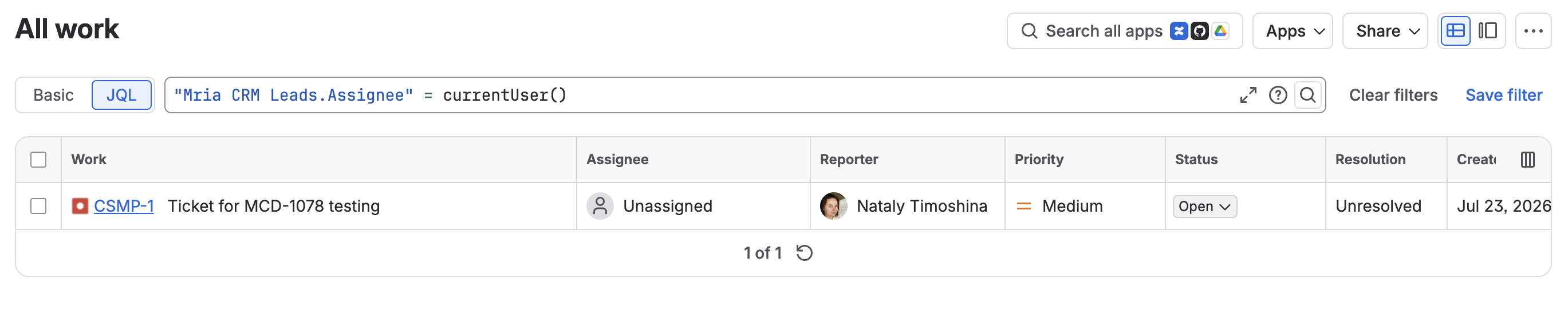
Save any of these as a filter and it behaves like every other Jira filter — a board, a dashboard gadget, a subscription.

Sorting #
Parameters sort, so a queue can be ordered by commercial urgency rather than by when a ticket happened to be raised:
project = SUP AND "Mria CRM Deals" is not EMPTY
  ORDER BY "Mria CRM Deals.Closing Date" ASC
Bulk changes #
Because the fields are searchable, they can drive a bulk change. Select everything a query returns and reprioritize, relabel, reassign or transition it in one operation — for example raising the priority of every ticket attached to a Deal in Negotiation.
The Mria CRM fields themselves cannot be bulk-edited — they are read-only. What you bulk-edit is Jira’s own fields, on the set of work items the CRM data helped you find.
Handing a list to someone outside Mria CRM #
This is the quietly valuable one. A saved filter, a dashboard gadget or a CSV export carries the CRM context with it, so finance, support leads or an exec can see which work belongs to which customer without a Mria CRM seat and without anyone assembling a spreadsheet by hand.
For reporting inside the CRM itself, see Reports.
5. Jira automation #
Reading CRM data in a flow is what these fields are for. To create or change CRM records from a flow — a Lead from a web form, a Deal moved when an epic is done — use the Mria CRM actions described on Jira Automation.
The fields are ordinary Jira fields as far as automation is concerned, which means CRM changes can drive Jira, and Jira can tell people about CRM changes — without anyone watching a list.
A worked example — tell the account owner in Slack when a Deal gets attached to one of their team’s work items:
- In Jira, open Project settings → Automation (or global Automation) and create a rule.
- Trigger: Field value changed, and choose Mria CRM Deals as the field.
- Condition (optional): narrow it — a particular project, work item type, or
"Mria CRM Deals.Stage" = "Negotiation"so only late-stage deals raise a noise. - Action: Send Slack message, Send email, or anything else automation offers — transition the work item, add a comment, set a priority, page an on-call.
Other shapes worth stealing:
- Raise priority automatically when a ticket is linked to a Deal above a certain stage.
- Comment on a work item with the linked Company, so the next person to read it has the context.
- Flag work still open on a Deal whose Closing Date has passed.
- Notify an account owner —
"Mria CRM Deals.Assignee"is a User parameter, so the rule can send to the person who owns the deal rather than to a fixed address.
Mria CRM did not have to build any of this. Automation is Atlassian’s, and it works on these fields because they are real Jira custom fields — the same reason boards, filters and exports do. Being Jira-native is the whole point: you get the rest of Jira for free.
6. Permissions #
- The fields respect Mria CRM’s own Roles & Permissions — someone who cannot see a record in the CRM does not get it through a Jira field.
- Which projects and screens show the fields is Jira administration, not a Mria CRM setting.
- Sharing a filter or dashboard shares whatever the viewer is allowed to see, the same as any Jira filter.
Related Pages #
- Jira Integration — the Mria CRM panel on a work item, and linking in both directions.
- Teamwork Graph & Atlassian Search — the other way CRM records reach Jira: findable in Atlassian search rather than queryable as fields.
- Reports — reporting from inside Mria CRM.


