One pull a day: keep Mria CRM in step with a CRM that cannot push #
The webhook pages on this site cover CRMs that can post a lead the moment it changes. Not every system can: a legacy CRM, a partner’s portal, a reporting database, a nightly export on a file share. For those the pattern is a daily pull: once a day, fetch what changed, create the Leads Mria CRM does not have yet, and note the ones it does. This page shows two ways to do that pull, with the same result in Mria CRM:
- Jira Automation — a flow with a Scheduled trigger, a Send web request that fetches the leads, and an Advanced branching loop over them. No code, no server, runs inside your site.
- REST API + Python — a 150-line script that calls the Mria CRM REST API, scheduled by cron, launchd or a CI runner. For sources that need pagination, a database driver or a transformation Jira cannot express.
Both read the same sample feed, a JSON file attached to this page, so you can try either before pointing it at your CRM: sample-crm-leads.json.
1. What you get #
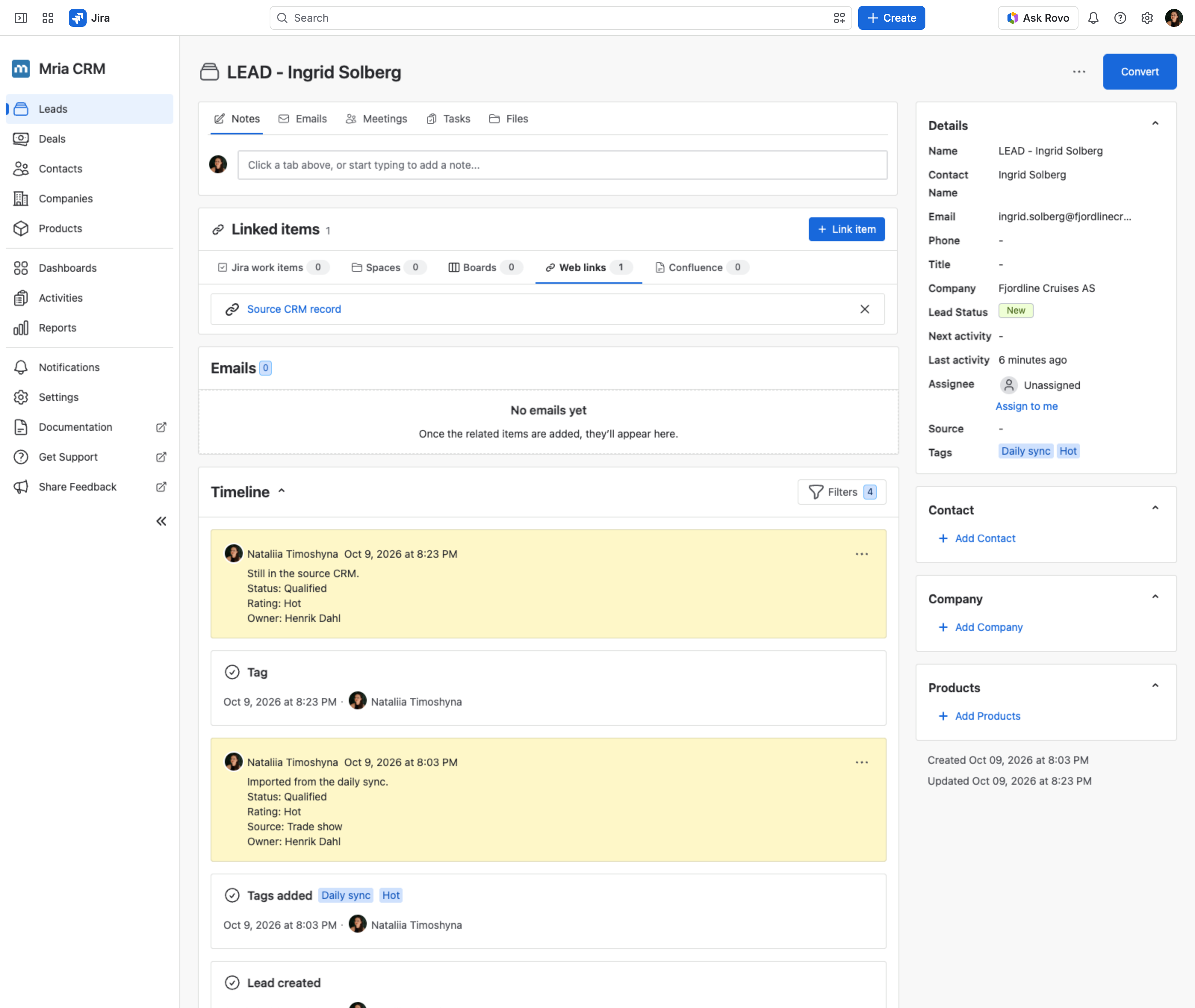
The feed lists three leads from a legacy CRM. After one run Mria CRM holds LEAD – Ingrid Solberg, LEAD – Rafael Costa and LEAD – Mei Tanaka, each tagged Daily sync and the lead’s rating, with a web link to the source record and a note with status, source and owner. The next day’s run finds all three already there and only adds the day’s note and tags. Nothing is ever created twice.
2. Route A — Jira Automation, no code #
Two flows share the work. A scheduled flow fetches the feed once a day and posts every lead it contains to the second flow. That second flow is the one every webhook page on this site uses — Incoming webhook, Find record, If/else — and handles one lead per call. The split is not decoration: inside a loop Jira Automation can test the loop variable, but it cannot see what a Mria CRM step returned, so the “is this person already a Lead?” question has to be asked in a flow of its own (section 5 has the detail).
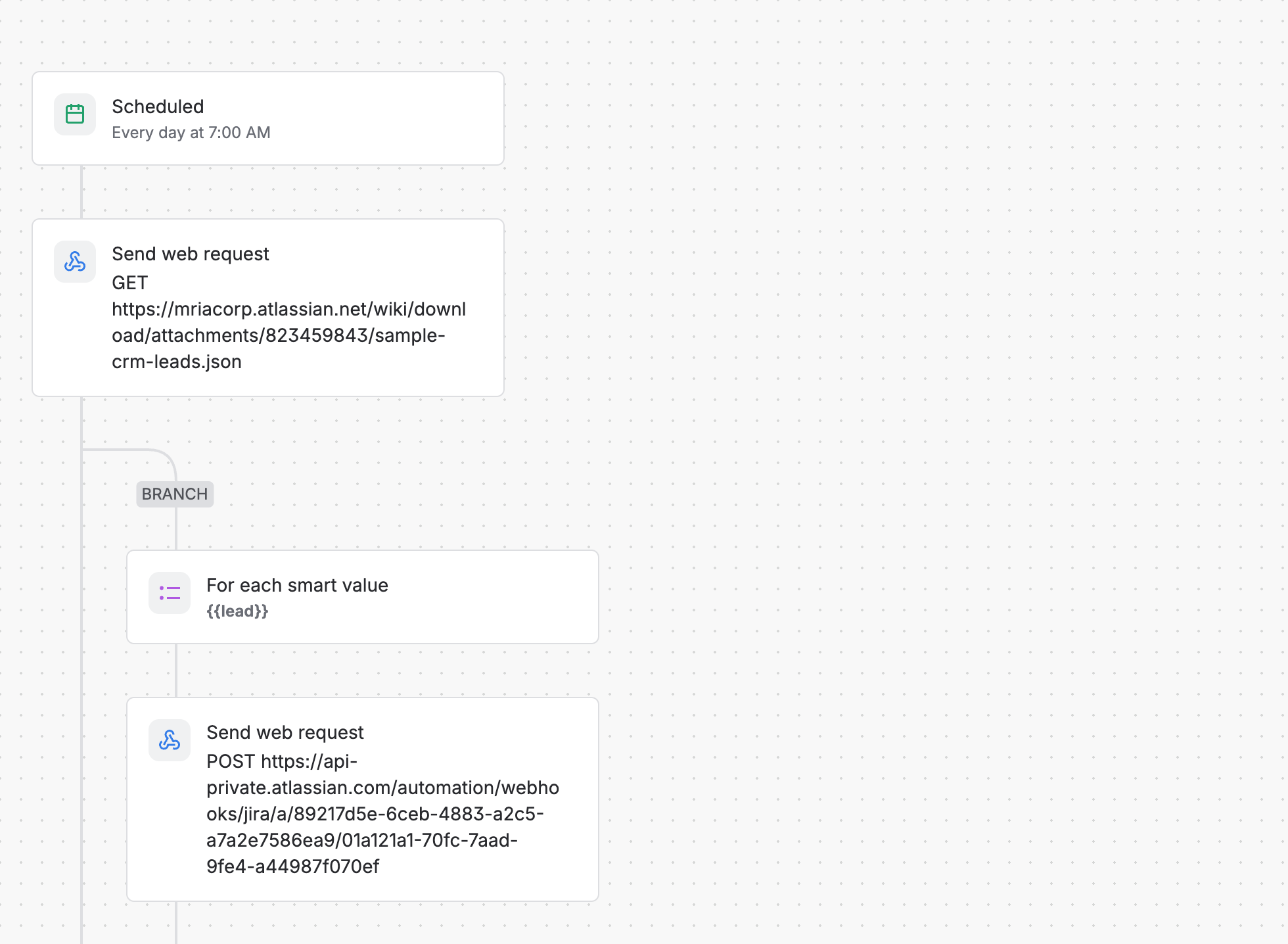
Flow 1 — the daily fetch #
- Scheduled — every day at 7:00.
- Send web request — GET the feed, wait for the response.
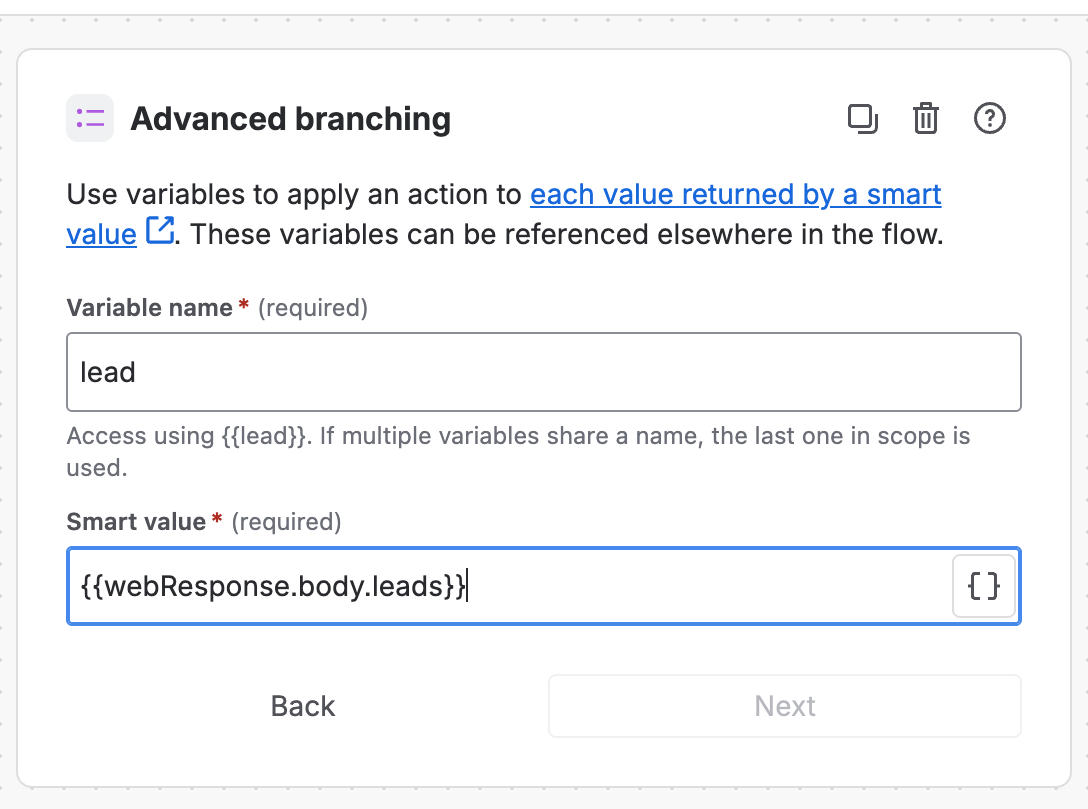
- Advanced branching — one pass per lead in
{{webResponse.body.leads}}, as the variable{{lead}}. - Send web request inside the loop — POST the lead to flow 2.
Step 1. The Scheduled trigger #
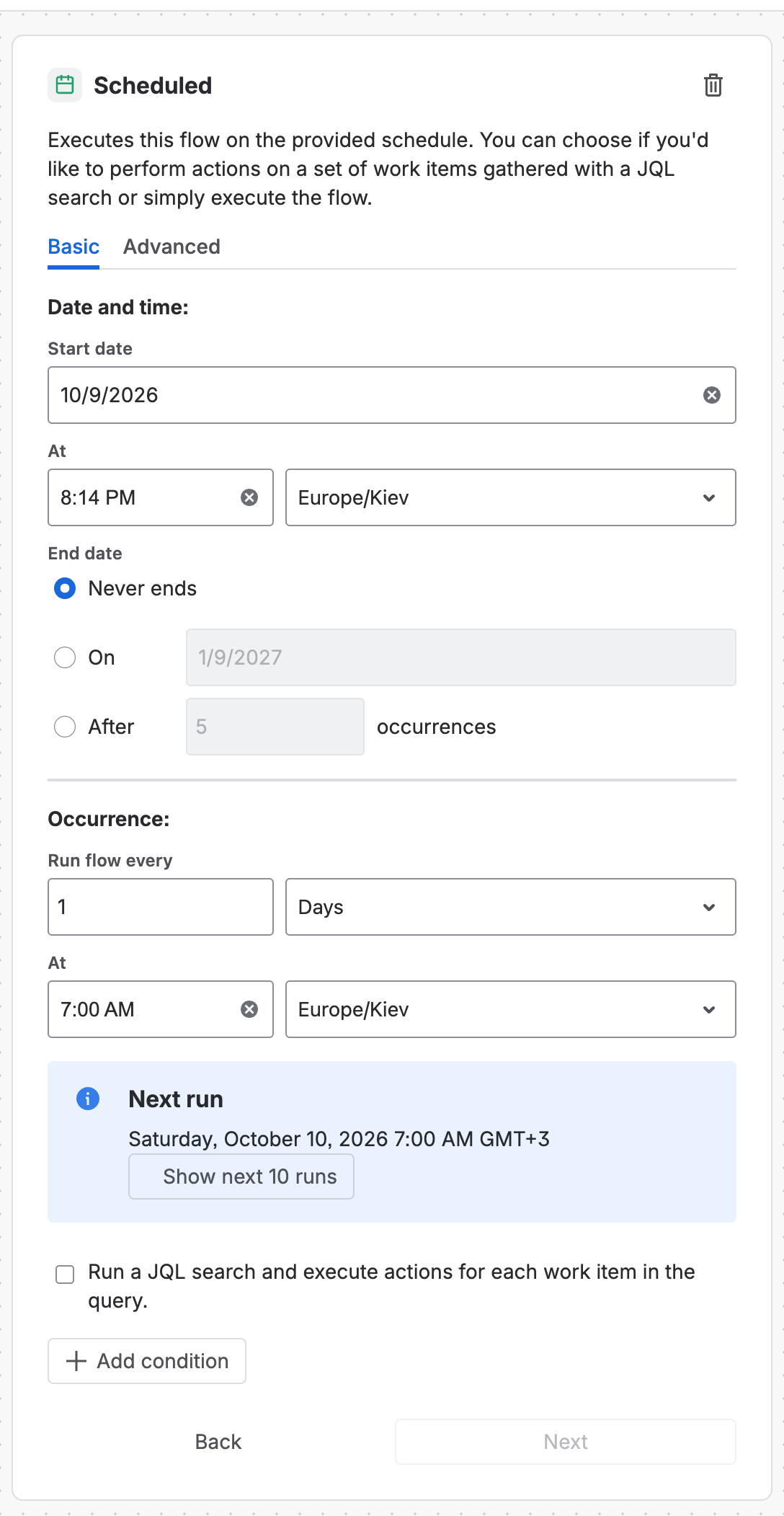
Create the flow from scratch and pick the trigger Scheduled. On the Basic tab set Run flow every to 1 Days at the time you want, in your time zone; the panel shows the next run. Leave Run a JQL search and execute actions for each work item unticked — this flow is not about work items. The Advanced tab takes a cron expression instead.
Step 2. Fetch the leads #
Add the action Send web request:
| Field | Value |
|---|---|
| Web request URL | the feed. For a real CRM, its list endpoint with a date filter, for example Pipedrive https://api.pipedrive.com/v1/persons?api_token=… or HubSpot https://api.hubapi.com/crm/v3/objects/contacts/search (POST with a filter on lastmodifieddate) |
| HTTP method | GET |
| Web request body | Empty |
| Delay execution of subsequent flow actions until we’ve received a response | ticked — without it {{webResponse}} is empty |
| Headers | whatever the source needs, for example Authorization: Bearer <token> with Hidden ticked so the token is masked in the editor and the audit log |
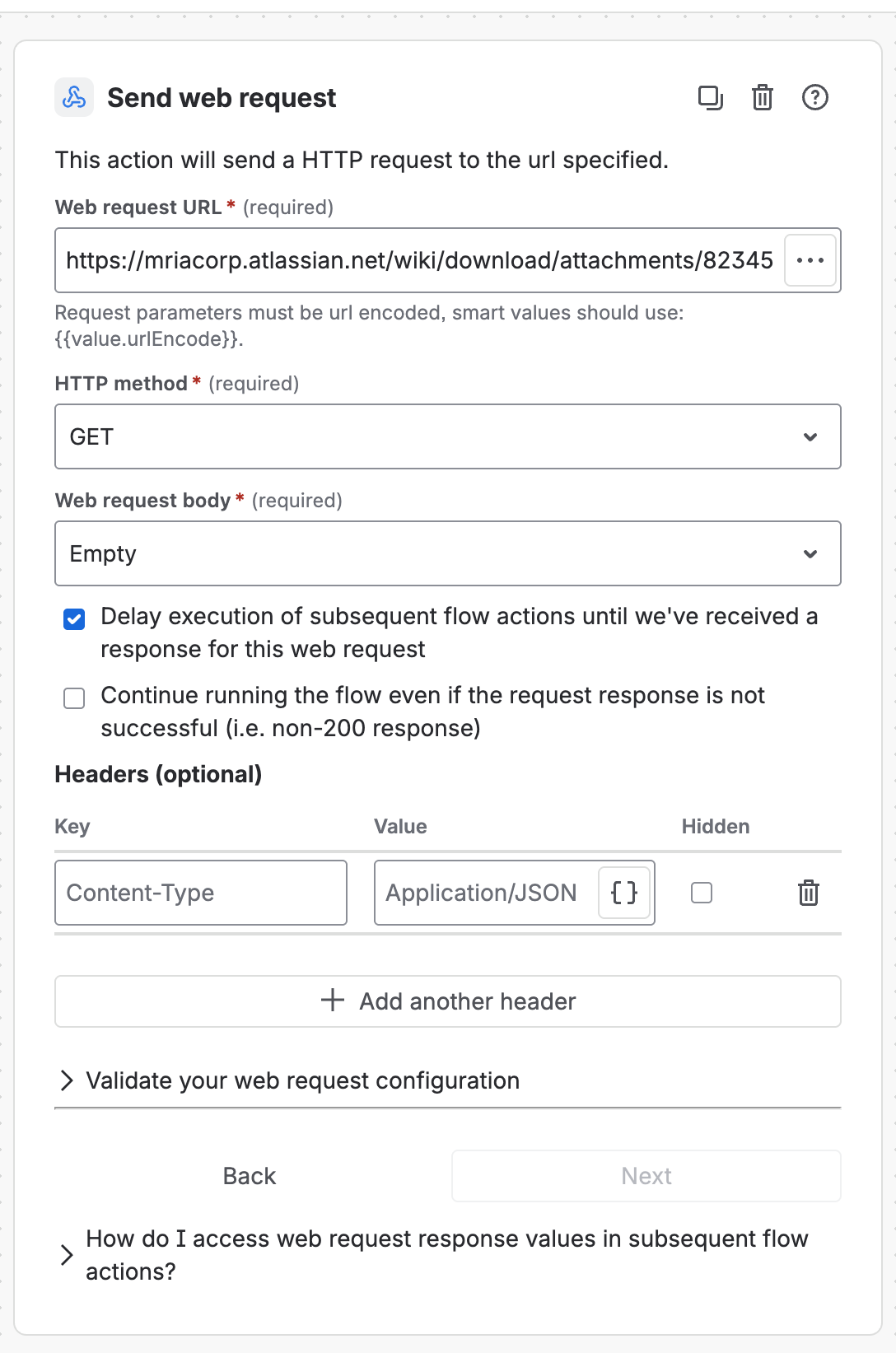
Jira follows redirects and parses a JSON answer into {{webResponse.body}}; the sample feed is a Confluence attachment behind a 302 and works as is.
Step 3. Loop over the leads #
Add a Branch → Advanced branching. Variable name lead, Smart value {{webResponse.body.leads}}. Everything inside the branch runs once per element, and the element is {{lead}} — so the email is {{lead.email}} and the company {{lead.company}}. The path after body is simply the JSON path of the list in the response; Pipedrive’s is {{webResponse.body.data}}, HubSpot’s {{webResponse.body.results}}.
Step 4. Post each lead to flow 2 #
Inside the branch add a second Send web request:
| Field | Value |
|---|---|
| Web request URL | the Webhook URL of flow 2 (below) |
| HTTP method | POST |
| Web request body | Custom data, the JSON below — every value is a smart value of the loop variable |
| Headers | X-Automation-Webhook-Token = the secret of flow 2, Hidden ticked |
| Delay execution… | unticked — fire and forget; flow 2 has its own audit log |
{"first_name": "{{lead.first_name}}", "last_name": "{{lead.last_name}}", "email": "{{lead.email}}", "company": "{{lead.company}}",
 "status": "{{lead.status}}", "rating": "{{lead.rating}}", "source": "{{lead.source}}", "owner": "{{lead.owner}}", "url": "{{lead.url}}"}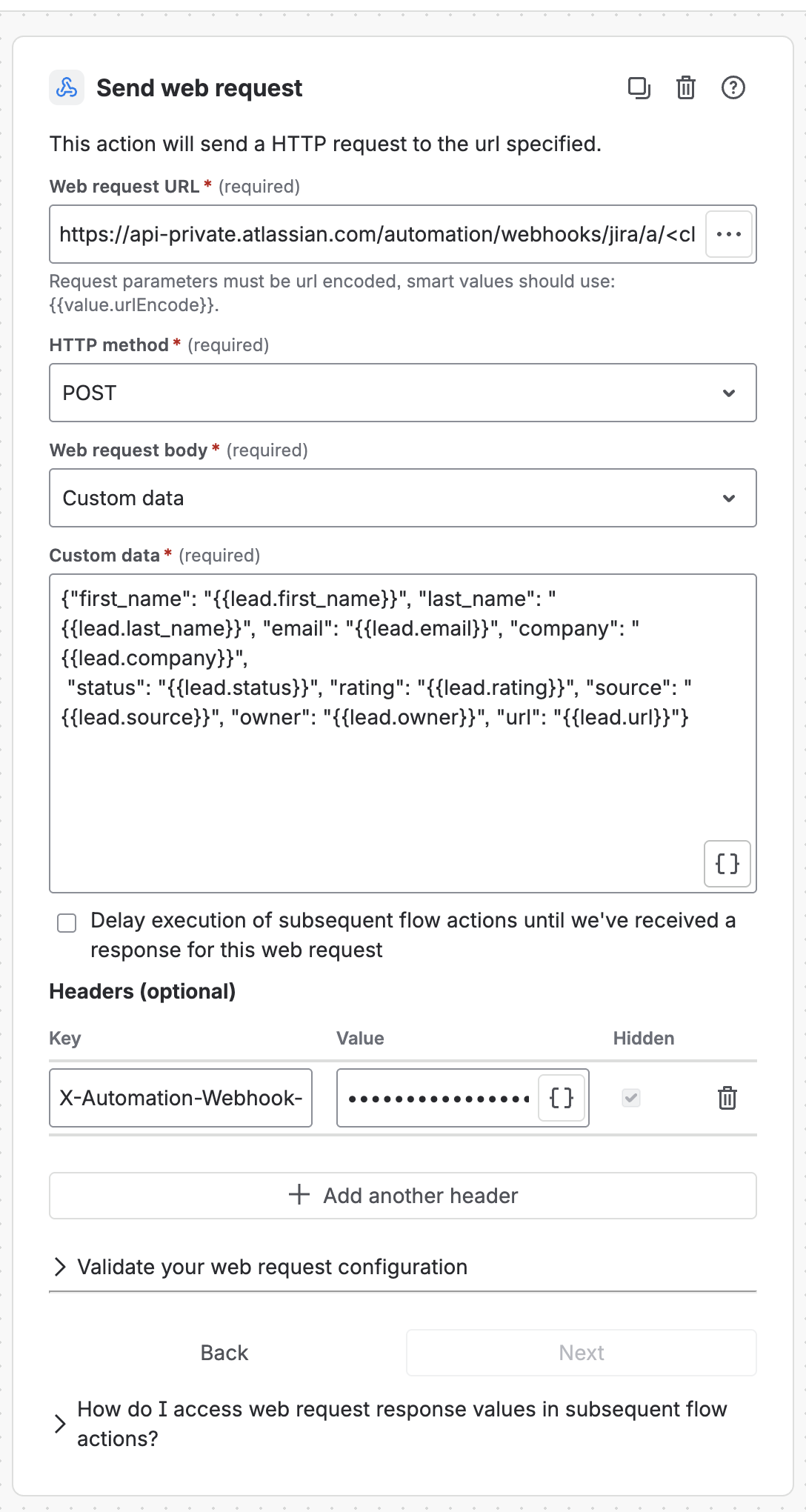
Flow 2 — one lead in, one Lead out #
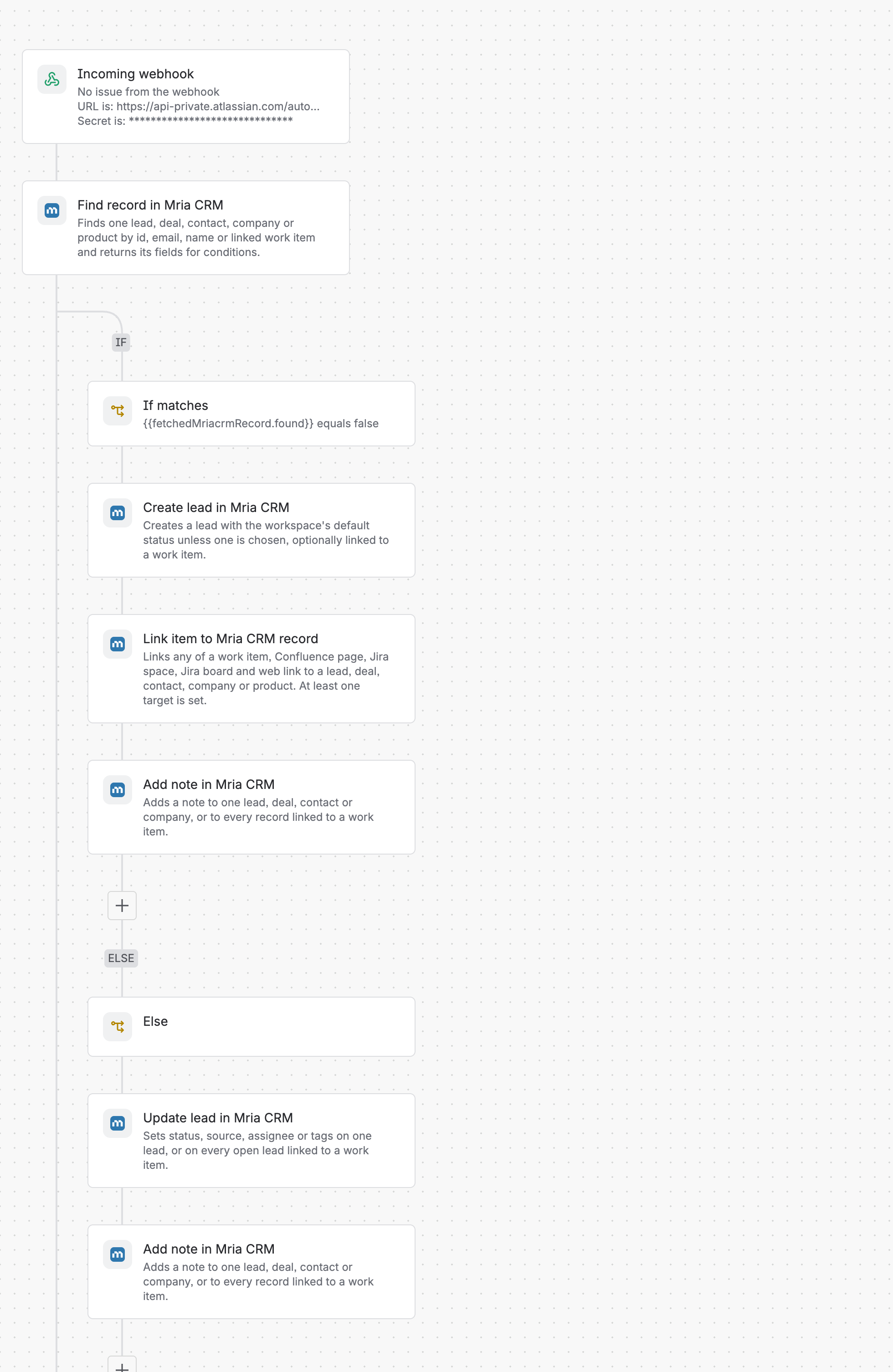
Create a second flow with the trigger Incoming webhook (Work item criteria No work items from the webhook, Generate secret), exactly as on HubSpot Leads to Mria CRM, and give it these steps:
| Step | Configuration |
|---|---|
| Find record in Mria CRM | Find by Email, Record type Lead, Email {{webhookData.email}} |
| If/else block | {{smart values}} condition: {{fetchedMriacrmRecord.found}} equals false |
| If — Create lead | Contact name {{webhookData.first_name}} {{webhookData.last_name}}, Contact email {{webhookData.email}}, Company name {{webhookData.company}}, Tags Daily sync, {{webhookData.rating}}, Work item key empty |
| If — Link item | Web link, URL {{webhookData.url}}, text Source CRM record, Record type Lead, Record id {{createdMriacrmLead.id}} |
| If — Add note | One record by id, Lead, {{createdMriacrmLead.id}}: Imported from the daily sync. Status: {{webhookData.status}} / Rating: {{webhookData.rating}} / Source: {{webhookData.source}} / Owner: {{webhookData.owner}} |
| Else — Update lead | One lead by id, {{fetchedMriacrmRecord.id}}, Tags Daily sync, {{webhookData.rating}} (Tags mode add) |
| Else — Add note | One record by id, Lead, {{fetchedMriacrmRecord.id}}: Still in the source CRM. Status: {{webhookData.status}} / Rating: {{webhookData.rating}} / Owner: {{webhookData.owner}} |
Step 5. Run it once by hand, then leave it on #
Turn both flows on. A scheduled flow can be run immediately from its ⋯ → Run scheduled flow now menu, which is the way to test it without waiting for 7:00. Flow 1’s audit log shows the fetch and one POST per lead; flow 2’s shows one run per lead with the branch it took:
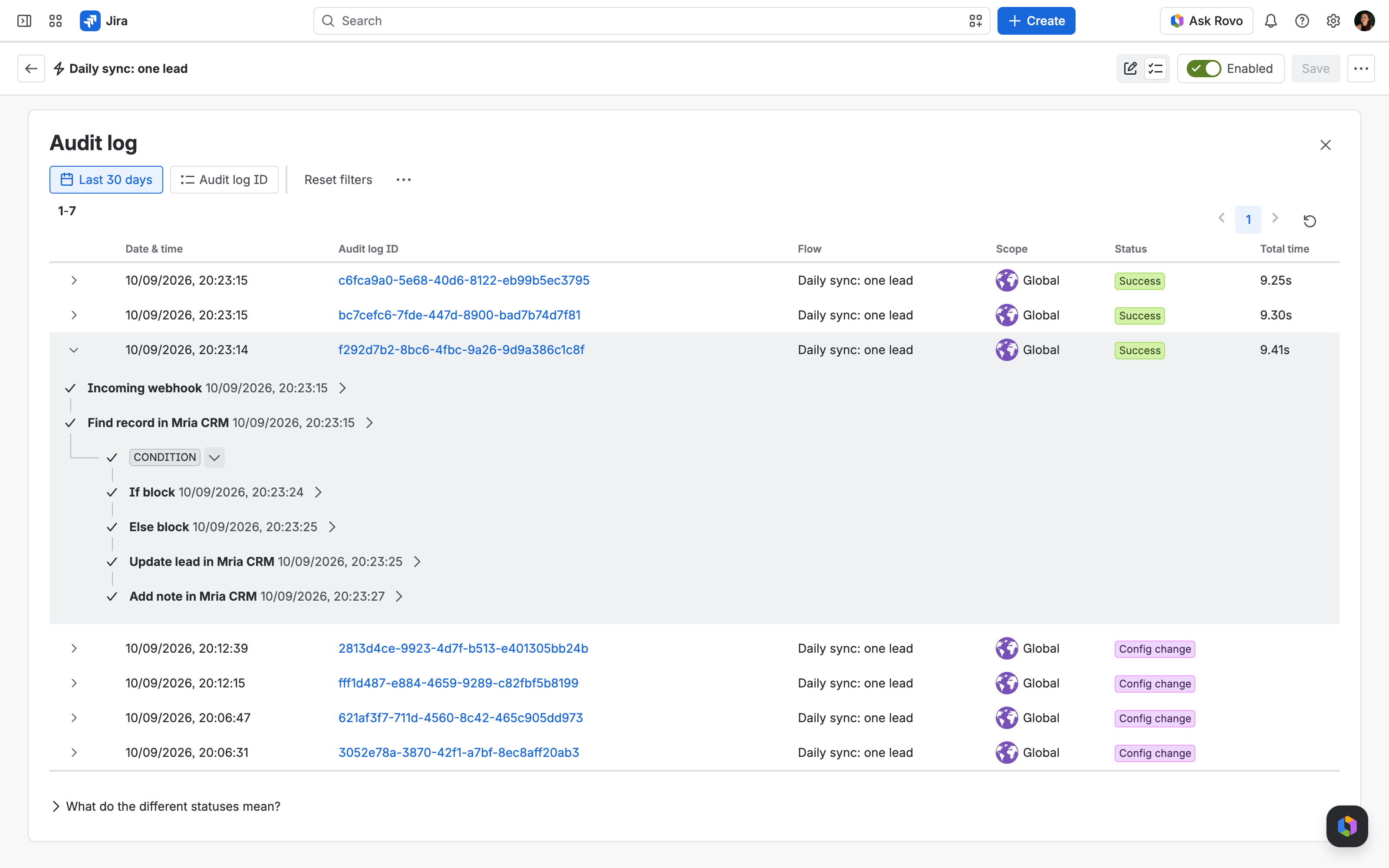
What the scheduled route is good at, and where it stops. Everything runs inside the site with no server to look after, the secret of flow 2 is a Hidden header, and the audit logs are the monitoring. Count the executions, though: one run of flow 1 plus one run of flow 2 per lead, every day, against the site’s monthly automation allowance. And a single web request returns a single page, so a source that paginates needs a date filter on the request or the script route below.
3. Route B — the REST API and a Python script #
The script mria_daily_sync.py does the same four things with the REST API: fetch the source, search Mria CRM for each email, create what is missing, note what exists. It uses only the Python standard library.
Step 1. An OAuth 2.0 integration for the script #
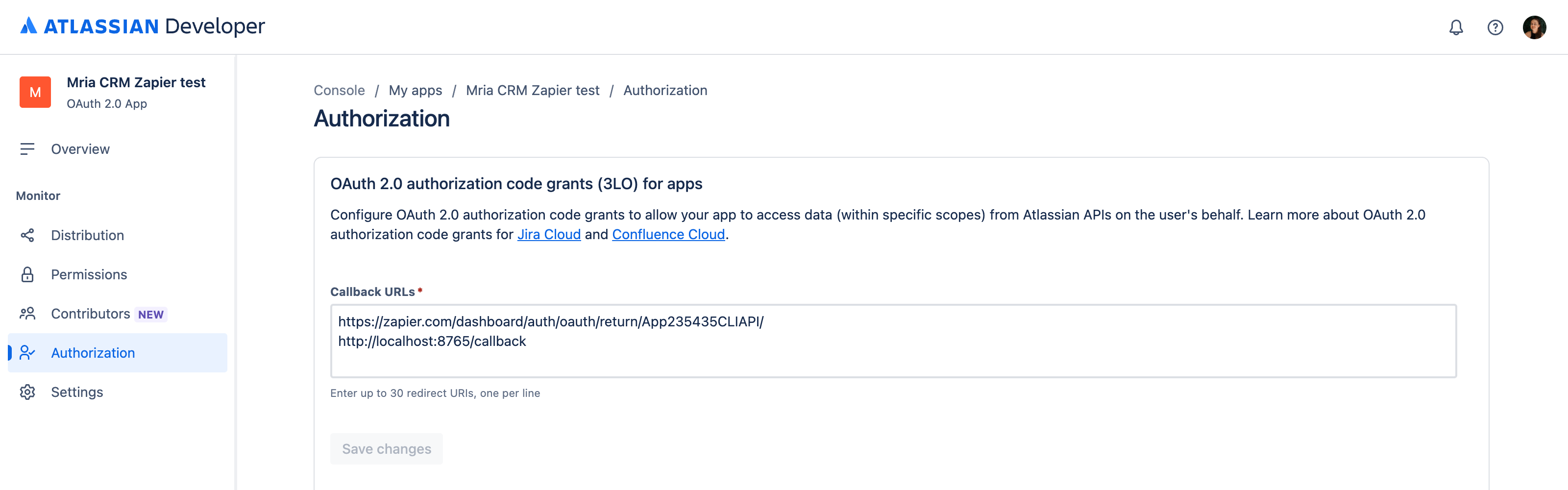
The REST API accepts only Atlassian OAuth 2.0 (3LO) tokens, so the script needs its own integration and a one-time consent. The setup is the one on Zapier: Lead Capture with one difference: the Callback URL is http://localhost:8765/callback, where the script listens during the consent.
- developer.atlassian.com → Create → OAuth 2.0 integration, then Permissions: add Mria CRM with
read:crm:custom write:crm:custom read:profile:customand the Jira API scoperead:forge-app:jira. - Authorization → OAuth 2.0 (3LO) → Configure: add
http://localhost:8765/callbackto the callback URLs (up to 30, one per line). - Settings: copy the Client ID and Secret into the script’s
.env(below).
Step 2. Configure and authorize once #
# .env next to the script (keep it out of version control)
MRIA_CLIENT_ID=<client id>
MRIA_CLIENT_SECRET=<secret>
MRIA_CLOUD_ID=<cloud id of your site>
MRIA_APP_ID=f3bb4fc8-7911-405b-959b-002b3292a3d0
MRIA_ENV_ID=<environment id of your Mria CRM install>
SOURCE_URL=https://mriacorp.atlassian.net/wiki/download/attachments/823459843/sample-crm-leads.json
# SOURCE_TOKEN=<bearer token for the source, if it needs one>
The cloud id and environment id are the two ids in the Base URL that Administration → Connected apps → Mria CRM → App REST APIs shows. Then:
python3 mria_daily_sync.py --authThe browser opens Atlassian’s consent page; pick the site and accept. The script stores the access and refresh tokens in .mria-token.json (mode 600) and refreshes them on every later run — Atlassian rotates refresh tokens, and the script always keeps the newest.
Step 3. Run it, then schedule it #
python3 mria_daily_sync.py --dry-run   # shows what would change
python3 mria_daily_sync.py             # does it
Schedule it wherever something already runs daily:
# cron, every day at 07:00
0 7 * * * cd /opt/mria-sync && /usr/bin/python3 mria_daily_sync.py >> sync.log 2>&1
# GitHub Actions (.github/workflows/mria-sync.yml); .env values become repository secrets
on:
schedule:
- cron: "0 7 * * *"
jobs:
sync:
runs-on: ubuntu-latest
steps:
- uses: actions/checkout@v4
- run: python3 mria_daily_sync.py
env:
MRIA_CLIENT_ID: ${{ secrets.MRIA_CLIENT_ID }}
MRIA_CLIENT_SECRET: ${{ secrets.MRIA_CLIENT_SECRET }}
MRIA_CLOUD_ID: ${{ secrets.MRIA_CLOUD_ID }}
MRIA_APP_ID: f3bb4fc8-7911-405b-959b-002b3292a3d0
MRIA_ENV_ID: ${{ secrets.MRIA_ENV_ID }}
SOURCE_URL: ${{ secrets.SOURCE_URL }}Where the token lives matters for CI. The refresh token rotates on every run, so a runner that starts from a clean checkout needs the newest .mria-token.json restored before the run and saved after it (a cache step, or a secret you update). A server with a persistent directory needs nothing.
What the script calls #
| Call | Purpose |
|---|---|
GET /me | proves the token works and names the user the records will be attributed to |
POST /leads/search with filter.search | finds a Lead by email (search also matches names and companies, so the script keeps only an exact email match) |
POST /leads | creates the Lead with createNewContact and createNewCompany so the contact and company records exist too |
POST /leads/{id}/notes | writes the day’s note |
Tags are the one thing the script leaves to Jira Automation: the REST API has no endpoint that lists or creates tags, and PATCH /leads/{id} replaces the whole tag set by id. If you need tags from a script, let a flow apply them — for example the HubSpot Leads to Mria CRM flow’s Update lead step, fed by an Incoming webhook the script calls.
4. Choosing between the two #
| Jira Automation | REST API + script | |
|---|---|---|
| Needs | a site admin and a source that answers one GET or POST | a developer, somewhere to run Python daily, an OAuth integration |
| Source pagination | one page per flow, fetch more with a second web request | a loop, any size |
| Transformations | smart value functions (text, dates, lists) | anything |
| Tags on the Lead | yes, Create lead and Update lead | no tag endpoint; notes only |
| Secrets | Hidden header in the editor | .env or CI secrets; tokens rotate |
| Runs counted against | the site’s monthly automation executions: one for the fetch plus one per lead for flow 2 | nothing on the Atlassian side |
| Failure handling | audit log, email on error | exit code and log; retry from cron |
5. Troubleshooting #
| What you see | Why, and what to do |
|---|---|
| The branch runs zero times | The smart value does not point at the list. Put a Log action with {{webResponse.body}} before the branch and read the shape in the audit log; the path is case-sensitive. |
| {{webResponse}} is empty | Delay execution of subsequent flow actions is not ticked, or the source answered with an error. The audit log shows the status code. |
| A condition on {{fetchedMriacrmRecord.found}} inside the loop never passes | Inside Advanced branching a condition sees the loop variable but not the output of a Mria CRM step (the audit log shows the first value blank). That is why the per-lead logic lives in flow 2. |
| The flow runs but every lead is created again | Find record searches by email; the feed must carry the same email the Lead was created with, and Open only must be left on its default so converted leads do not count. |
| Script: no token yet / 401 | Run –auth once on the machine that will run the sync; a token file from another machine is already rotated away. |
| Script: 403 on writes | The Mria CRM license is inactive, or the integration lacks write:crm:custom. |
| Aborted — Monthly flow executions have been exceeded | Every branch element counts as an execution. For large daily batches use the script, or filter the source by last-modified date. |
Related Pages #
- Jira Automation — how Mria CRM steps work, and the webhook-driven use cases.
- Automation Actions Reference — every field of Find record, Create lead, Update lead, Link item and Add note.
- REST API — authentication, base URL and the endpoints the script calls.
- Zapier: Lead Capture — the OAuth integration set up step by step.
- Atlassian: Send web request and Branches — the two building blocks of Route A.


