Power BI has no connector for Mria CRM. The REST API gives read access to everything a pipeline dashboard is built from: deals with their pipeline, stage, amount, probability and close date, companies, contacts, leads and custom fields.
This page shows how to bring that data into Power BI and keep it fresh, and comes with an export script and a Power BI template. The script, the template and every call below were run against a test site and in Power BI Desktop; the refresh settings of the Power BI service are quoted from Microsoft’s documentation.
1. How it works #
- A small script runs on a schedule. It reads Mria CRM through the REST API, read-only, and writes CSV files to a folder.
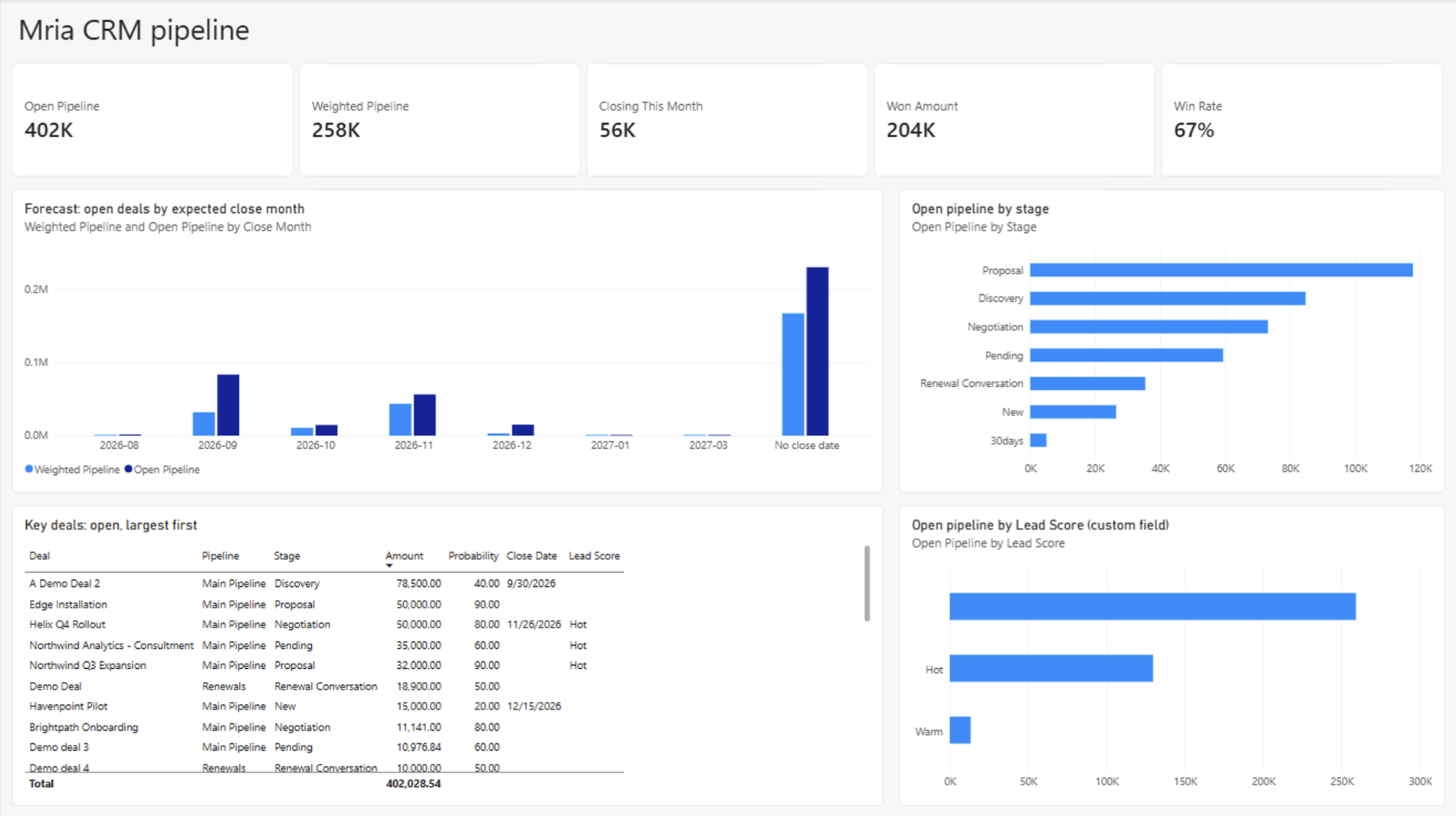
- A Power BI semantic model reads the files. The template on this page is such a model, with a first report page.
- Power BI refreshes the model on its own schedule, the way it refreshes any file-based model.
Why Power BI does not call the API itself
The API signs in with Atlassian OAuth 2.0 (3LO). An access token lives one hour. The refresh token that renews it is replaced every time it is used, and the one just used stops working ten minutes later (Atlassian: reuse interval; the ten minutes were confirmed on a test site). A client has to store the new refresh token after every use. A Power BI query can read a token but cannot save one, so a model that calls the API directly refreshes for about ten minutes and then fails for good. The export script stores the new token on every run and keeps working unattended. As a side effect, no API secret ends up inside a Power BI file.
2. Before you start #
- The API is enabled on the site and you have an OAuth 2.0 integration: see REST API: Setup. Register
http://localhost:8765/callbackas its callback URL. For reporting, give the integrationread:crm:customandread:profile:custom, plusread:forge-app:jiraunder Jira API, and leavewrite:crm:customout. - A user to give consent. The API always acts as a user: there is no API key and no token that belongs to the site rather than to a person. The export contains what that user’s Mria CRM role lets them view. If the integration should not depend on one colleague’s account, use a dedicated Atlassian account with a view-only Mria CRM role and give consent as that account.
- A computer or server that is on when the export should run, with Python 3.9 or later. The script needs no additional packages.
- Power BI Desktop to open the template, and the Power BI service if the report should refresh on a schedule and be shared.
Read-only by design
The script asks for the read scopes only and contains no call that writes. A token without the write scope cannot change CRM data even if another program gets hold of it. Creating a deal with the script’s token was refused on the test site:
HTTP 403
Missing required scopes for path=/v1/deals, method=POST. Missing: [write:crm:custom]
3. Step 1 — Export the data #
Download mria_powerbi_export.py and put it in a folder of its own. It is plain Python with no credentials inside: they come from environment variables or from a .env file next to the script.
MRIA_CLIENT_ID=<client id of the integration>
MRIA_CLIENT_SECRET=<its secret>
MRIA_CLOUD_ID=<cloud id of your Atlassian site>
The cloud id is the first UUID of the Base URL that admin.atlassian.com shows under App REST APIs; REST API: Authorization with curl shows where to find each value.
python mria_powerbi_export.py --auth                  # once: consent in the browser
python mria_powerbi_export.py --out C:\MriaExport     # every run: rewrites the files
The first command opens the Atlassian consent screen in a browser. Sign in as the user from section 2, choose the site and accept. The second command is the one to schedule. It prints what it wrote:
  Deals.csv          62 rows
  Stages.csv         20 rows
  Companies.csv     102 rows
  Contacts.csv      103 rows
  Leads.csv         100 rows
done in 108s -> C:\MriaExport
The files #
| File | Holds |
|---|---|
Deals.csv | One row per deal: name, pipeline, stage, Stage Type (OPEN, CLOSED_WON or CLOSED_LOST), amount, probability, Weighted Amount (amount × probability), company, primary contact, assignee, deal type, source, loss reason, Close Date, Close Month (2026-11, or No close date), age in days, created, updated, last and next activity — and one column per custom field. |
Stages.csv | Every pipeline with its stages, in order, with the stage type and default probability. |
Companies.csv | Name, country, city, type, status, and the counts of open leads, open deals and linked contacts. |
Contacts.csv | Name, email, job title, phone, company, type and status. |
Leads.csv | Name, status, contact, company, created, updated, last and next activity. |
ExportInfo.csv | When the export ran and how many rows each file has. |
The files are UTF-8 and comma-separated. Dates and times are in UTC. Every run writes the full current state, so a deal deleted in Mria CRM is gone from the next file, and each file is replaced in one step: Power BI never reads a half-written file.
Custom fields #
Every custom field of a deal becomes a column of Deals.csv, named after the field. A dropdown holds the option’s name, a multi-select its names separated by commas. A field added in Mria CRM later simply appears as a new column.
The list of deals does not include custom field values, so the script reads them one deal at a time. That is one extra call per deal, and it is what an export spends most of its time on: on the test site 62 deals took 17 seconds without custom fields and about two minutes with them.
| Option | Does |
|---|---|
--custom-fields deal | The default: custom fields of deals. |
--custom-fields deal,company,contact,lead | Custom fields of the other record types as well, as columns of their files. One call per record of each type named. |
--custom-fields none | No custom fields. The fastest export. |
--pause 0.5 | Seconds to wait between calls. The default is 0.2. |
Schedule it #
Run the export as often as the dashboards need fresh data, with the scheduler of the machine it is on:
# Windows, every hour
schtasks /create /tn "Mria CRM export" /sc hourly /tr "python C:\Mria\mria_powerbi_export.py --out C:\MriaExport"

# Linux or macOS, every hour (crontab -e)
0 * * * * python3 /opt/mria/mria_powerbi_export.py --out /data/mria-export
Run it under the account that ran --auth, so that it can read and replace the token file.
The token file is a key, and it has one owner
After --auth the script keeps its tokens in .mria-token.json next to itself. Protect the file like a password. And let nothing else use the refresh token in it — not a second copy of the script, not Postman, not a Power BI query: whoever refreshes first gets the new token, the other holder is locked out ten minutes later, and the next run asks for --auth again. A token that is not used for 90 days expires, so a scheduled export also keeps the consent alive.
4. Step 2 — Open the template in Power BI Desktop #
Download mria-crm-pipeline-template.pbit and open it. Power BI Desktop asks for one value, the folder the script writes to:
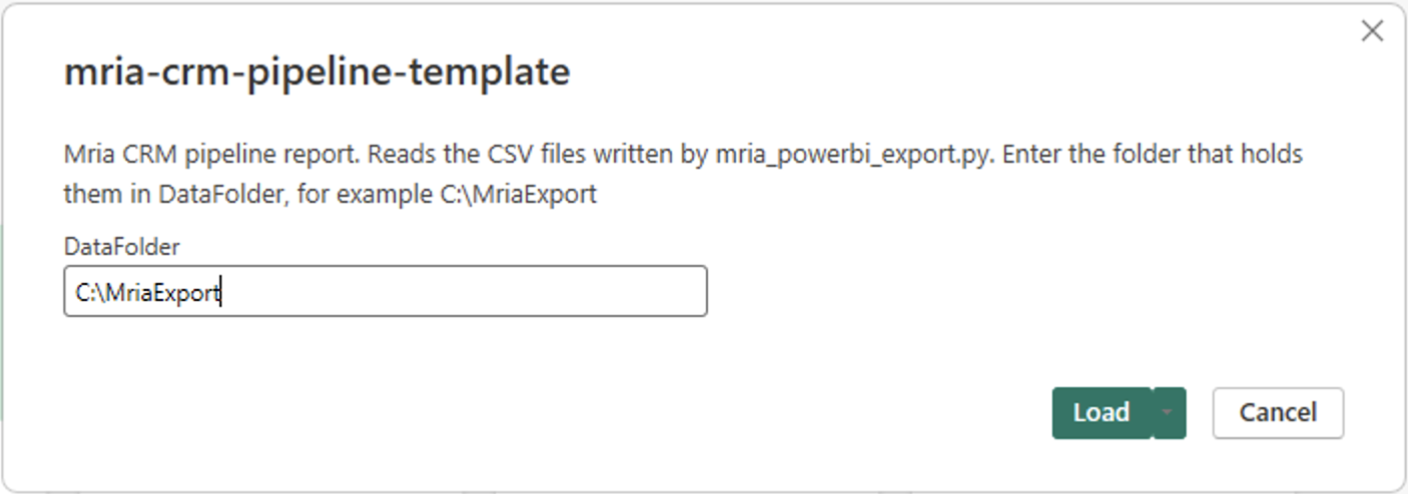
Select Load. The template reads the six files and opens the report page shown in section 1. Save it as a .pbix file: that is your report from here on. The template holds no data and no credentials.
What is in the model #
| Table | From | Related to |
|---|---|---|
| Deals | Deals.csv | Companies |
| Stages | Stages.csv | — |
| Companies | Companies.csv | — |
| Contacts | Contacts.csv | Companies |
| Leads | Leads.csv | Companies |
| Export Info | ExportInfo.csv | — |
| Measure | Meaning | DAX |
|---|---|---|
| Open Pipeline | Amount of all open deals | CALCULATE ( SUM ( Deals[Amount] ), Deals[Stage Type] = "OPEN" ) |
| Weighted Pipeline | Open deals, each counted at its probability | CALCULATE ( SUM ( Deals[Weighted Amount] ), Deals[Stage Type] = "OPEN" ) |
| Closing This Month | Open deals whose close date is in the current month | CALCULATE ( [Open Pipeline], Deals[Close Date] >= DATE ( YEAR ( TODAY () ), MONTH ( TODAY () ), 1 ), Deals[Close Date] <= EOMONTH ( TODAY (), 0 ) ) |
| Won Amount | Amount of won deals | CALCULATE ( SUM ( Deals[Amount] ), Deals[Stage Type] = "CLOSED_WON" ) |
| Open Deals | Number of open deals | CALCULATE ( COUNTROWS ( Deals ), Deals[Stage Type] = "OPEN" ) |
| Win Rate | Won deals as a share of all closed deals | DIVIDE ( CALCULATE ( COUNTROWS ( Deals ), Deals[Stage Type] = "CLOSED_WON" ), CALCULATE ( COUNTROWS ( Deals ), Deals[Stage Type] <> "OPEN" ) ) |
| Data As Of | When the export ran (UTC). Put it on the page so readers see how fresh the numbers are. | MAX ( 'Export Info'[Exported At] ) |
The measures filter on Stage Type, not on stage names, so they hold for every pipeline and survive a renamed stage. Amounts are summed as they are stored: if your deals are in more than one currency, convert before you add them up.
Your custom fields #
The template knows the built-in columns only. Your custom fields come in by themselves: after the load every custom field column of Deals.csv is a column of the Deals table — here Competitor, Estimated Budget, Lead Score, Next Step and Salesforce ID:
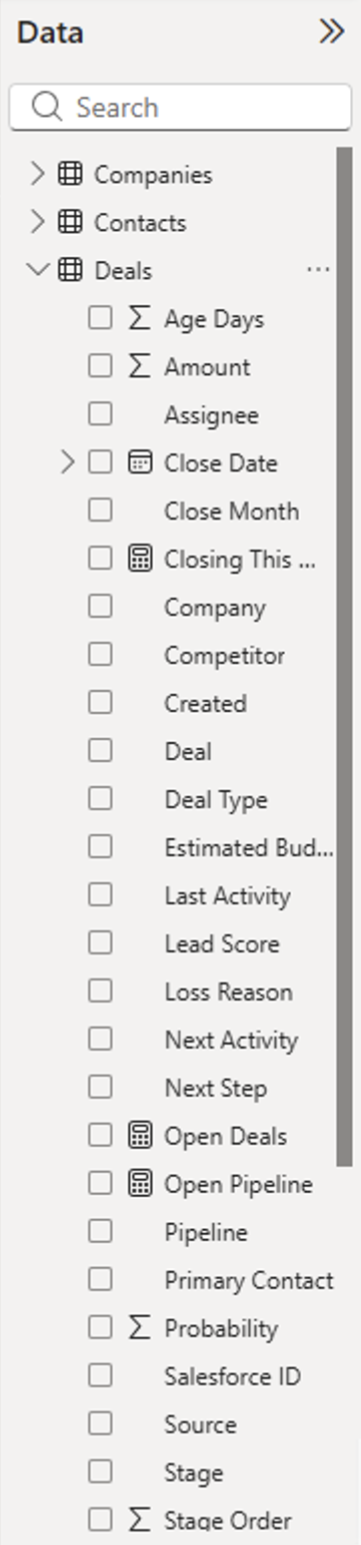
- Custom field columns load as text. For a number or a date field, set the type in Table view → Column tools → Data type.
- A field added in Mria CRM later arrives in the file with the next export. To use it in the report, refresh in Power BI Desktop and publish again.
The reports most teams start with #
| Report | Built from |
|---|---|
| Forecast by month | Weighted Pipeline and Open Pipeline by Close Month. Deals without a close date form their own column, which is usually worth a look by itself. |
| Key deals | A table of Deal, Stage, Amount, Probability and Close Date, filtered to Stage Type OPEN and sorted by Amount. Add your own priority or score custom field as a column or a slicer. |
| Landing this month | The Closing This Month measure as a card, and the same table with a relative date filter on Close Date: is in this month. |
| Pipeline and performance | Open Pipeline by Stage or by Pipeline; Won Amount and Win Rate by Assignee, Source or Deal Type; Open Deals by Company country through the Companies table. |
5. Step 3 — Refresh on a schedule #
Publish the report from Power BI Desktop with Home → Publish. Scheduled refresh is then set on the semantic model in the Power BI service, and what it takes depends on where the files are:
| The files are | What the Power BI service needs |
|---|---|
| In a folder on a computer or server, or on a network share | An on-premises data gateway on a machine that can read the folder and is on at refresh time — often the machine the script runs on. Map the model’s file source to the gateway under Settings → Gateway and cloud connections, then turn on Scheduled refresh. |
| In a SharePoint or OneDrive for work or school library — the script writes into a synced folder | No gateway, but the model has to read the files by their web address instead of a folder path (below). Under Settings → Data source credentials choose OAuth2 and sign in, then turn on Scheduled refresh. See Microsoft: use OneDrive for work or school links. |
For the second row, change two things in Transform data: set DataFolder to the web address of the folder, ending in a slash — for example https://contoso.sharepoint.com/sites/Sales/Shared%20Documents/MriaExport/ — and replace the MriaFile function with this one. Microsoft’s page above shows how to copy a file’s address from the library; the folder address is that address without the file name.
// One exported file as a table, for example MriaFile("Deals.csv")
(file as text) as table =>
    let
        Csv = Csv.Document(Web.Contents(DataFolder, [RelativePath = file]),
            [Delimiter = ",", Encoding = 65001, QuoteStyle = QuoteStyle.Csv])
    in
Table.PromoteHeaders(Csv, [PromoteAllScalars = true])- Let the export finish before the refresh starts: export on the hour, refresh at half past.
- Power BI allows up to 8 scheduled refreshes a day on a Pro license and up to 48 on Premium or Fabric capacity, turns a schedule off after four failed refreshes in a row, and pauses it when nobody has opened the report for two months (Microsoft: configure scheduled refresh). There is no point in exporting more often than the model refreshes.
- The service keeps the model as it was published. A refresh brings in new rows and new values, not new columns: see custom fields in section 4.
6. A one-off look without the script #
To explore the API from Power Query once — to see what an endpoint returns before you decide what to export — a model can call it directly. It needs five text parameters (Manage parameters → New parameter): CloudId, EnvId, ClientId, ClientSecret and RefreshToken, and three blank queries (New source → Blank query → Advanced editor) named MriaToken, MriaGet and Deals. A refresh token comes from the handshake on REST API: Authorization with curl.
// MriaToken: a fresh access token for this refresh
() as text =>
    Json.Document(
        Web.Contents("https://auth.atlassian.com", [
            RelativePath = "oauth/token",
            Headers = [#"Content-Type" = "application/json"],
            Content = Json.FromValue([
                grant_type = "refresh_token",
                client_id = ClientId,
                client_secret = ClientSecret,
                refresh_token = RefreshToken
            ])
        ])
    )[access_token]
// MriaGet: every record of one endpoint, for example MriaGet(token, "deals").
// Lists come in pages: follow them until isLast is true.
(token as text, path as text, optional query as nullable record) as list =>
let
AppId = "f3bb4fc8-7911-405b-959b-002b3292a3d0",
Page = (startAt as nullable number, size as nullable number) =>
Json.Document(
Web.Contents("https://api.atlassian.com", [
RelativePath = "svc/jira/" & CloudId & "/apps/" & AppId & "_" & EnvId & "/v1/" & path,
Query = (query ?? [])
& (if startAt = null then [] else [startAt = Text.From(startAt), maxResults = Text.From(size)]),
Headers = [Authorization = "Bearer " & token, Accept = "application/json"]
])
),
Pages = List.Generate(
() => Page(null, null),
(p) => p <> null,
(p) => if Record.FieldOrDefault(p, "isLast", true) then null
else Page(p[startAt] + p[maxResults], p[maxResults]),
(p) => p[values]
)
in
List.Combine(Pages)// Deals: one row per deal
let
Token = MriaToken(),
Rows = MriaGet(Token, "deals"),
Sub = (r as nullable record, field as text) => if r = null then null else Record.FieldOrDefault(r, field),
AsDate = (v as nullable text) => if v = null then null else Date.From(DateTimeZone.FromText(v)),
Records = List.Transform(Rows, (d) => [
DealId = d[id],
Deal = d[name],
Stage = Sub(d[pipelineStage], "name"),
Amount = d[amount],
Probability = d[probability],
Company = Sub(d[company], "name"),
Assignee = Sub(d[assignee], "name"),
#"Close Date" = AsDate(d[closeDate])
])
in
Table.FromRecords(Records, type table [
DealId = text, Deal = text, Stage = nullable text, Amount = nullable number,
Probability = nullable number, Company = nullable text, Assignee = nullable text,
#"Close Date" = nullable date
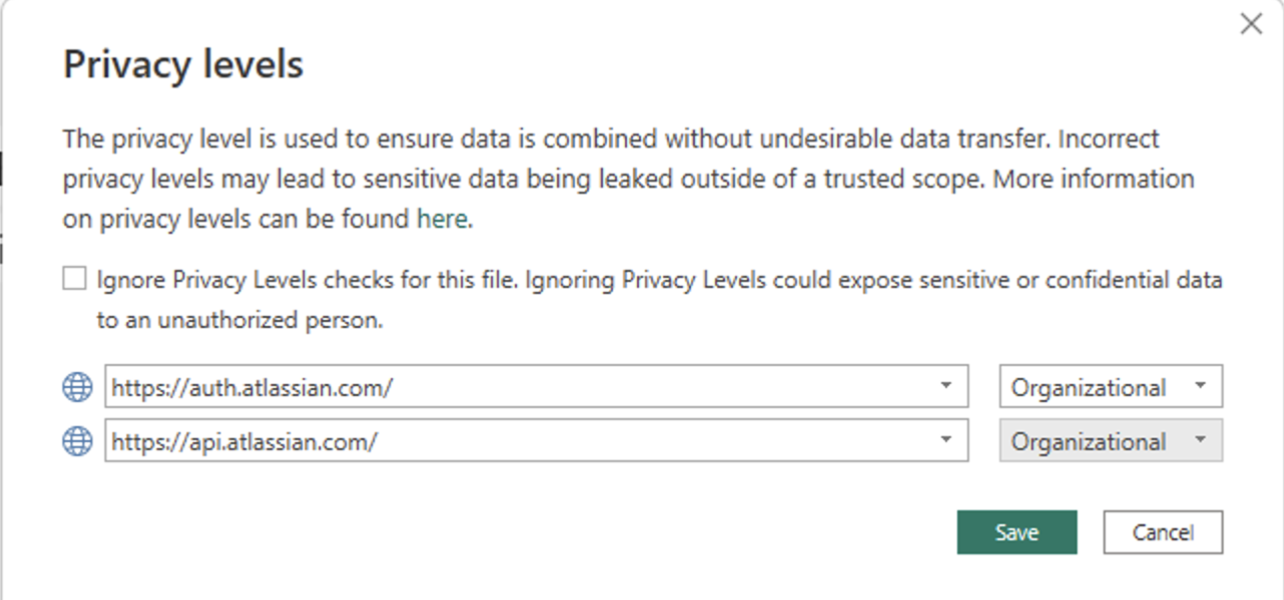
])On the first load Power BI Desktop asks how to sign in to auth.atlassian.com and to api.atlassian.com. Choose Anonymous for both: the queries send the token themselves.
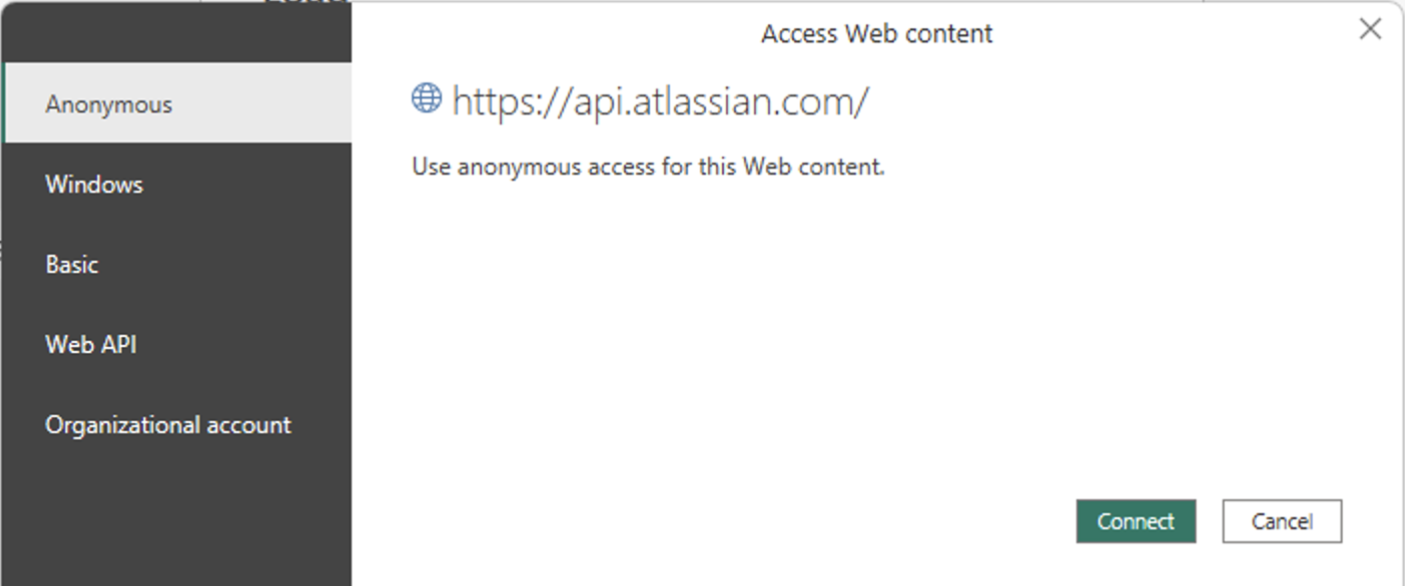
It then asks for privacy levels, because one source’s answer is sent to the other. Give both the same level, for example Organizational:
This works for about ten minutes
The first refresh uses the refresh token, and Power BI cannot store the new one it gets back. Refreshes within the next ten minutes still work; after that every refresh fails with Access to the resource is forbidden until you paste a new refresh token. Use a refresh token of its own for this, never the one in the export script’s token file, and do not publish or share such a file: it holds the client secret.
7. Good to know #
| Topic | What applies |
|---|---|
| Freshness | A report is as fresh as the last export that ran before the last refresh. The Data As Of measure shows the export time. |
| History | The files hold the current state, not how it changed. For a trend such as pipeline value week by week, keep dated copies of Deals.csv and load them as one table. |
| Volume | Lists are read in pages of 100, one request at a time. With custom fields on, add one request per deal. When the API answers 429 or a 5xx the script waits and tries again. The limits are on REST API: Paging, Filters, Errors and Limits. |
| Permissions | The export contains what the consenting user may view in Mria CRM. If that user loses access, or the role loses a View permission, the export fails or shrinks accordingly. |
| More than one site | A token works on one install. Give each site its own copy of the script in its own folder, with its own .env, token file and output folder. |
| Other tools | The files are plain CSV. Excel, a database loader or another BI tool reads them the same way. |
Related Pages #
- REST API: Setup — enabling the API and creating the integration.
- REST API: Authorization with curl — the handshake, the token lifetimes and where each id comes from.
- REST API: Paging, Filters, Errors and Limits — paging, filters, the error envelope and the rates.
- REST API: Reference — every field of every endpoint the script reads.
- Custom Fields — the fields that become columns.
- Reports — the reports built into Mria CRM.
This API is supported and actively developed, so it can change without notice. It builds on Atlassian’s Forge App REST APIs (Preview). Send feedback to the Mria CRM team.


