A deal is Won — delivery gets a work item, the deal gets the link #
Sales closes a deal in Mria CRM; somebody then has to open the delivery work in Jira, copy the amount and the contact across, and link the two so that each side can find the other. This flow does that hand-off by itself: every deal that reaches the Won stage gets exactly one Jira work item, created in the delivery project with the deal’s details in its description, linked to the deal and noted on it. Delivery Milestones to Deals is the same bridge in the other direction.
Why this flow runs on a schedule. Mria CRM contributes actions to Jira Automation, not triggers: nothing in the CRM can start a flow yet, so there is no “when a deal is won” trigger to pick. Instead the flow runs on a Scheduled trigger, searches for Won deals, and hands off the ones that have no work item yet. The interval is yours to choose; section 6 says what it costs.
1. What you get #
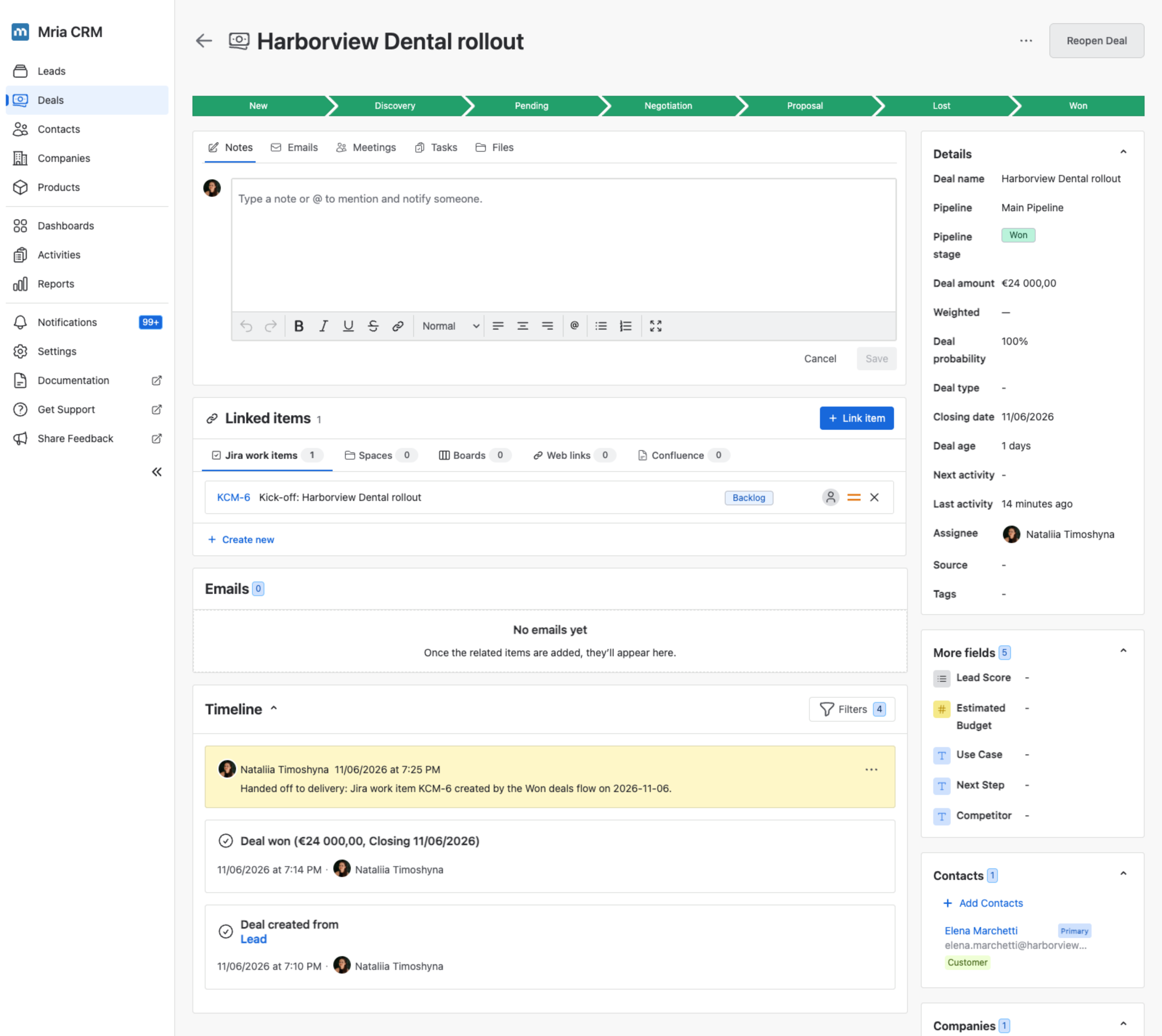
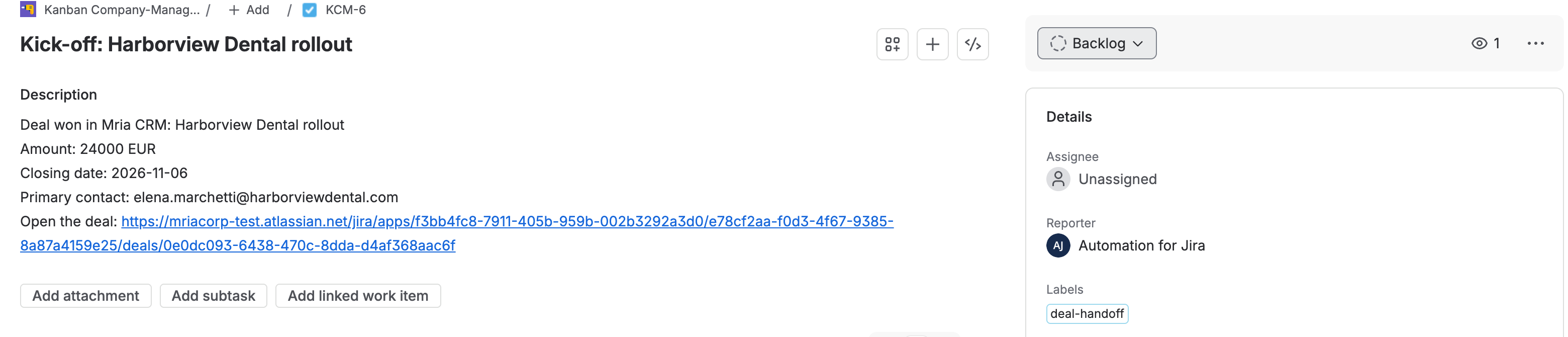
Two deals were closed as Won on the same day: Harborview Dental rollout and Riverside Bikes webshop integration. At the next run the flow created KCM-6 and KCM-7 in the delivery project — Kick-off: Harborview Dental rollout with the amount, the closing date, the primary contact and a link to the deal in its description — linked each work item to its deal, and left a note on the deal naming the work item. When a third deal was won the day after, the run created KCM-8 for it and skipped the two that already had theirs; the run after that created nothing at all.
2. The flow at a glance #
- Scheduled — every day at 8:00.
- Search records in Mria CRM — Deals in the Won stage of the pipeline whose closing date has arrived.
- Advanced branching — one pass per deal, as
{{deal}}. - Lookup work items — a JQL search for a hand-off work item already linked to this deal.
- Two conditions — the lookup found nothing, and the deal was won after the flow went live.
- Create work item, Link item to Mria CRM record and Add note in Mria CRM.
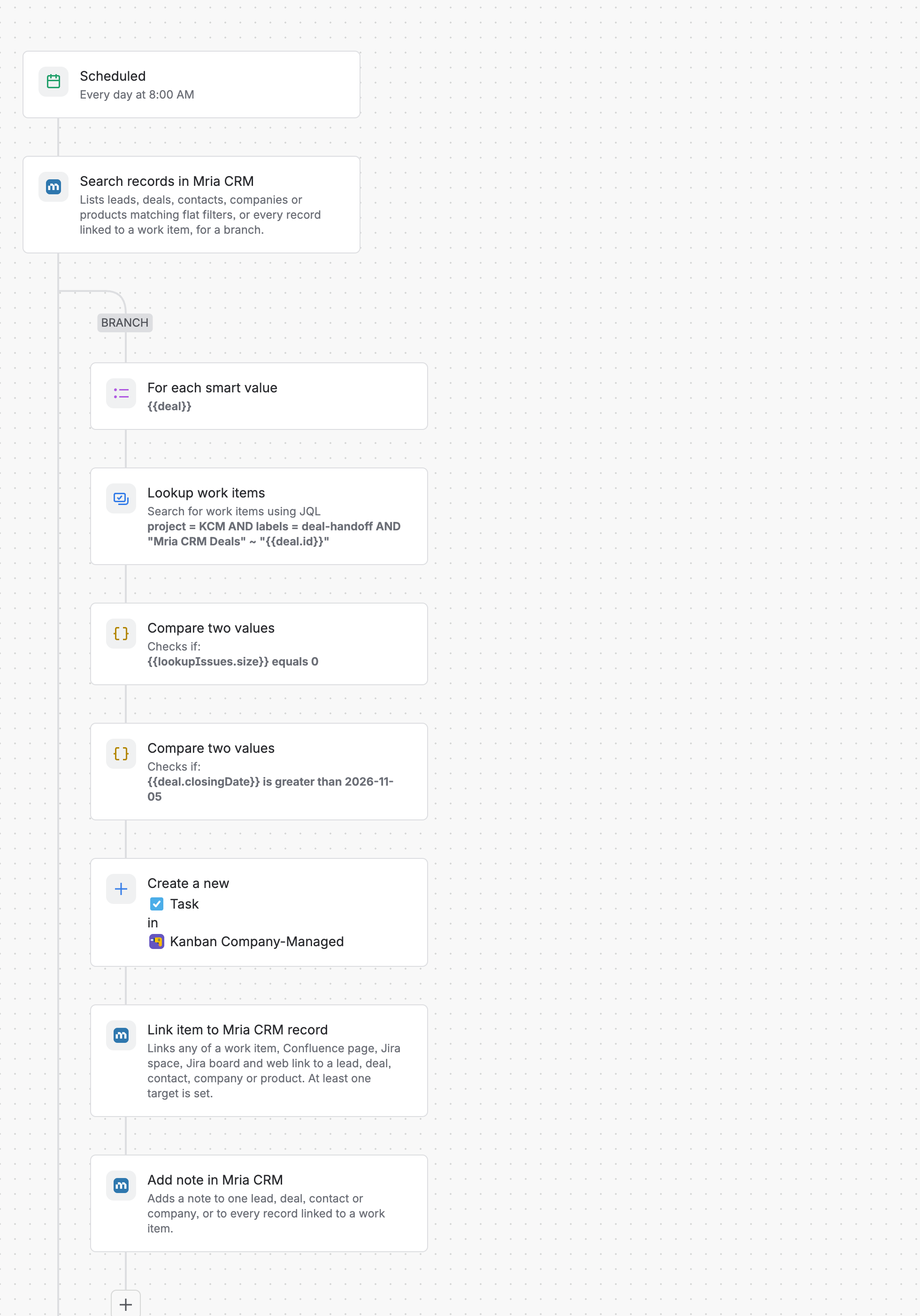
The guard against duplicates is step 4: the work item the flow creates is linked to the deal, and that link is what the next run looks for. The flow never needs to remember what it did — the link is the memory.
3. Build it #
You need permission to create automation flows in Jira, a Jira project for the work items (the one here is Kanban Company-Managed, key KCM), and a Mria CRM role that can view and edit Deals; the Mria CRM steps run as you.
Step 1. The Scheduled trigger #
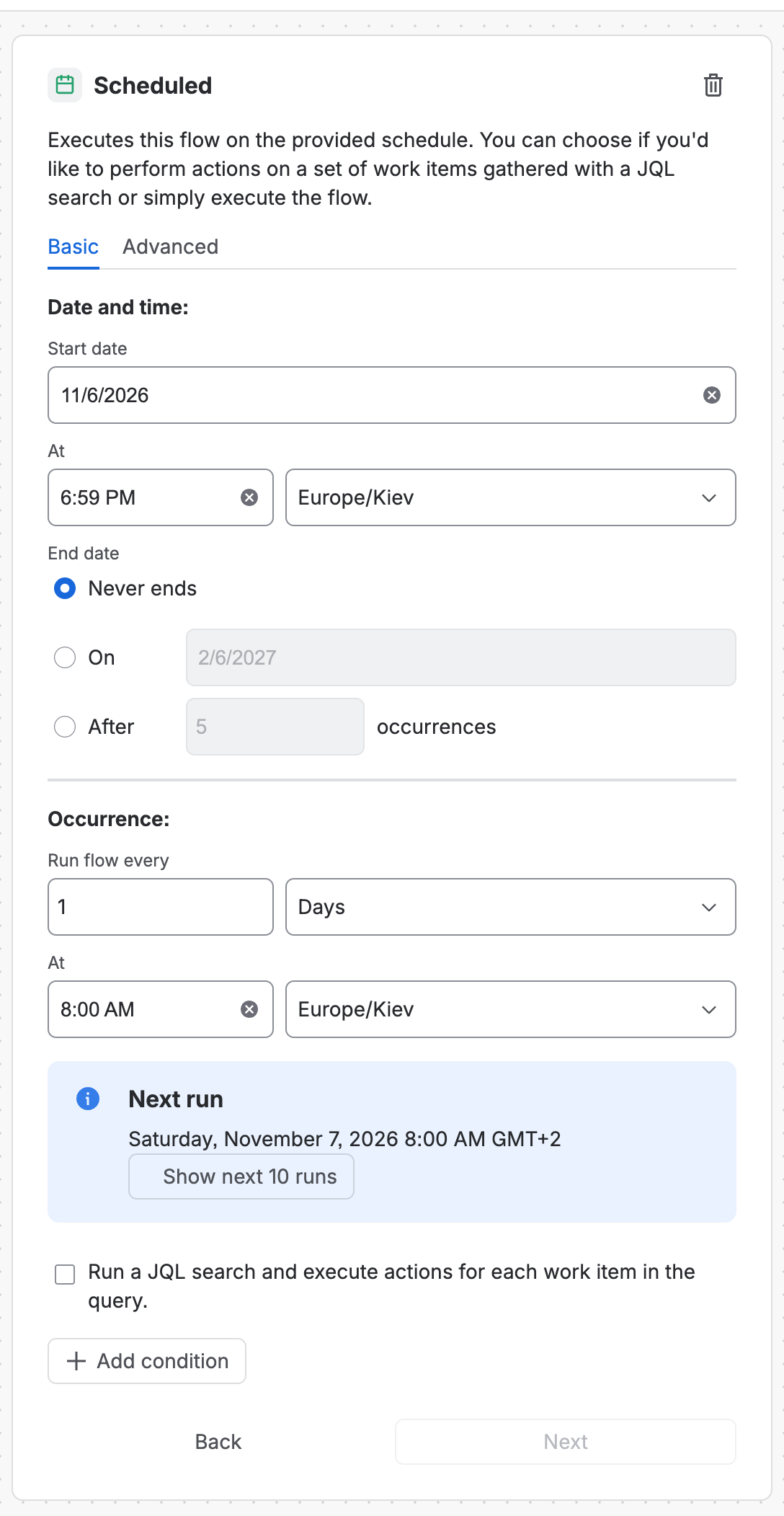
Open Settings → System → Global automation, choose Create flow → Create from scratch and pick the trigger Scheduled. Set Run flow every to 1 Days at a time before the delivery team starts its day; the panel shows the next run in your time zone. Leave Run a JQL search and execute actions for each work item unticked — the search happens in the next step, in the CRM.
Step 2. Search records — the Won deals #
Add Search records in Mria CRM (click Connect if it is your first Mria CRM step) and set:
| Field | Value |
|---|---|
| Record type | Deal |
| Work item key | empty — the field is pre-filled with {{issue.key}}, and a scheduled flow has no work item |
| Pipeline | Main Pipeline |
| Stage | Won — the pipeline’s Closed / Won stage. Stage type = Closed Won would take Won deals from every pipeline instead |
| Closing date before | {{now.plusDays(1).format("yyyy-MM-dd")}} — tomorrow, so a deal won with a closing date still in the future is handed off on that date, not before |
| Limit | empty (50). Raise it up to 150 if more deals than that can be won between two runs |
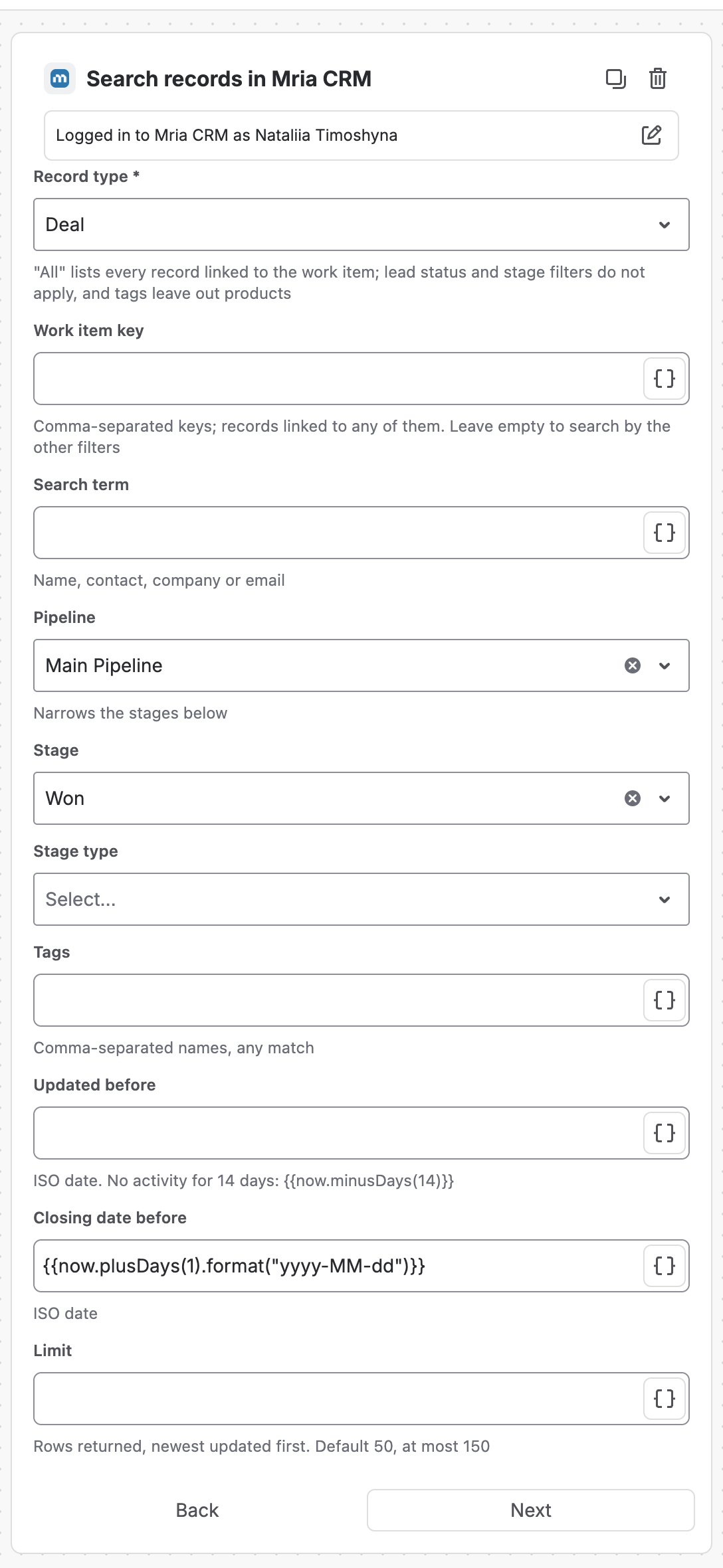
The result is the list {{fetchedMriacrmRecordsList}}. Each row carries id, name, amount, closingDate, email (the primary contact), assigneeAccountId and url — the Actions Reference lists them all.
Step 3. One pass per deal #
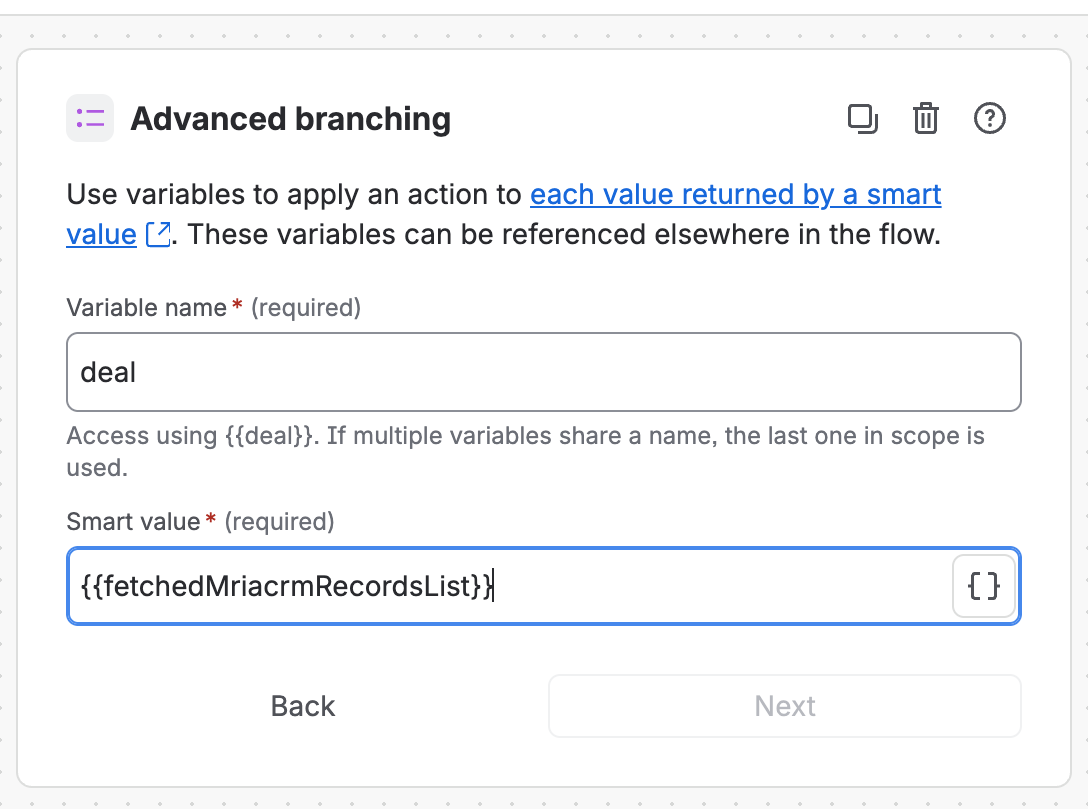
Add Branch → Advanced branching with Variable name deal and Smart value {{fetchedMriacrmRecordsList}}. Everything you add to the branch runs once per deal and reads it as {{deal.name}}, {{deal.id}} and so on.
Step 4. Has this deal got a work item already? #
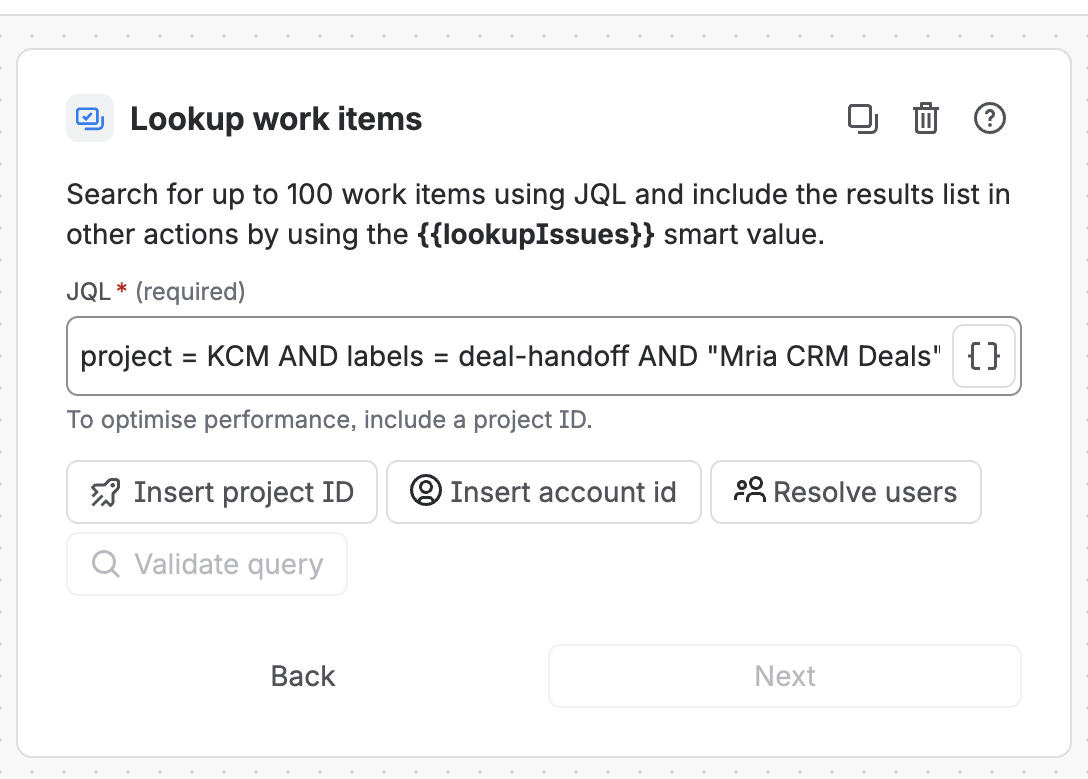
Inside the branch add the Jira action Lookup work items with this JQL:
project = KCM AND labels = deal-handoff AND "Mria CRM Deals" ~ "{{deal.id}}"It works because every work item carries the Mria CRM Deals field, which lists the deals linked to it and is searchable with ~ by deal id. The project and the label narrow it to the work items this flow creates, so a deal that is also linked to, say, a support request still gets its kick-off item.
Several Mria CRM installations on one site? Then more than one field is called Mria CRM Deals. Jira searches all of them when you use the name; to pin the right one, write cf[10475] ~ "{{deal.id}}" with the id of the production installation’s field (Settings → Work items → Custom fields).
Step 5. Two conditions #
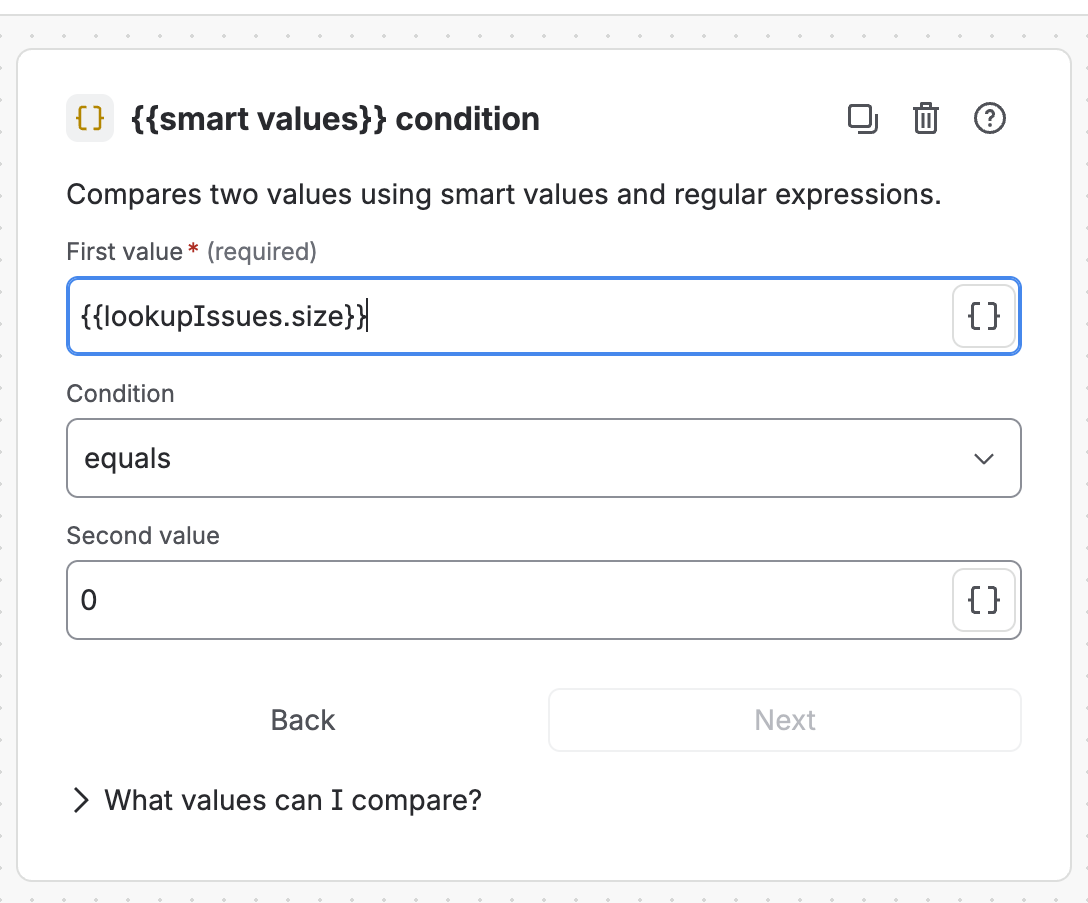
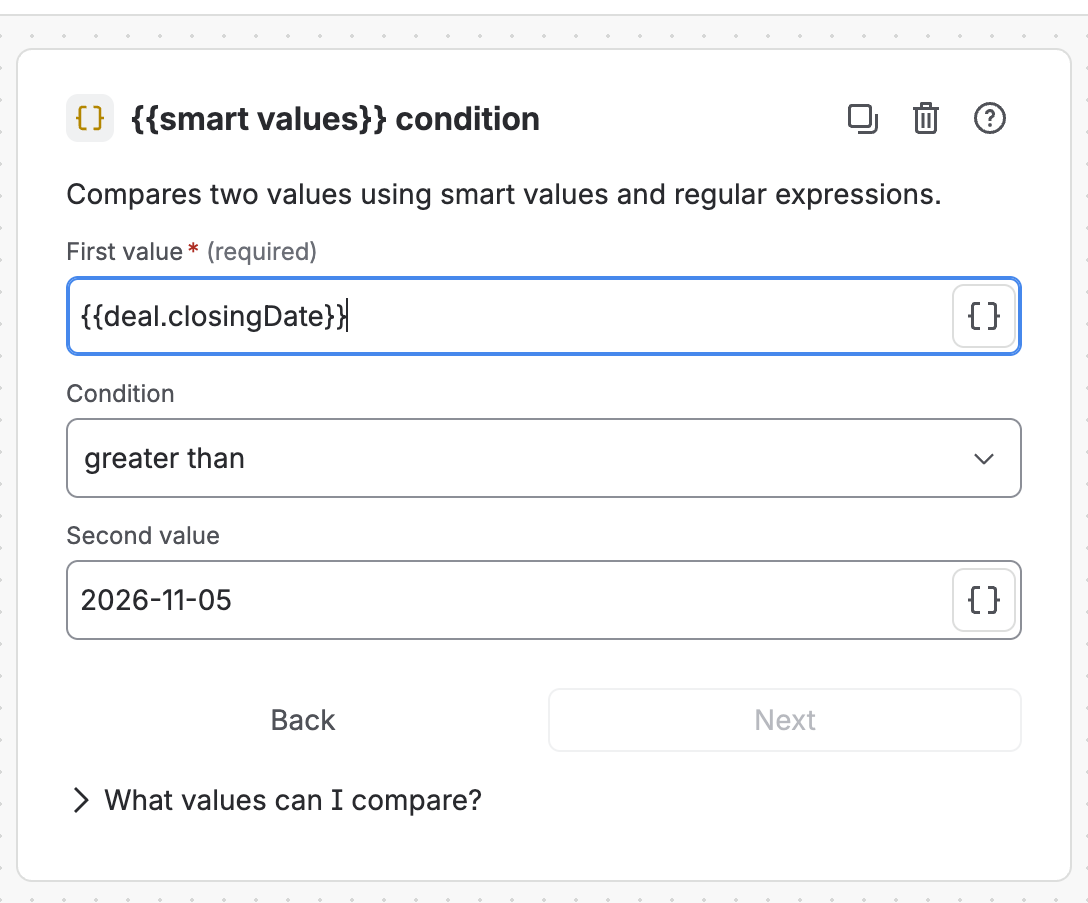
Still inside the branch, add Condition → {{smart values}} condition twice:
| First value | Condition | Second value | Why |
|---|---|---|---|
{{lookupIssues.size}} | equals | 0 | no hand-off work item exists yet — this is the duplicate guard |
{{deal.closingDate}} | greater than | 2026-11-05 | the day before the flow went live, so the first run does not hand off every deal you ever won. ISO dates compare correctly as text |
Step 6. Create the work item #
Add the Jira action Create work item:
| Field | Value |
|---|---|
| Space | the delivery project — Kanban Company-Managed (KCM) |
| Issue type | Task |
| Summary | Kick-off: {{deal.name}} |
| Description | the text below — the amount is in the workspace currency, and {{deal.url}} opens the deal in Mria CRM |
| Labels | deal-handoff (via Choose fields to set…) — the label the lookup in step 4 searches for |
Deal won in Mria CRM: {{deal.name}}
Amount: {{deal.amount}} EUR
Closing date: {{deal.closingDate}}
Primary contact: {{deal.email}}
Open the deal: {{deal.url}}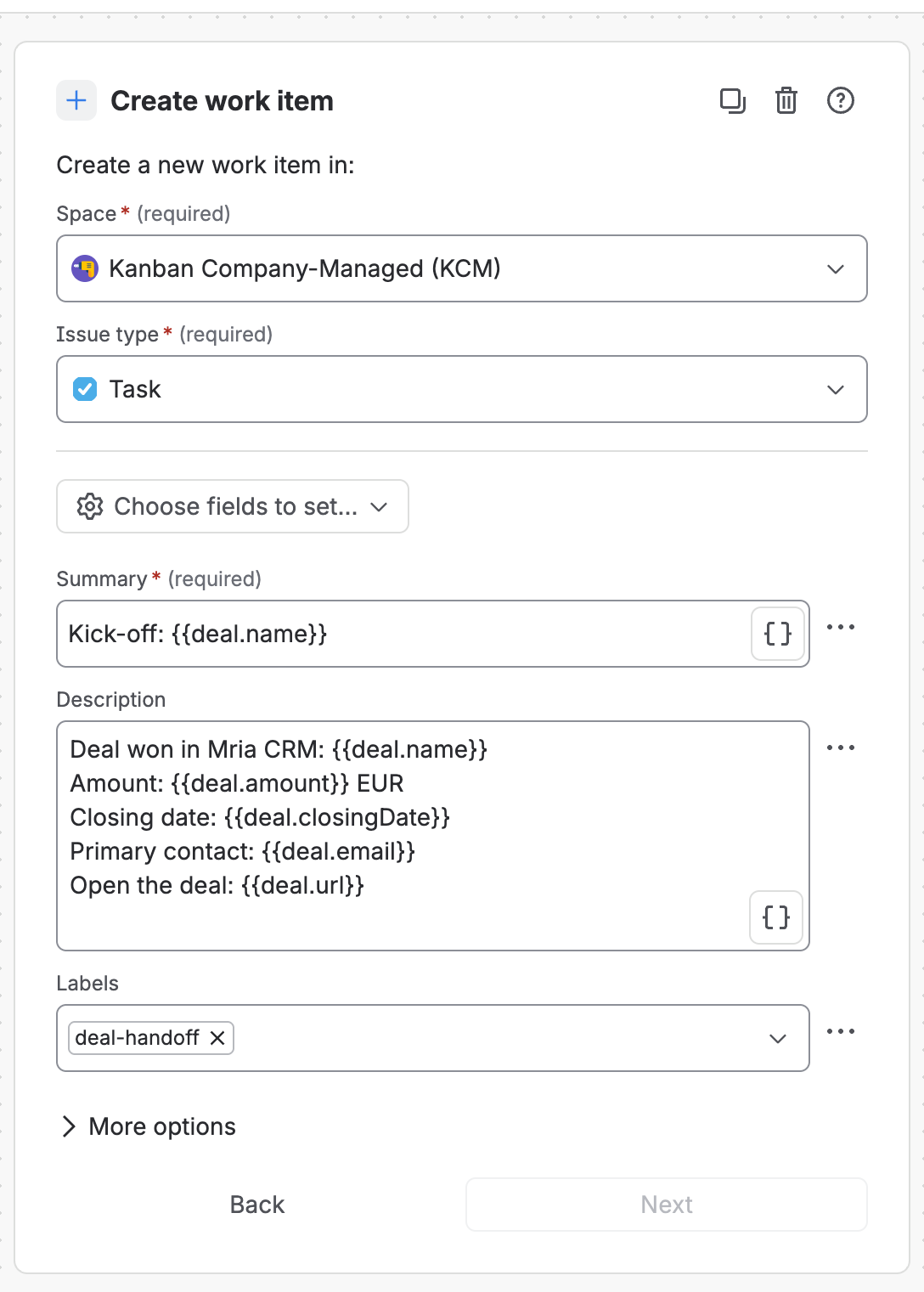
Step 7. Link the work item to the deal #
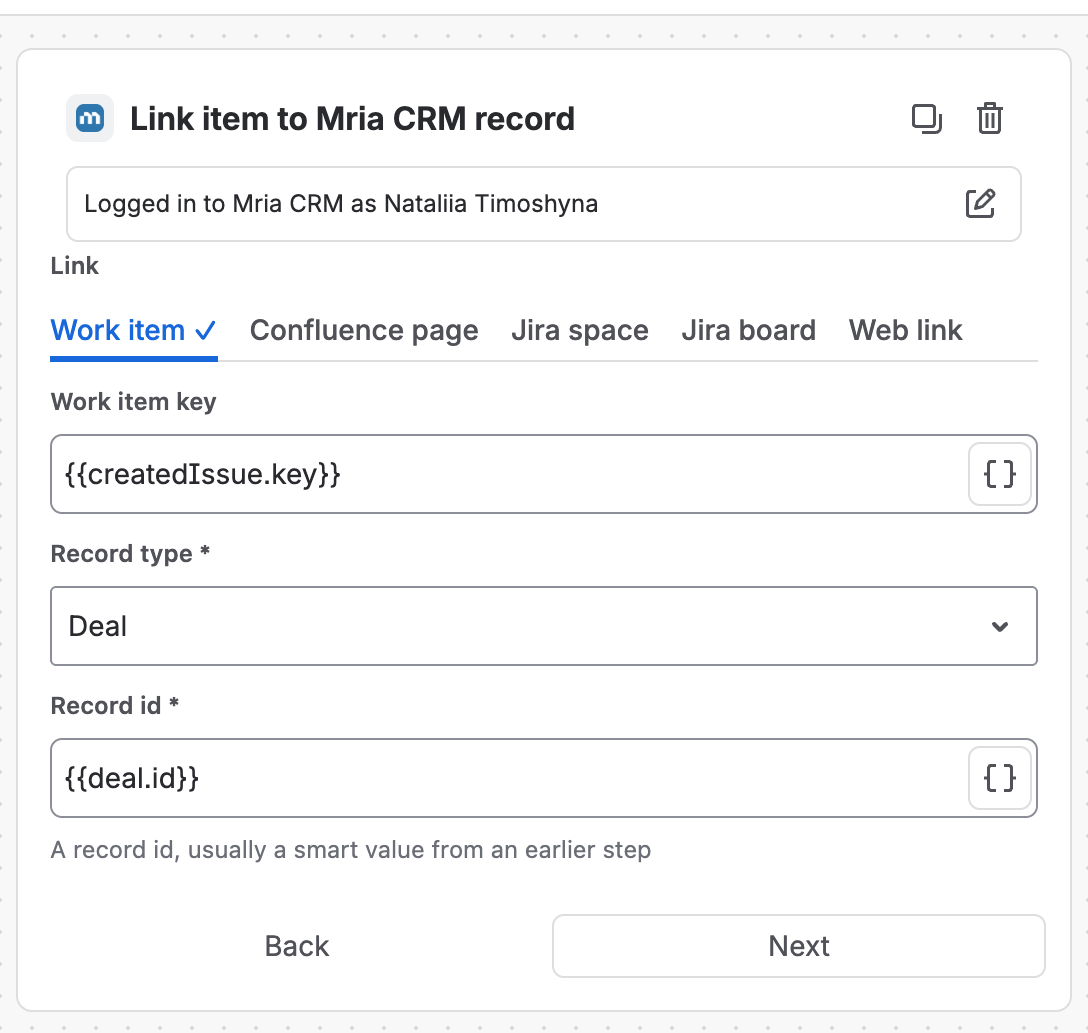
Add Link item to Mria CRM record, tab Work item:
| Field | Value |
|---|---|
| Work item key | {{createdIssue.key}} — the work item step 6 just created |
| Record type | Deal |
| Record id | {{deal.id}} |
This is the step that makes the next run skip the deal: once linked, the work item shows up in the Mria CRM Deals field, and the lookup in step 4 finds it. The link is also what the delivery team and sales see on both sides — the Jira work items tab on the deal, the Mria CRM panel on the work item.
Step 8. Note the hand-off on the deal #
Add Add note in Mria CRM with Add to = One record by id, Record type Deal, Record id {{deal.id}} and the content:
Handed off to delivery: Jira work item {{createdIssue.key}} created by the Won deals flow on {{now.format("yyyy-MM-dd")}}.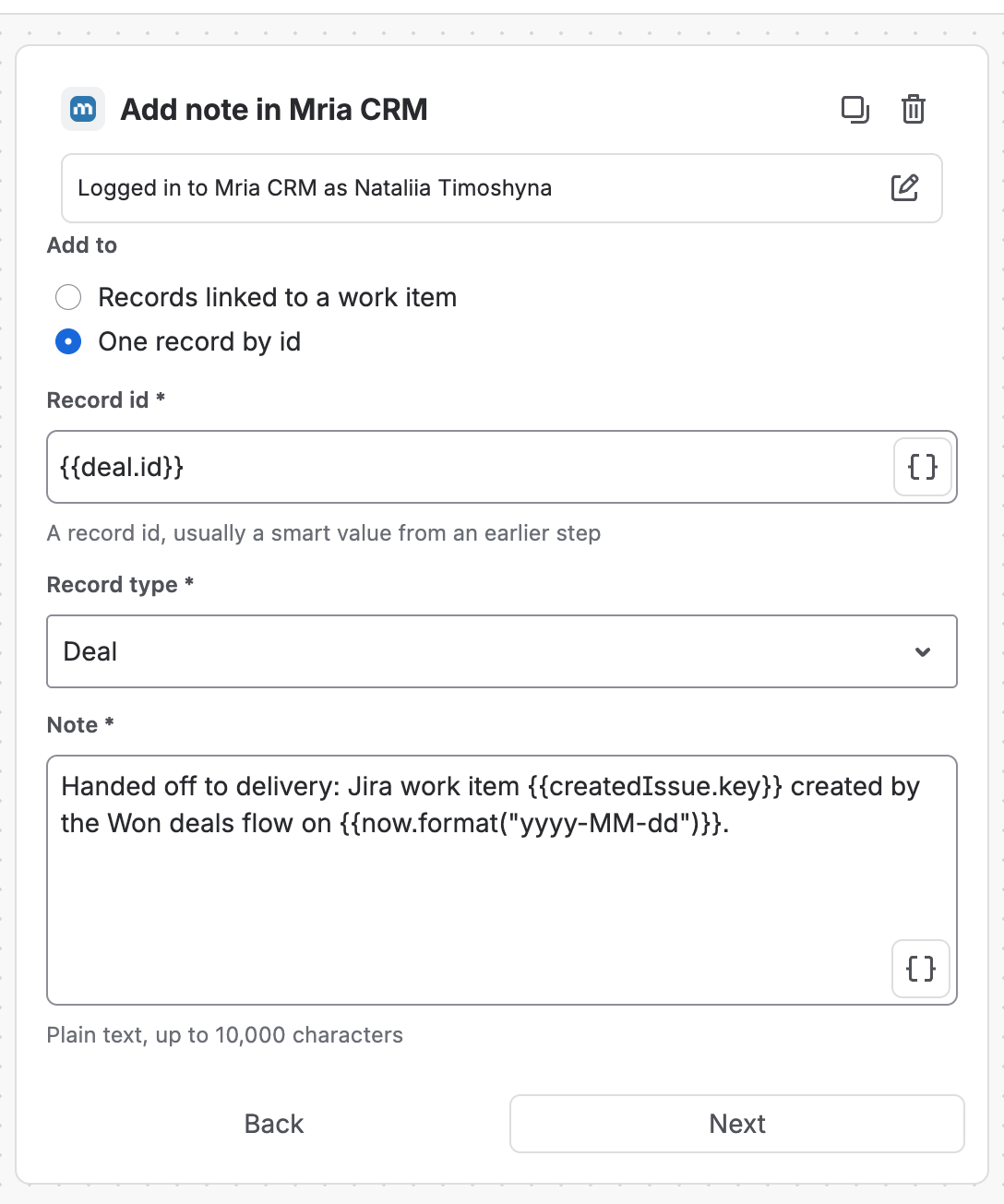
Step 9. Save, turn it on, run it once #
Name the flow, save it and switch it on. You do not have to wait for the schedule: ⋯ → Run scheduled flow now runs it immediately, which is the way to test it. Run it twice — the second run must create nothing.
4. Check that it worked #
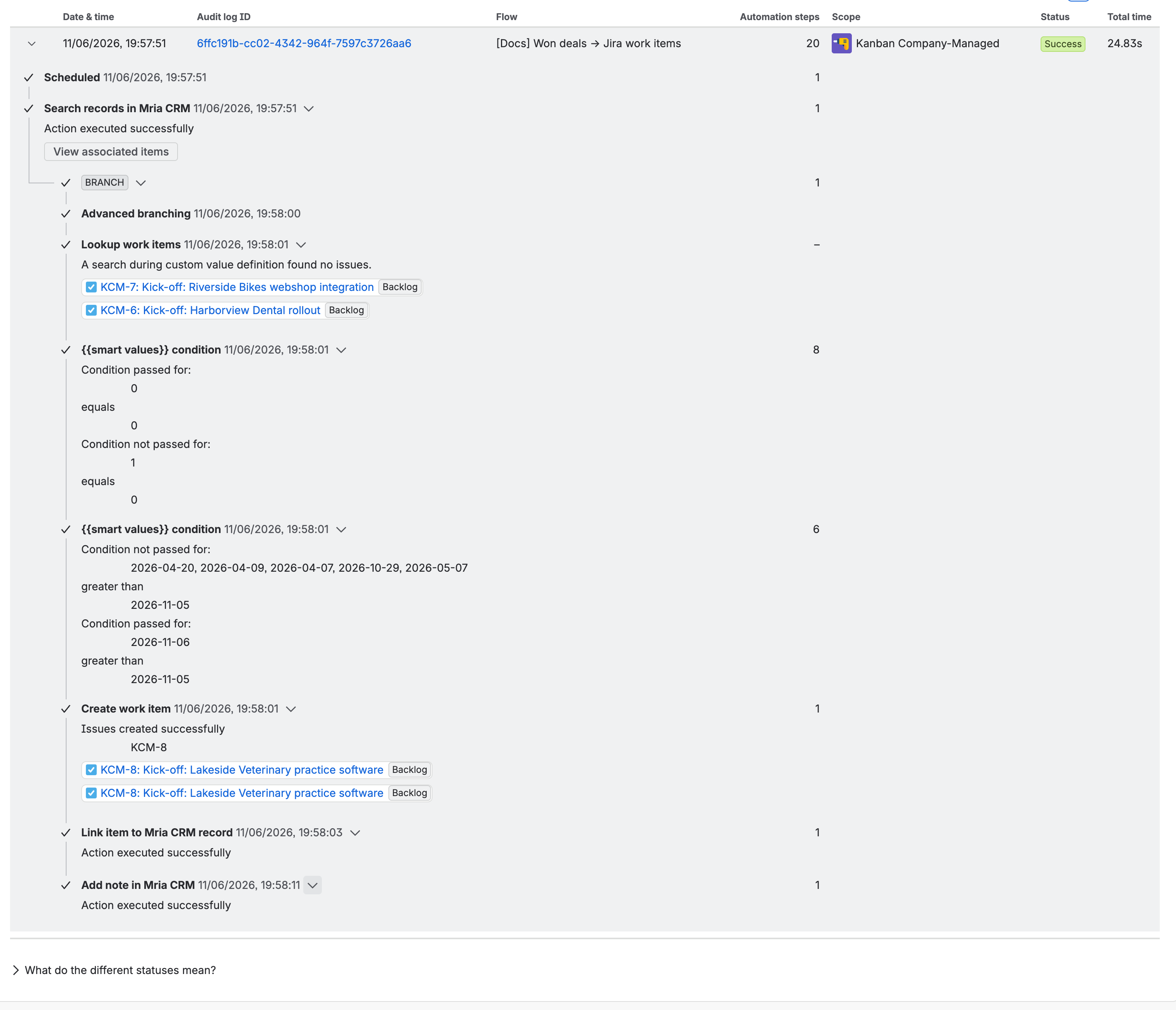
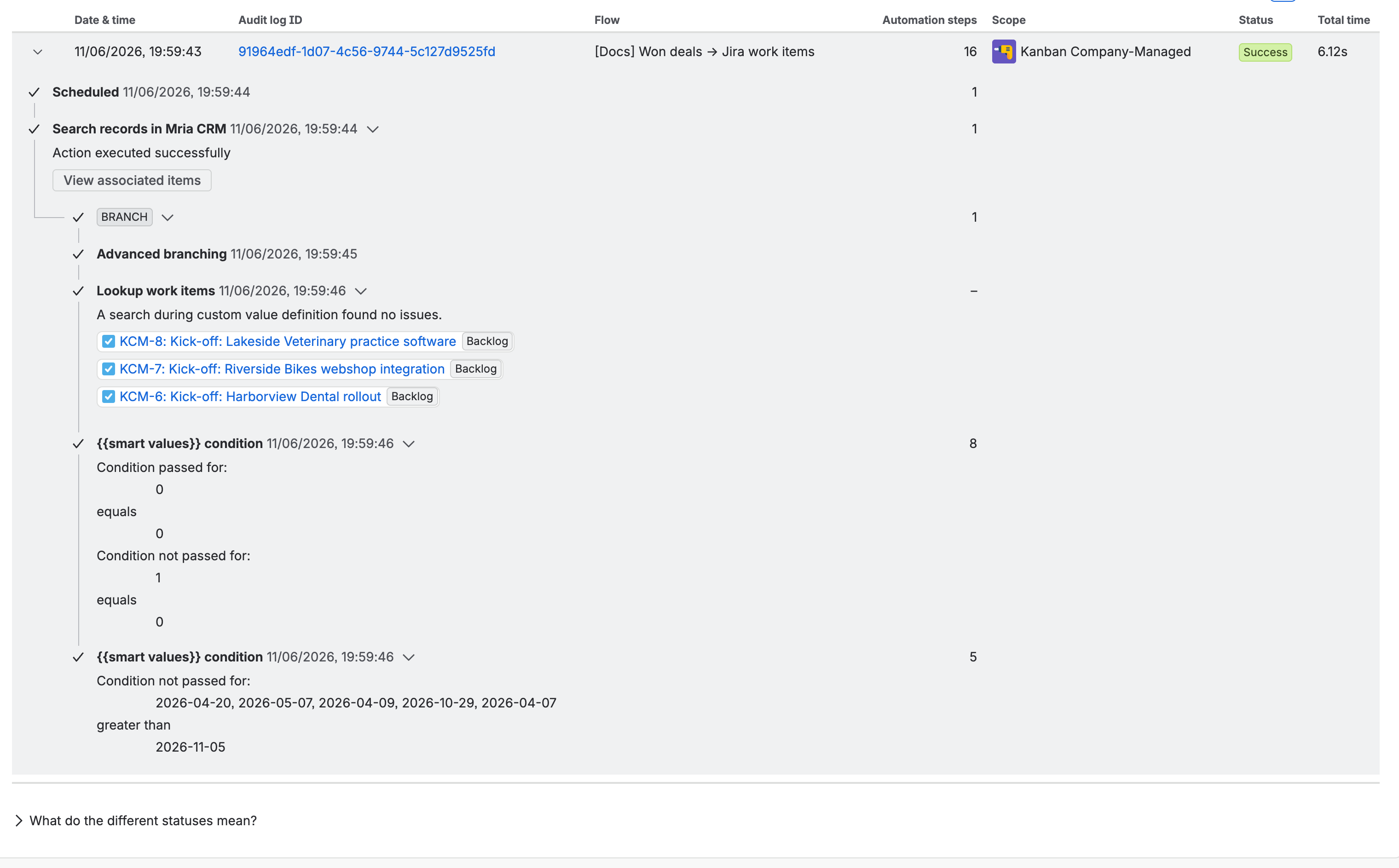
The flow’s Audit log tells the whole story per run. The run below found eight Won deals whose closing date had arrived. Five were closed before the go-live date and failed the date condition; two already had a work item, so the lookup returned 1 and the first condition failed for them; one deal passed both, and the three steps at the bottom ran for it — Issues created successfully: KCM-8:
The next run finds all three work items in the lookup, every deal fails one condition or the other, and no action runs:
On the deal, the Jira work items tab under Linked items lists the new work item and the Timeline holds the note. The work item itself carries the label and the description, and its Mria CRM panel shows the deal:
When a run fails, the owner gets an email #
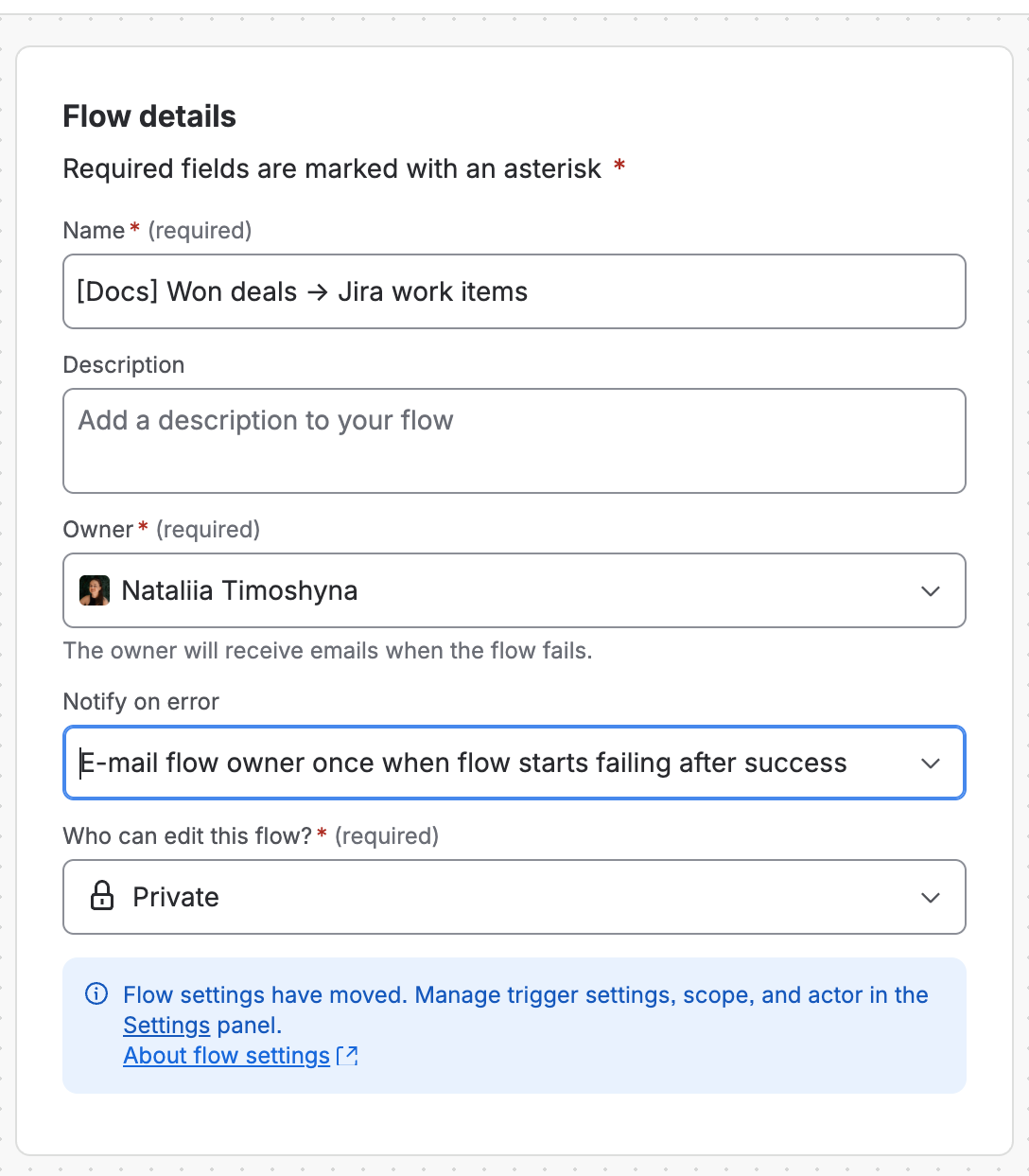
The flow’s owner is emailed when a run fails — the Flow details panel (⋯ → Flow details) says so under Owner, and its Notify on error setting decides how often:
| Notify on error | What you get |
|---|---|
| E-mail flow owner once when flow starts failing after success | the default: one email when a run fails, then silence until the flow succeeds again |
| E-mail flow owner every time this flow fails | one email per failed run — on a daily flow, one a day until it is fixed |
| Don’t notify | no email; the audit log is the only place the failure shows |
A run counts as failed when any step reports an error, even when the work item was created — Jira marks it Some errors in the audit log. Two runs ended that way while this page was built — a temporary Log action with a smart value that could not be rendered (the audit log reads Unable to render smart values when executing this flow) and the Fields ignored: Assignee case from section 5 — and with the default setting only the first of them produced an email. Open the audit log entry the email names, read the step marked red, and either fix the step or, if the flow is doing the right thing, accept the yellow status. To stop the emails altogether, set Notify on error to Don’t notify and save the flow.
5. Make it yours #
- Hourly instead of daily. Set the trigger to 1 Hours if waiting for the next morning’s run is too long. Every run is a flow execution, so the hourly version costs twenty-four a day — see section 6.
- Hand off the moment the deal is won. Clear Closing date before in step 2 and a Won deal with a future closing date is picked up at the next run.
- Assign it to the deal’s owner. Add Assignee through Choose fields to set…, type
{{deal.assigneeAccountId}}and pick Smart value. The work item is assigned to the deal’s owner — provided the project’s create screen contains Assignee. If it does not, Jira still creates the work item and the audit log reads Fields ignored: Assignee with a yellow Some errors on the run. - A real template. Create work item takes any field of the project — components, a due date from
{{deal.closingDate}}, a fixed epic as Parent. For a set of sub-tasks, add more Create work item steps after the first one with{{createdIssue.key}}as their parent. - Every pipeline. Replace Pipeline and Stage in step 2 with Stage type = Closed Won.
- Mark the deal as well. An Update deal in Mria CRM step with Tags
Handed off(Tags mode add) makes the hand-off visible in the deals table and the Kanban cards. - Lost deals. The same flow with Stage = Lost and a different summary opens a retrospective task instead.
6. What it costs, and what it cannot do #
- One execution per run, whatever it finds. A run that searches, loops over eight deals and creates one work item counts once toward the site’s monthly automation usage — on this site it was attributed to the product with the largest allowance. Daily is 30 executions a month, hourly about 720. Under the step-based usage model the Mria CRM steps and the Jira steps each count as a step; conditions, lookups and logs are non-billable.
- Up to a day late. A deal won just after the daily run waits for the next one. That delay is what a CRM-side trigger would remove when it ships; until then, shorten the interval if it matters.
- Closing date decides when. The flow reads the deal’s closing date, which the Deal Won? dialog sets to today unless sales changes it. A deal won with a closing date in the past is still handed off, as long as the date is after the go-live date in step 5.
- Fifty deals per run. Search records returns 50 rows by default and 150 at most, newest updated first. Won deals that already have a work item still count toward the limit, so on a busy pipeline set Limit to 150 and run hourly, or add Updated before and Closing date filters that keep history out.
- Company names are not in the list. Search records returns the primary contact’s email, the amount and the owner’s account id, but not the company. If the work item needs it, put the company in the deal name, or add a Find record step by id — it returns the same fields.
7. Troubleshooting #
| What you see | Why, and what to do |
|---|---|
| The branch runs zero times | Search records found nothing. Check the pipeline and stage in step 2, and that Closing date before is tomorrow, not today. |
| A deal gets a second work item | The lookup does not find the first one. Its JQL must use the same project and label the Create work item step sets, and the Link item step must have run — look for it in the first run’s audit log. |
| Condition on {{lookupIssues.size}} is never evaluated | The Lookup work items step is outside the branch, or the condition is before it. Both belong inside the branch, lookup first. |
| Every deal you ever won gets a work item | The date condition in step 5 is missing or its date is wrong. Disable the flow, delete the extra work items, and set the date to the day before you enable it again. |
| Some errors — Fields ignored: Assignee | Assignee is not on the project’s create screen. Add it there, or leave the field out — the work item is created either way. |
| Set exactly one of Record id and Work item key | Work item key in Search records still holds {{issue.key}}. Clear it. |
| Aborted — Monthly flow executions have been exceeded | The site reached its automation usage for the month. Runs resume next month; the deals won meanwhile are handed off by the first run after that, because the lookup still finds no work item for them. |
Related Pages #
- Jira Automation — how Mria CRM steps work, and the other use cases.
- Automation Actions Reference — every field of Search records, Link item and Add note.
- Mria CRM Custom Fields in Jira — the Mria CRM Deals field the duplicate guard searches.
- Delivery Milestones to Deals — the opposite direction: Jira work moves the deal.
- Atlassian: Scheduled trigger and Advanced branching — the two Jira building blocks.


